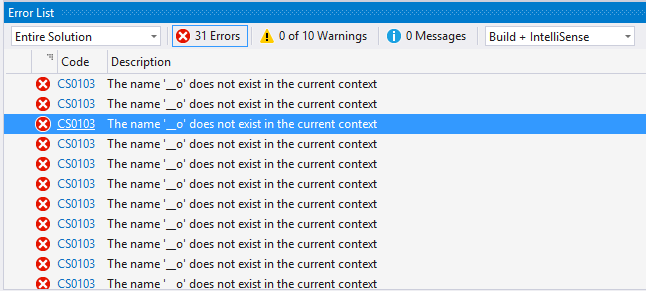
I just installed Visual Studio 2015 and opened my asp .net project that I was working on. I’m receiving many errors (all exactly the same) as below:
Error CS0103 The name ‘__o’ does not exist in the current context
Well actually I don’t have any variables named __o and the code works like a charm (error is invalid) but what bothers me is that I’m not able to see when my code really has an error as it goes somewhere in this list and I should check the whole list.
Answers:
Thank you for visiting the Q&A section on Magenaut. Please note that all the answers may not help you solve the issue immediately. So please treat them as advisements. If you found the post helpful (or not), leave a comment & I’ll get back to you as soon as possible.
Method 1
I found out that if I choose Build Only instead of Build + IntelliSense the errors (that are related to IntelliSense) will go away.
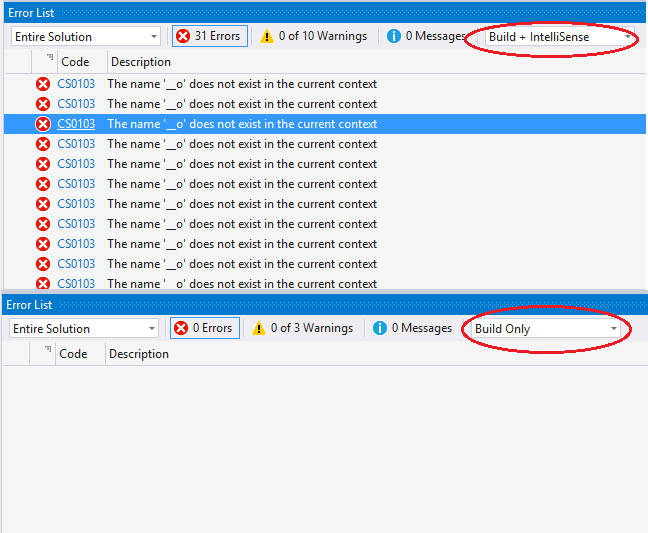
Update 1: The Reason
The reason that this is happening is that for codes like this:
<% if (true) { %>
    <%=1%>
<% } %>
<%=2%>
In order to provide IntelliSense in <%= %> blocks at design time, ASP.NET generates assignment to a temporary __o variable and language (VB or C#) then provide the IntelliSense for the variable. That is done when page compiler sees the first <%= … %> block. But here, the block is inside the if, so after the if closes, the variable goes out of scope. We end up generating something like this:
if (true) {
    object @__o;
    @__o = 1;
}
@__o = 2;
The workaround is to add a dummy expression early in the page. E.g.
<%=""%>
This will not render anything, and it will make sure that __o is declared top level in the Render method, before any potential if (or other scoping) statement.
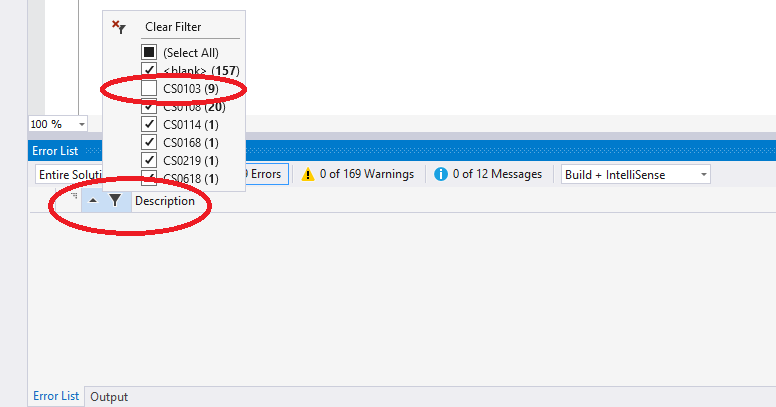
Update 2: Getting rid of this error without losing other IntelliSense errors
Click on the filter button on the top left corner of the error list panel and uncheck the CS0103 which the error code for the: The name ‘__o’ does not exist in the current context and these errors will not be shown anymore and you can still have other IntelliSense errors and warnings:
Method 2
After reading the links given in the comments above, it turns out to be how intellisense handles if blocks.
Mikhail Arkhipov posted an explanation and workaround in the ASP.NET
forums:We have finally obtained reliable repro and identified the underlying issue. A trivial repro looks like this:
<% if (true) { %>
    <%=1%>
<% } %>
<%=2%>
In order to provide intellisense in
<%= %>blocks at design time, ASP.NET generates assignment to a temporary__ovariable and language
(VB or C#) then provide the intellisense for the variable. That is
done when page compiler sees the first<%= ... %>block. But here, the
block is inside theif, so after theifcloses, the variable goes out
of scope. We end up generating something like this:if (true) { object @__o; @__o = 1; } @__o = 2;The workaround is to add a dummy expression early in the page. E.g.
<%="" %>. This will not render anything, and it will make sure
that__ois declared top level in the Render method, before any
potentialif(or other scoping) statement.
Noting above, Failure‘s answer doesn’t actually do much harm, other than hiding all intellisense error, which would be known anyway at build time.
Reference:
http://youku.io/questions/324366/asp-net-mvc-error-name-o-is-not-declared
https://msdn.microsoft.com/en-us/library/t8zbaa6f.aspx
Method 3
Declare variable __o in code, like this:
public object __o;
Be sure to put it in Master page (if you are using one).
Method 4
<% response.write(var) %> instead of <% =var %> removes the error
without declaring __o as suggested other posts
http://forums.asp.net/p/923745/1266105.aspx
Method 5
What resolved this problem from its heart for me was to add a dummy expression early in the page. E.g. <%=”” %>. Check out this link for further explanation: https://forums.asp.net/post/1263727.aspx
Method 6
I my old ASP.net MVC project I put this in my master page right at the top and it helped in at least one instance where <%=”” %> did not help:
<script runat="server" type="text/C#">
public object __o;
</script>
All methods was sourced from stackoverflow.com or stackexchange.com, is licensed under cc by-sa 2.5, cc by-sa 3.0 and cc by-sa 4.0