I am new to C#. Just following YouTube simple example and trying to simply connect to SQL database. But GridView1 gives me an error.
Thes is my WebForm1.aspx.cs
using System.Linq;
using System.Web;
using System.Web.UI;
using System.Web.UI.WebControls;
using System.Data.SqlClient;
using System.Data.OleDb;
using System.Data.Odbc;


namespace adoDemo
{
    public partial class WebForm1 : System.Web.UI.Page
    {
        protected void Page_Load(object sender, EventArgs e)
        {
            String CS = "data source =.; database = AdventureWorks2016CTP3; integrated security = SSPI";
            SqlConnection con = new SqlConnection(CS);
            SqlCommand cmd = new SqlCommand("select top 5 * from [Sales].[CreditCard]", con);
            con.Open();
            GridView1.DataSource = cmd.ExecuteReader();
            GridView1.DataBind();
            con.Close();
        }
    }
}
This is WebForm.aspx.designer.cs
//------------------------------------------------------------------------------
// <auto-generated>
//     This code was generated by a tool.
//
//     Changes to this file may cause incorrect behavior and will be lost if
//     the code is regenerated.
// </auto-generated>
//------------------------------------------------------------------------------

namespace adoDemo {


    public partial class WebForm1
    {

        /// <summary>
        /// form1 control.
        /// </summary>
        /// <remarks>
        /// Auto-generated field.
        /// To modify move field declaration from designer file to code-behind file.
        /// </remarks>
        protected global::System.Web.UI.HtmlControls.HtmlForm form1;
    }
}
And this is WebForm1.aspx
   <script runat="server">

    Protected Sub Unnamed1_SelectedIndexChanged(sender As Object, e As EventArgs)

    End Sub
</script>
body

<asp:gridview id="GridView1" runat="server" OnSelectedIndexChanged="Unnamed1_SelectedIndexChanged" BackColor="#DEBA84" BorderColor="#DEBA84" BorderStyle="None" BorderWidth="1px" CellPadding="3" CellSpacing="2">
    <FooterStyle BackColor="#F7DFB5" ForeColor="#8C4510" />
    <HeaderStyle BackColor="#A55129" Font-Bold="True" ForeColor="White" />
    <PagerStyle ForeColor="#8C4510" HorizontalAlign="Center" />
    <RowStyle BackColor="#FFF7E7" ForeColor="#8C4510" />
    <SelectedRowStyle BackColor="#738A9C" Font-Bold="True" ForeColor="White" />
    <SortedAscendingCellStyle BackColor="#FFF1D4" />
    <SortedAscendingHeaderStyle BackColor="#B95C30" />
    <SortedDescendingCellStyle BackColor="#F1E5CE" />
    <SortedDescendingHeaderStyle BackColor="#93451F" />
</asp:gridview>
This is how my WebForm1.aspx.designer.cs looks like
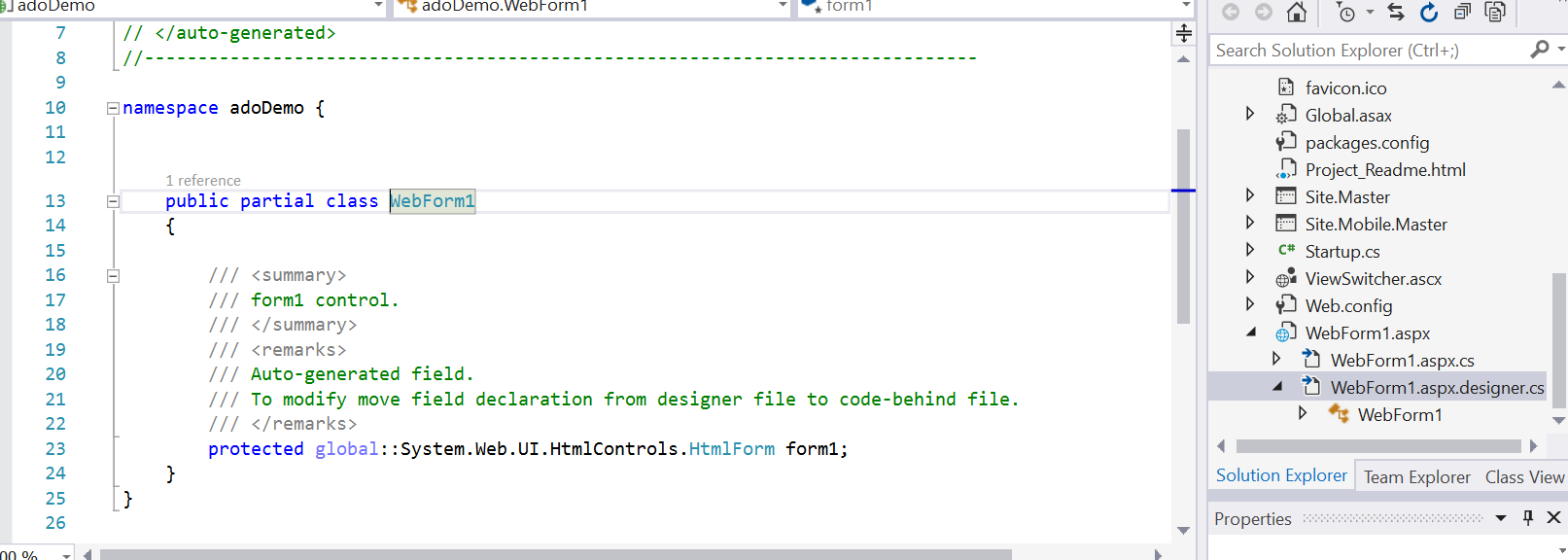
Is there anything I’m missing?
Answers:
Thank you for visiting the Q&A section on Magenaut. Please note that all the answers may not help you solve the issue immediately. So please treat them as advisements. If you found the post helpful (or not), leave a comment & I’ll get back to you as soon as possible.
Method 1
The page designer does sometimes refuse to add controls to the .designer.cs file; I’ve seen this a number of times.
If this happens, add a class-level variable yourself to the .aspx.cs: –
namespace adoDemo
{
    public partial class WebForm1 : System.Web.UI.Page
    {
        // make sure its's the same spelling & case as in the .aspx
        protected GridView GridView1;

        protected void Page_Load(object sender, EventArgs e)
        {
            // etc
        }
    }
}
Method 2
You need to add id="GridView1" in Gridview
   <asp:gridview id="GridView1" runat="server" OnSelectedIndexChanged="Unnamed1_SelectedIndexChanged"
 BackColor="#DEBA84" BorderColor="#DEBA84" BorderStyle="None" BorderWidth="1px" CellPadding="3" CellSpacing="2">
Method 3
If you’re copying from a tutorial or example, make sure you’ve got the Namespace input correctly and that it’s not the Namespace of the example.
All methods was sourced from stackoverflow.com or stackexchange.com, is licensed under cc by-sa 2.5, cc by-sa 3.0 and cc by-sa 4.0