I’m new to C# and currently I’m trying to make 2 simple textboxes for weather, one to have the temperature in Celsius, and the other textbox have the temperature in Fahrenheit, what I wanna do is make the user type the temperature in any textbox and the other will calculate and convert it like from Celsius to Fahrenheit and vice versa,
but I keep getting errors:
“The name ‘TXTF” does not exist in the current context”
“The name ‘TXTC” does not exist in the current context”
here is my code:-
using System;
using System.Collections.Generic;
using System.Linq;
using System.Web;
using System.Web.UI;
using System.Web.UI.WebControls;

namespace MainWeb2
{
    public partial class Weather : System.Web.UI.Page
    {
        protected void Page_Load(object sender, EventArgs e)
        {

        }

        protected void TextBox1_TextChanged(object sender, EventArgs e)
        {
            String C = TextBox1.Text;
            int TXTC = Int32.Parse(C);
            string TXTC1 = TXTC.ToString();
            TXTC = (TXTF - 32) * (5 / 9);
        }

        protected void TextBox2_TextChanged(object sender, EventArgs e)
        {
            String F = TextBox2.Text;
            int TXTF = Int32.Parse(F);
            string TXTF1 = TXTF.ToString();
            TXTF = (TXTC) * (9 / 5) + 32;
        }
    }
}
What should I do?
Answers:
Thank you for visiting the Q&A section on Magenaut. Please note that all the answers may not help you solve the issue immediately. So please treat them as advisements. If you found the post helpful (or not), leave a comment & I’ll get back to you as soon as possible.
Method 1
what you have looks rather fine. The ONLY part is you need to set both text boxes postback = true.
This setting for BOTH text boxes:
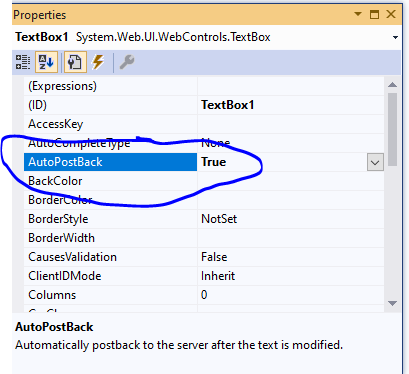
The only part missing is that you need to set both textboxes to fire a post back.
You could also I suppose put a button on the form, type in the value and hit the calculate button.
But, for both text boxes, you need to set postback = true.
And you code? Well, you could use this:
{
int TXTC;

TXTC = Int(TextBox1.Text);

TextBox2.Text = (TXTC - 32) * (5 / 9);
}
And for text box2, this:
{
int TXTC;

TXTC = Int(TextBox2.Text);

TextBox1.Text = (TXTC) * (9 / 5) + 32;
}
So the system will “cast” the data types to text for you. In fact, you could even do this, and it will work:
First one:
TextBox2.Text = (TextBox1.Text - 32) * (5 / 9);
and
TextBox1.Text = TextBox2.Text * (9 / 5) + 32;
So unlike say native c++, .net does a LOT of automatic conversions for you.
And if you set the format of each text box to number (this setting)
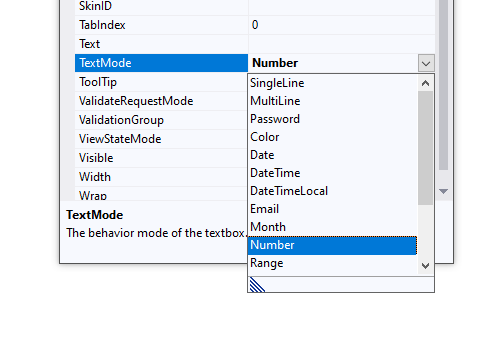
Then users can ONLY type in numbers – and thus some additonal type checking is afforded by doing this. (users will ONLY be able to enter numbers – and thus you don’t need all that type casting code.
All in all? Your code will and should work. Just missing the auto-post back setting.
Method 2
You are using TXTC and TXTF in the respective other TextBox_Changed CallBack, even tough it wasn’t defined in that Function.
To fix that you would need to declare TXTC and TXTF outside of your functions so both of them can acces the values.
namespace MainWeb2 {
    public partial class Weather : System.Web.UI.Page {
        // Declare PlaceHolders for TextBoxes with default value of 1.
        int TXTC = 1;
        int TXTF = 1;

        protected void TextBox1_TextChanged(object sender, EventArgs e) {
            ...
            Int32.TryParse(C, out TXTC);
            ...
        }

        protected void TextBox2_TextChanged(object sender, EventArgs e) {
            ...
            Int32.TryParse(F, out TXTF);
            ...
        }
    }
}
All methods was sourced from stackoverflow.com or stackexchange.com, is licensed under cc by-sa 2.5, cc by-sa 3.0 and cc by-sa 4.0