This code streams large files to our users:
                // Open the file.
            iStream = new System.IO.FileStream(filepath, System.IO.FileMode.Open,
                        System.IO.FileAccess.Read, System.IO.FileShare.Read);


            // Total bytes to read:
            dataToRead = iStream.Length;

            // Read the bytes.
            while (dataToRead > 0)
            {
                // Verify that the client is connected.
                if (Response.IsClientConnected)
                {
                    // Read the data in buffer.
                    length = iStream.Read(buffer, 0, 10000);

                    // Write the data to the current output stream.
                    Response.OutputStream.Write(buffer, 0, length);

                    // Flush the data to the HTML output.
                    Response.Flush();

                    buffer = new Byte[10000];
                    dataToRead = dataToRead - length;
                }
                else
                {
                    //prevent infinite loop if user disconnects
                    dataToRead = -1;
                }
            }
Every once and a while we recieve this exception:
The remote host closed the connection. The error code is 0x80072746
Here is the full stack trace:
Stack Trace:
   at System.Web.Hosting.ISAPIWorkerRequestInProcForIIS6.FlushCore(Byte[] status, Byte[] header, Int32 keepConnected, Int32 totalBodySize, Int32 numBodyFragments, IntPtr[] bodyFragments, Int32[] bodyFragmentLengths, Int32 doneWithSession, Int32 finalStatus, Boolean& async)
   at System.Web.Hosting.ISAPIWorkerRequest.FlushCachedResponse(Boolean isFinal)
   at System.Web.Hosting.ISAPIWorkerRequest.FlushResponse(Boolean finalFlush)
   at System.Web.HttpResponse.Flush(Boolean finalFlush)
   at System.Web.HttpResponse.Flush()
   at System.Web.HttpWriter.WriteFromStream(Byte[] data, Int32 offset, Int32 size)
   at System.Web.HttpResponseStream.Write(Byte[] buffer, Int32 offset, Int32 count)
   at BIS.DocumentBus.Controls.DocumentViewer.StreamFile(String filepath)
We have never had evidence that users are having trouble downloading our files and plan to simply ignore this exception.
Any idea what the source of this problem is? Is it safe to ignore?
Answers:
Thank you for visiting the Q&A section on Magenaut. Please note that all the answers may not help you solve the issue immediately. So please treat them as advisements. If you found the post helpful (or not), leave a comment & I’ll get back to you as soon as possible.
Method 1
That exception means that the client downloading the file broke the connection before the file had finished downloading. i.e. The client navigated to another page, or just closed the browser.
I might try moving the if (Response.IsClientConnected) line after your iStream.Read. Even if you did that, I think there still might be a chance to receive this error if the connection is broken while the OutputStream.Write method is still working.
Method 2
There are a few different possible causes of this. I can think of three:
One is filling the buffer with close to 2GB of data, but this shouldn’t be the case here, since you are flushing regularly.
Another is indeed that described in the answer you previously accepted. It’s very hard to reproduce, so I wouldn’t assume it was necessarily wrong.
Another possible case, and the one I would bet on, is that the executionTimeout is exceeded, which would cause a ThreadAbortException at first, but this could in turn cause the failure of Flush() which would turn into the exception noted
Method 3
Increase executionTimeout in httpRuntime element of web.config.
If user is downloading large file on slow connection, request will eventually timeout.
Method 4
I am posting this answer because it might be help others and save some important time.
In my case Response.Buffer = true in download method (on very first statement) solved the issue.
Thanks
Method 5
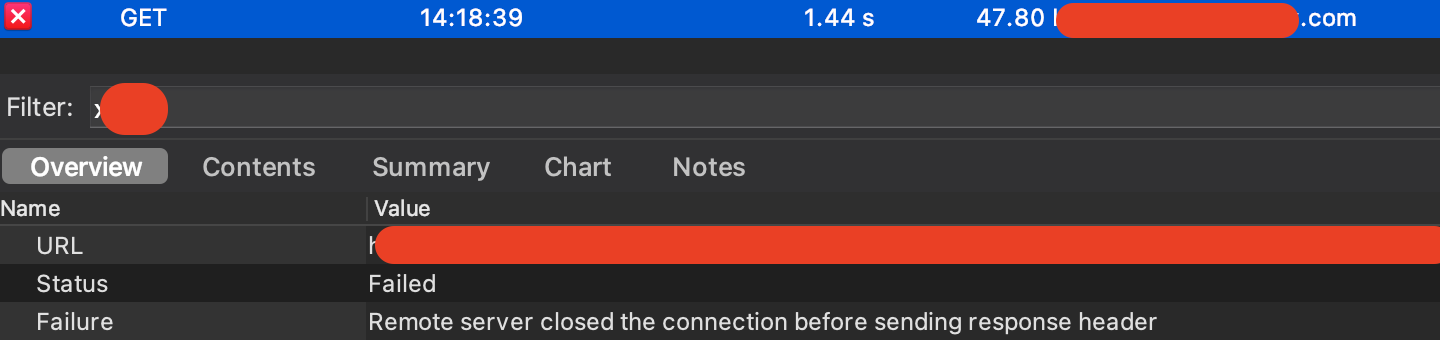
I know this is a C# question, but on my iPad, when I have it connected to Charles Proxy, I can semi-consistently reproduce this problem when I trigger a network call, but then immediately background the app.
I hit the home button as fast as I could to background the app. My total request/response time takes about 6 seconds.
and if I backgrounded in like 1-2 seconds, the response would usually come back ok. If I backgrounded the app in less than 0.5 seconds, then the request would usually fail. I have no thorough understanding of TCP, but it might be that the TCP handshake isn’t even complete and the connection just gets dropped hence the error message.
This matches with this other answer saying:
I get this one all the time. It means that the user started to download a file, and then it either failed, or they cancelled it.
All methods was sourced from stackoverflow.com or stackexchange.com, is licensed under cc by-sa 2.5, cc by-sa 3.0 and cc by-sa 4.0