Im fetching a local xml file using jQuery ajax through an html that i download from my site.
The problem is that each and every time the file gets downloaded, the user must right click on it -> properties -> unblock. Otherwise jquery ajax throws a “permission denied” error.
Is there any way to mark the file as trusted or something similar? Should i implement something on the serverside when downloading the file? Or add something on the client side in the saved html file? Thanks in advance.
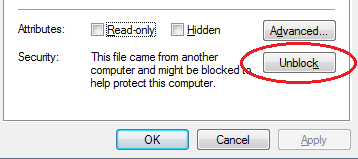
Answers:
Thank you for visiting the Q&A section on Magenaut. Please note that all the answers may not help you solve the issue immediately. So please treat them as advisements. If you found the post helpful (or not), leave a comment & I’ll get back to you as soon as possible.
Method 1
The NTFS file system attache to this file a flag as unsafe. You can use one utility from Sysinternals called Streams to remove this flag. You can download the Streams from:
http://technet.microsoft.com/en-us/sysinternals/bb897440.aspx
Then using the Process class you can run the streams -d <file.xml> command to remove this flag, after you have get the file. How to run it:
Process runcommd = new Process();

runcommd.StartInfo.FileName = "streams";
runcommd.StartInfo.Arguments = " -d "fullpath\file.xml"";

runcommd.StartInfo.UseShellExecute = false;
runcommd.StartInfo.CreateNoWindow = false;

runcommd.StartInfo.RedirectStandardError = true;
runcommd.StartInfo.RedirectStandardOutput = true;
runcommd.StartInfo.RedirectStandardInput = true;

// now run it
runcommd.Start();

// be sure that we end
runcommd.StandardInput.Flush();
runcommd.StandardInput.Close();
The Streams are from MS site, so its official and credible source, and its just a utility that remove this flag from the file. I think that you can do your job.
Method 2
@Aristos is spot-on on the alternate file stream issue, however this can be done without the use of an external EXE (streams.exe). For anyone else looking at this later on you can run the following command to empty the alternate file stream (AFS):
echo. > my_blocked_file.zip:Zone.Identifier
Assuming the file name of my_blocked_file.zip this will empty the content of the AFS. Also, you can issue dir /r to list AFS’s and notepad my_blocked_file.zip:Zone.Identifier to actually edit the them.
This is what an Internet Zone Identifier looks like:
[ZoneTransfer]
ZoneId=3
Additional reading on these streams:
http://msdn.microsoft.com/en-us/library/ff469212(v=prot.10)
and the respective security zones are:
- Intranet: ZoneId=1
- Trusted Site: ZoneId=2
- Internet: ZoneId=3
- Restricted Site: ZoneId=4
Also, IE only seems to read the AFS when you open/close the session so you couldn’t change a stream and then just refresh, you’d need to create a new IE instance to re-read the new AFS.
Method 3
Give this a try. Open up regedit, and look for the following key/value:
HKEY_CURRENT_USERSoftwareMicrosoftWindowsCurrentVersionPoliciesAttachmentsSaveZoneInformation
Set this value to 1 and see if the problem persists. Might have to log out and back in to be sure, as its an HKCU value. You still might get this message once more, but if you unblock it again with this value in place, it might prevent it from happening again.
All methods was sourced from stackoverflow.com or stackexchange.com, is licensed under cc by-sa 2.5, cc by-sa 3.0 and cc by-sa 4.0