I recently updated my app and tried to run it, and got the following error about “Address already in use”. What does this mean and how do I fix it?
Traceback (most recent call last):
  File "/home/ubuntu/workspace/app.py", line 11, in <module>
    app.run(host = os.getenv('IP', '0.0.0.0'), port=int(os.getenv('PORT',8080)))
  File "/usr/local/lib/python2.7/dist-packages/flask/app.py", line 772, in run
    run_simple(host, port, self, **options)
  File "/usr/local/lib/python2.7/dist-packages/werkzeug/serving.py", line 687, in run_simple
    inner()
  File "/usr/local/lib/python2.7/dist-packages/werkzeug/serving.py", line 653, in inner
    fd=fd).serve_forever()
  File "/usr/local/lib/python2.7/dist-packages/werkzeug/serving.py", line 557, in make_server
    passthrough_errors, ssl_context, fd=fd)
  File "/usr/local/lib/python2.7/dist-packages/werkzeug/serving.py", line 467, in __init__
    HTTPServer.__init__(self, (host, int(port)), handler)
  File "/usr/lib/python2.7/SocketServer.py", line 419, in __init__
    self.server_bind()
  File "/usr/lib/python2.7/BaseHTTPServer.py", line 108, in server_bind
    SocketServer.TCPServer.server_bind(self)
  File "/usr/lib/python2.7/SocketServer.py", line 430, in server_bind
    self.socket.bind(self.server_address)
  File "/usr/lib/python2.7/socket.py", line 224, in meth
    return getattr(self._sock,name)(*args)
socket.error: [Errno 98] Address already in use
Answers:
Thank you for visiting the Q&A section on Magenaut. Please note that all the answers may not help you solve the issue immediately. So please treat them as advisements. If you found the post helpful (or not), leave a comment & I’ll get back to you as soon as possible.
Method 1
It means there’s another service’s using that port (8080 in this case). Maybe because you forgot close another running Flask app and it’s using 8080 port.
However, you could change the port you’re using, for example change it to 4444 like this:
if __name__=="__main__":
    app.run(host=os.getenv('IP', '0.0.0.0'),
            port=int(os.getenv('PORT', 4444)))
But anyways, I think you’d like to know which program is using that part if it’s not your program. You could use nmap or netcat GNU program to check it.
Here’s the netcat way (from here):
$ sudo netstat -nlp | grep 8080
tcp  0  0  0.0.0.0:8080  0.0.0.0:*  LISTEN  125004/nginx
When you got it, I’d suggest stop it manually (for example if it’s nginx or other HTTP servers, then stop it via service command or systemctl if you’re using systemd Linux)
You can also kill it via command kill:
kill <pid>
You can also kill it via killall or pkill, it use a process name instead of it’s pid:
killall/pkill <process name>
Method 2
Try to kill all the other processes which are running on your server using this command
sudo fuser -k xxxx/tcp
replace xxxx with your port name
Method 3
On OSX (12.1)
Run:
sudo lsof -i -P | grep LISTEN | grep 5000
ControlCe  1619        xxx   21u  IPv4 xxx      0t0    TCP *:5000 (LISTEN)
ControlCe  1619        xxx   22u  IPv6 xxx      0t0    TCP *:5000 (LISTEN)
If ControlCe is returned (Apple’s Control Center) is running. To turn it OFF go to:
Apple/System Preferences/Sharing/ and turn OFF AirPlay Receiver
Method 4
You can get the pid of all running processes having python keyword using the command:
ps -fA | grep python
After getting the pid’s use kill command as follows:
kill -9 pid
After running above two commands now run the flask app, it will work fine
Method 5
You can simply use host and port parameter of run function to set another host and port .so that you can test your application.
if __name__=="__main__":
    app.run(host='127.0.0.9',port=4455,debug=True)
Method 6
I had the same issue.
I listed all application running with the command
sudo lsof -i -P -n | grep LISTEN
And there was another application using the same port.
After I stopped the other application, I could start my Flask application.
Method 7
This will kill all processes on port 8080
kill -9 $(lsof -t -i:"8080")
If you are using Ctrl+Z which just stops the process (pauses) instead of Ctrl+C to stop the process you may end up with an open port.
Method 8
I had the same issue but killing the current process didn’t help as it would happen at runtime. I placed a subprocess.run with a bash script to kill it right before the app.run in my python and it worked.
#!/bin/bash

kill $(lsof -i:5001 -t)
Method 9
Try restarting terminal/shell or whatever platform you are using to run python. It worked for me.
Method 10
This happens when you use “ctrl+z” when flask app is running. When you run your flask app again in same terminal you get the error “OSError: [Errno 98] Address already in use”
Solution:
fg
use "ctrl+c" this time to stop
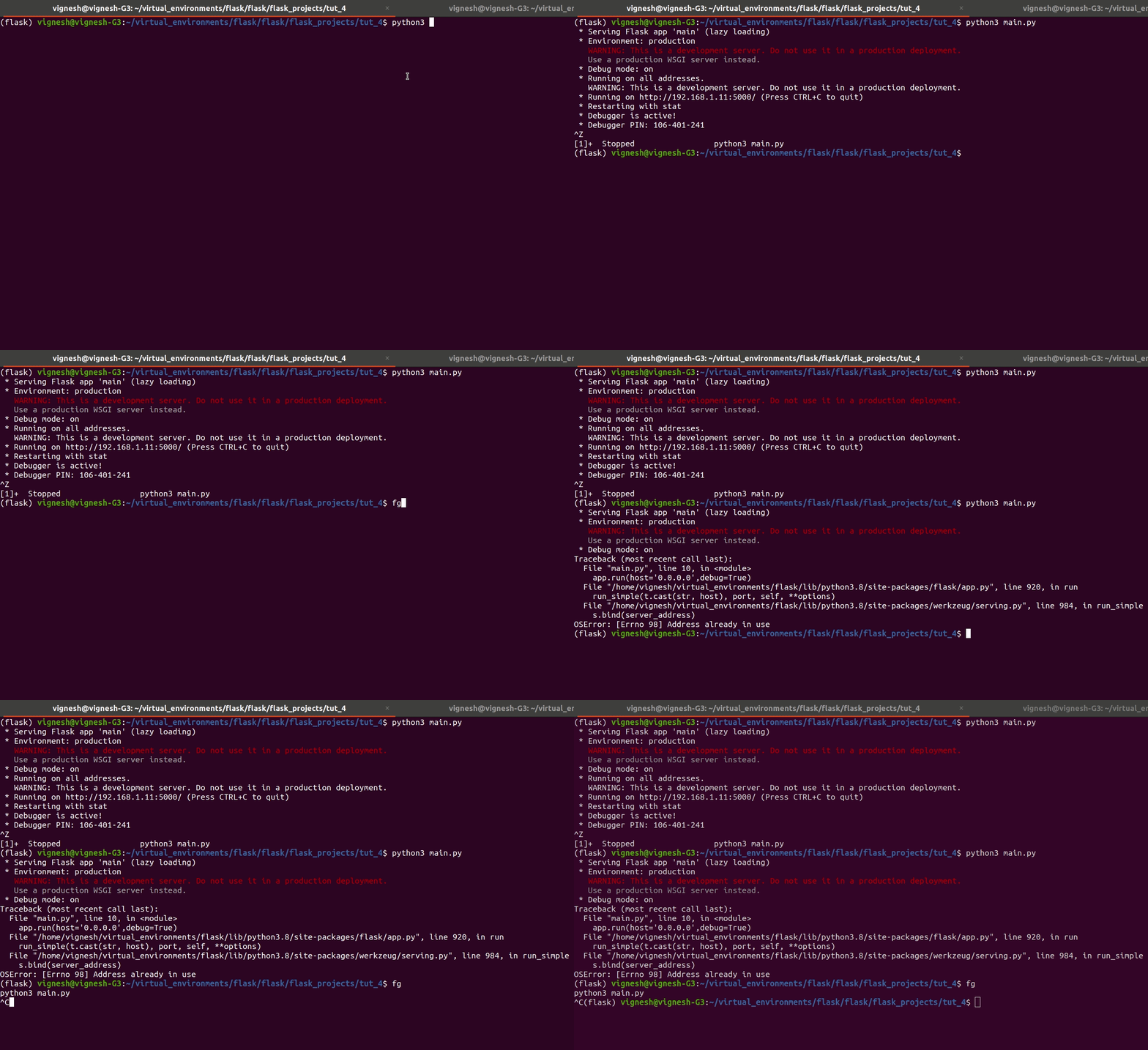
When we use “ctrl+z” the process runs in background, we then bring it to the foreground using the “fg” and then use “ctrl+c” to stop it
All methods was sourced from stackoverflow.com or stackexchange.com, is licensed under cc by-sa 2.5, cc by-sa 3.0 and cc by-sa 4.0