I have an ASP.NET web app. It has a CMS web application which I want to run on IIS(through Visual Studio). It’s .csproj file lists the project URL as https://localhost:27251/.
I created a site on IIS which sets the physical path to the CMS root folder. This contains a Default.aspx and web.config etc.
As it uses SSL I assigned the cert to the site in IIS.
When I run my application in Visual Studio, a Chrome window opens at https://localhost:27251/ but the following is loaded:
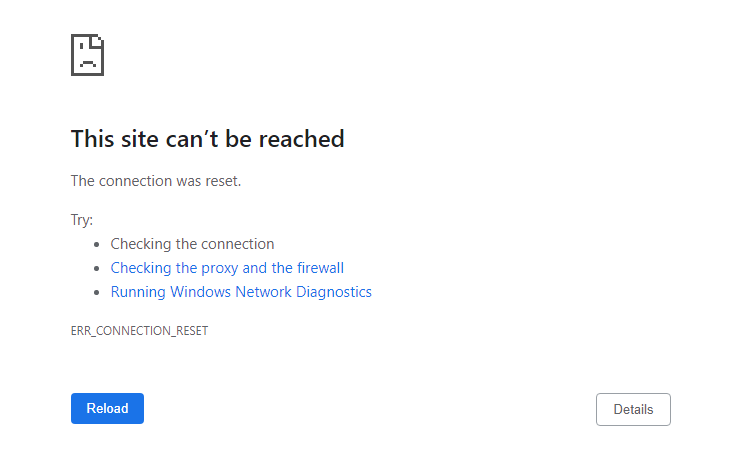
How do I go about resolving this?
This is my site binding:
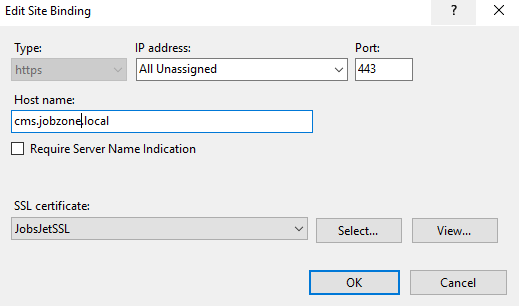
I generated a bindings report with Jexus Manager. Here’s the output:
IMPORTANT: This report might contain confidential information. Mask such before sharing to others.
-----
System Time: 11/8/2020 11:34:45 AM
Processor Architecture: AMD64
OS: Microsoft Windows NT 10.0.14393.0
Server Type: IIS Express
-----
This machine has 2 IP addresses to take external traffic.
* 172.16.1.5.
* 198.19.175.62.
-----
[W3SVC/2]
ServerComment  : CMS
ServerAutoStart: True
ServerState    : Stopped

BINDING: https *:443:cms.jobzone.local
Jexus Manager is not running as administrator, so TCP reserved port range is not verified. Please run "netsh int ipv4 show excludedportrange protocol=tcp" at command prompt to see if any conflict exists.
URL reservation https://cms.jobzone.local:443/ is missing. So this binding only works if IIS Express runs as administrator.
This site can take external traffic if,
 * TCP port 443 must be opened on Windows Firewall (or any other installed firewall products).
 * Requests from web browsers must be routed to following end points on this machine,
   * 172.16.1.5:443.
   * 198.19.175.62:443.
This site can take local traffic at 127.0.0.1:443.
This site can take local traffic at [::1]:443.
 * Web browsers should use URL https://cms.jobzone.local:443. Requests must have Host header of "cms.jobzone.local".
   Start DNS query for cms.jobzone.local.
DNS query failed: No such host is known..
Please review the host name cms.jobzone.local.
Binding Diagnostics does not verify certificates and other SSL/TLS related settings.
Please run SSL Diagnostics at server level to analyze SSL/TLS configuration. More information can be found at https://docs.jexusmanager.com/tutorials/ssl-diagnostics.html.
When I select Edit Bindings in IIS I see that there appears to be no configured bindings. Is this correct?
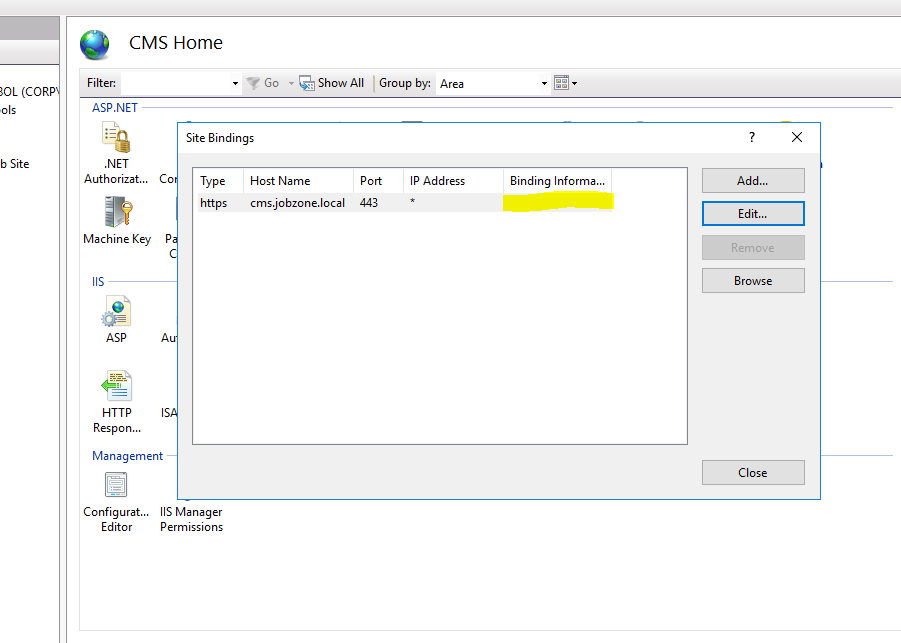
Possible Progress
I added 127.0.0.1 cms.jobzone.local to my hosts file. Now when I got to https://cms.jobzone.local in my browser I get the following page:
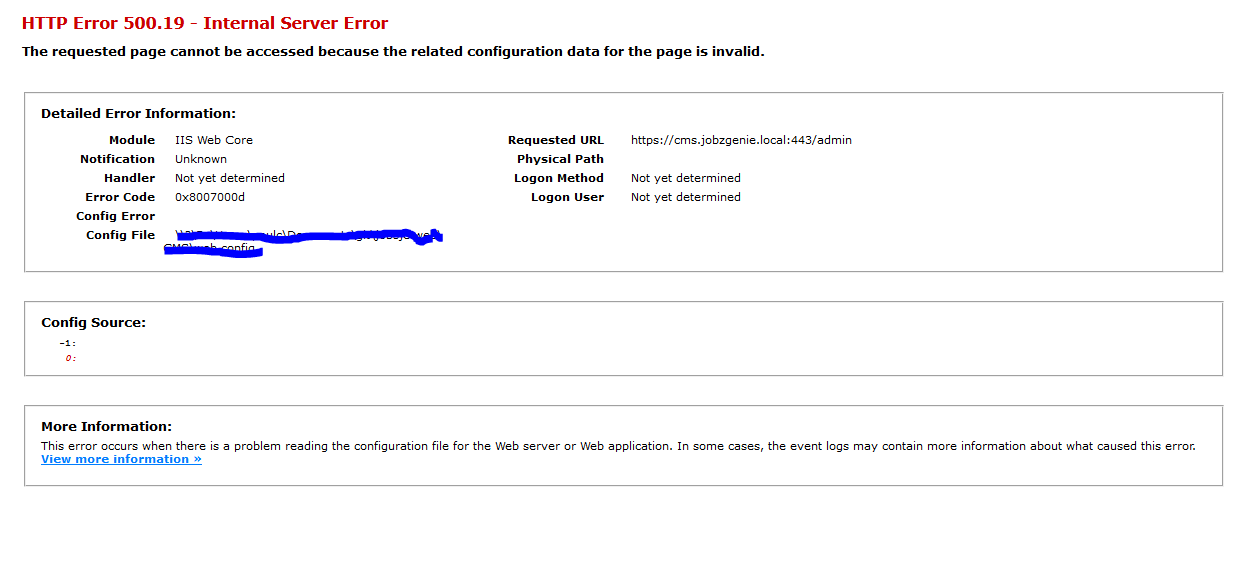
Here is my web.config:
a<?xml version="1.0" encoding="utf-8"?>
<configuration>
<configSections>
<!-- Content staging BEGIN -->
<section name="microsoft.web.services3" type="Microsoft.Web.Services3.Configuration.WebServicesConfiguration, Microsoft.Web.Services3, Version=3.0.0.0, Culture=neutral, PublicKeyToken=31bf3856ad364e35" />
<!-- Content staging END -->
<!-- FiftyOne BEGIN -->
<sectionGroup name="fiftyOne">
<section name="log" type="FiftyOne.Foundation.Mobile.Configuration.LogSection, FiftyOne.Foundation" requirePermission="false" allowDefinition="Everywhere" restartOnExternalChanges="false" allowExeDefinition="MachineToApplication" />
<section name="redirect" type="FiftyOne.Foundation.Mobile.Configuration.RedirectSection, FiftyOne.Foundation" requirePermission="false" allowDefinition="Everywhere" restartOnExternalChanges="false" allowExeDefinition="MachineToApplication" />
<section name="detection" type="FiftyOne.Foundation.Mobile.Detection.Configuration.DetectionSection, FiftyOne.Foundation" requirePermission="false" allowDefinition="Everywhere" restartOnExternalChanges="false" allowExeDefinition="MachineToApplication" />
</sectionGroup>
<!-- FiftyOne END -->
<!-- For more information on Entity Framework configuration, visit http://go.microsoft.com/fwlink/?LinkID=237468 -->
<section name="entityFramework" type="System.Data.Entity.Internal.ConfigFile.EntityFrameworkSection, EntityFramework, Version=6.0.0.0, Culture=neutral, PublicKeyToken=b77a5c561934e089" requirePermission="false" />
<section name="log4net" type="log4net.Config.Log4NetConfigurationSectionHandler, log4net" />
<section name="Unity.WebForms" type="Unity.WebForms.Configuration.UnityWebFormsConfiguration, Unity.WebForms" allowLocation="false" allowDefinition="Everywhere" />
</configSections>
<!-- Without this ignore list Unity.WebForms attempts to "build up" controls for CMS page properties unnecessarily, causing issues when it finds controls with ambiguous constructors -->
<Unity.WebForms>
<ignoreNamspaces>
<namespace prefix="CMS" />
</ignoreNamspaces>
</Unity.WebForms>
<appSettings>
<add key="CMSProgrammingLanguage" value="C#" />
<add key="WS.webservice" value="http://localhost/WebService/webservice.asmx" />
<add key="CMSTrialKey" value="CX09-20160808-FWVtCO" />
<add key="ChartImageHandler" value="storage=session;timeout=20;" />
<add key="PageInspector:ServerCodeMappingSupport" value="Disabled" />
<add key="ValidationSettings:UnobtrusiveValidationMode" value="None" />
<add key="CMSApplicationGuid" value="fbeca0bd-d5b7-4dfd-a832-e15a8ac03aa2" />
<add key="CMSApplicationName" value="JobsJet CMS" />
<!-- Note: Changing the 'CMSHashStringSalt' value may prevent macros from resolving correctly, and break dialog links and images on your website.
To fix these issues, you need to globally re-sign macros in 'System -> Macros -> Signatures' or manually re-save the affected content. -->
<add key="CMSHashStringSalt" value="863d6a7f-b2ef-4182-accd-1d47bd0a8b94" />
<add key="CMSDebugMacros" value="true" />
<add key="CMSDefaultUICulture" value="en-GB" />
<add key="CMSStagingServerName" value="Dev" />
<add key="JobzoneURL" value="https://web.jobsjet.local" />
<add key="KenticoSiteName" value="JobsJet" />
<add key="KenticoSiteId" value="1" />
<!-- Required now due to addition of OWIN packages added to JG DataObjects assembly -->
<add key="owin:AutomaticAppStartup" value="false" />
</appSettings>
<log4net debug="true">
<appender name="RollingLogFileAppender" type="log4net.Appender.RollingFileAppender">
<file value="Logs//Log_" />
<appendToFile value="true" />
<rollingStyle value="Date" />
<datePattern value="dd-MM-yyyy'.txt'" />
<maxSizeRollBackups value="10" />
<maximumFileSize value="10MB" />
<staticLogFileName value="false" />
<layout type="log4net.Layout.PatternLayout">
<conversionPattern value="%date [%thread] %-5level %logger – %message%newline" />
</layout>
</appender>
<root>
<level value="ALL" />
<appender-ref ref="RollingLogFileAppender" />
</root>
</log4net>
<connectionStrings>
<!--<add name="CMSConnectionString" connectionString="Data Source=BIZPC702SQLEXPRESS2014;Initial Catalog=jobzone;Integrated Security=False;Persist Security Info=False;User ID=jobzone_user;Password=jobzone99;Connect Timeout=60;Encrypt=False;Current Language=English;" />-->
<add name="CMSConnectionString" connectionString="Data Source=BIZSQL007;Initial Catalog=jobzone;Integrated Security=False;Persist Security Info=False;User ID=jobzone_user;Password=jobzone99;Connect Timeout=60;Encrypt=False;Current Language=English;" />
<add name="Entities" connectionString="metadata=res://*/DataModels.JobsJetDataModel.csdl|res://*/DataModels.JobsJetDataModel.ssdl|res://*/DataModels.JobsJetDataModel.msl;provider=System.Data.SqlClient;provider connection string="data source=BIZSQL007;initial catalog=jobzone;persist security info=True;user id=jobzone_user;password=jobzone99;MultipleActiveResultSets=True;App=EntityFramework"" providerName="System.Data.EntityClient" />
</connectionStrings>
<!--
For a description of web.config changes see http://go.microsoft.com/fwlink/?LinkId=235367.
The following attributes can be set on the <httpRuntime> tag.
<system.Web>
<httpRuntime targetFramework="4.6.1" />
</system.Web>
-->
<system.web>
<pages validateRequest="false" clientIDMode="AutoID">
<controls>
<add tagPrefix="ajaxToolkit" namespace="AjaxControlToolkit" assembly="AjaxControlToolkit" />
<add tagPrefix="cms" namespace="CMS.UIControls" assembly="CMS.UIControls" />
<add tagPrefix="cms" namespace="CMS.FormEngine" assembly="CMS.FormEngine" />
<add tagPrefix="cms" namespace="CMS.PortalEngine.Web.UI" assembly="CMS.PortalEngine.Web.UI" />
<add tagPrefix="cms" namespace="CMS.DocumentEngine.Web.UI" assembly="CMS.DocumentEngine.Web.UI" />
<add tagPrefix="cms" namespace="CMS.FormEngine.Web.UI" assembly="CMS.FormEngine.Web.UI" />
<add tagPrefix="cms" namespace="CMS.OnlineForms.Web.UI" assembly="CMS.OnlineForms.Web.UI" />
<add tagPrefix="cms" namespace="CMS.Base.Web.UI" assembly="CMS.Base.Web.UI" />
<add tagPrefix="cms" namespace="CMS.TranslationServices.Web.UI" assembly="CMS.TranslationServices.Web.UI" />
<add tagPrefix="asp" namespace="System.Web.UI.DataVisualization.Charting" assembly="System.Web.DataVisualization, Version=4.0.0.0, Culture=neutral, PublicKeyToken=31bf3856ad364e35" />
<add tagPrefix="asp" namespace="System.Web.UI.WebControls" assembly="System.Web.Extensions, Version=4.0.0.0, Culture=neutral, PublicKeyToken=31bf3856ad364e35" />
</controls>
<namespaces>
<add namespace="CMS.Helpers" />
<add namespace="CMS.Base.Web.UI" />
</namespaces>
</pages>
<customErrors mode="RemoteOnly">
<error statusCode="500" redirect="~/CMSMessages/Error.aspx" />
</customErrors>
<authentication mode="Forms">
<forms loginUrl="CMSPages/logon.aspx" defaultUrl="Default.aspx" name=".ASPXFORMSAUTH" timeout="60000" slidingExpiration="true" />
</authentication>
<httpRuntime maxRequestLength="2097151" waitChangeNotification="1" maxWaitChangeNotification="3600" requestValidationMode="2.0" maxUrlLength="1000" targetFramework="4.5" />
<globalization requestEncoding="utf-8" responseEncoding="utf-8" culture="en-US" uiCulture="en-US" />
<membership defaultProvider="CMSProvider" userIsOnlineTimeWindow="30">
<providers>
<clear />
<add name="CMSProvider" type="CMS.MembershipProvider.CMSMembershipProvider" connectionStringName="CMSConnectionString" enablePasswordRetrieval="false" enablePasswordReset="true" requiresQuestionAndAnswer="false" requiresUniqueEmail="true" passwordFormat="Hashed" />
</providers>
</membership>
<roleManager defaultProvider="CMSRoleProvider" enabled="true" cacheRolesInCookie="true" cookieName=".ASPROLES" cookieTimeout="30" cookiePath="/" cookieRequireSSL="false" cookieSlidingExpiration="true" cookieProtection="All">
<providers>
<clear />
<add name="CMSRoleProvider" type="CMS.MembershipProvider.CMSRoleProvider" connectionStringName="CMSConnectionString" applicationName="SampleApplication" writeExceptionsToEventLog="false" />
</providers>
</roleManager>
<httpHandlers>
<add path="ChartImg.axd" verb="*" type="System.Web.UI.DataVisualization.Charting.ChartHttpHandler, System.Web.DataVisualization, Version=4.0.0.0, Culture=neutral, PublicKeyToken=31bf3856ad364e35" validate="false" />
</httpHandlers>
<httpModules>
<add name="XHtmlModule" type="CMS.OutputFilter.OutputFilterModule, CMS.OutputFilter" />
<add name="CMSApplicationModule" type="CMS.Base.ApplicationModule, CMS.Base" />
</httpModules>
<xhtmlConformance mode="Strict" />
<sessionState mode="InProc" stateConnectionString="tcpip=127.0.0.1:42424" sqlConnectionString="data source=127.0.0.1;Trusted_Connection=yes" cookieless="false" timeout="20" />
<compilation debug="true" numRecompilesBeforeAppRestart="100" targetFramework="4.6.1">
<assemblies>
<add assembly="SMDiagnostics, Version=4.0.0.0, Culture=neutral, PublicKeyToken=B77A5C561934E089" />
<add assembly="Microsoft.Transactions.Bridge, Version=4.0.0.0, Culture=neutral, PublicKeyToken=B03F5F7F11D50A3A" />
<add assembly="System.Management, Version=4.0.0.0, Culture=neutral, PublicKeyToken=B03F5F7F11D50A3A" />
<add assembly="System.Design, Version=4.0.0.0, Culture=neutral, PublicKeyToken=B03F5F7F11D50A3A" />
<add assembly="System.Security, Version=4.0.0.0, Culture=neutral, PublicKeyToken=B03F5F7F11D50A3A" />
<add assembly="System.Configuration.Install, Version=4.0.0.0, Culture=neutral, PublicKeyToken=B03F5F7F11D50A3A" />
<add assembly="System.DirectoryServices, Version=4.0.0.0, Culture=neutral, PublicKeyToken=B03F5F7F11D50A3A" />
<add assembly="System.Configuration, Version=4.0.0.0, Culture=neutral, PublicKeyToken=B03F5F7F11D50A3A" />
<add assembly="System.Data, Version=4.0.0.0, Culture=neutral, PublicKeyToken=B77A5C561934E089" />
<add assembly="System, Version=4.0.0.0, Culture=neutral, PublicKeyToken=B77A5C561934E089" />
<add assembly="System.Web, Version=4.0.0.0, Culture=neutral, PublicKeyToken=B03F5F7F11D50A3A" />
<add assembly="System.Xml, Version=4.0.0.0, Culture=neutral, PublicKeyToken=B77A5C561934E089" />
<add assembly="System.Drawing, Version=4.0.0.0, Culture=neutral, PublicKeyToken=B03F5F7F11D50A3A" />
<add assembly="System.Web.Extensions.Design, Version=4.0.0.0, Culture=neutral, PublicKeyToken=31BF3856AD364E35" />
<add assembly="System.Deployment, Version=4.0.0.0, Culture=neutral, PublicKeyToken=B03F5F7F11D50A3A" />
<add assembly="System.Transactions, Version=4.0.0.0, Culture=neutral, PublicKeyToken=B77A5C561934E089" />
<add assembly="System.Web.RegularExpressions, Version=4.0.0.0, Culture=neutral, PublicKeyToken=B03F5F7F11D50A3A" />
<add assembly="System.Data.Linq, Version=4.0.0.0, Culture=neutral, PublicKeyToken=B77A5C561934E089" />
<add assembly="System.Messaging, Version=4.0.0.0, Culture=neutral, PublicKeyToken=B03F5F7F11D50A3A" />
<add assembly="System.IdentityModel.Selectors, Version=4.0.0.0, Culture=neutral, PublicKeyToken=B77A5C561934E089" />
<add assembly="System.ServiceProcess, Version=4.0.0.0, Culture=neutral, PublicKeyToken=B03F5F7F11D50A3A" />
<add assembly="System.Web.Routing, Version=4.0.0.0, Culture=neutral,PublicKeyToken=31BF3856AD364E35" />
<add assembly="System.Web.DataVisualization, Version=4.0.0.0, Culture=neutral, PublicKeyToken=31BF3856AD364E35" />
<add assembly="WindowsBase, Version=4.0.0.0, Culture=neutral, PublicKeyToken=31bf3856ad364e35" />
<add assembly="System.Windows.Forms, Version=4.0.0.0, Culture=neutral, PublicKeyToken=b77a5c561934e089" />
<add assembly="System.Net.Http, Version=4.0.0.0, Culture=neutral, PublicKeyToken=b03f5f7f11d50a3a" />
</assemblies>
<!-- Different programming languages BEGIN -->
<!--
<codeSubDirectories>
<add directoryName="CSCode"></add>
<add directoryName="VBCode"></add>
</codeSubDirectories>
-->
<!-- Different programming languages END -->
</compilation>
<httpCookies httpOnlyCookies="true" />
</system.web>
<!-- Windows authentication BEGIN -->
<!--
<location path="">
<system.web>
<authorization>
<deny users="?"/>
</authorization>
</system.web>
</location>
-->
<!-- Windows authentication END -->
<location path="cms">
<system.web>
<authorization>
<deny users="?" />
</authorization>
</system.web>
</location>
<!-- WebDAV location BEGIN -->
<location path="cms/files">
<system.web>
<httpHandlers>
<clear />
<add verb="*" path="*" type="CMS.WebDAV.WebDAVHandler, CMS.WebDAV" />
</httpHandlers>
<httpRuntime executionTimeout="2400" maxRequestLength="2097151" />
</system.web>
<system.webServer>
<handlers>
<clear />
<add name="CMSWebDAVHandler" path="*" verb="*" type="CMS.WebDAV.WebDAVHandler, CMS.WebDAV" />
</handlers>
<security>
<requestFiltering>
<requestLimits maxAllowedContentLength="2147483648" />
</requestFiltering>
</security>
</system.webServer>
</location>
<!-- WebDAV location END -->
<!-- Content staging BEGIN -->
<microsoft.web.services3>
<security>
<securityTokenManager>
<add type="CMS.Synchronization.WSE3.WebServiceAuthorization" namespace="http://docs.oasis-open.org/wss/2004/01/oasis-200401-wss-wssecurity-secext-1.0.xsd" localName="UsernameToken" />
</securityTokenManager>
<x509 allowTestRoot="true" verifyTrust="true" />
</security>
<policy fileName="wse3policy.config" />
<diagnostics>
<trace enabled="false" input="InputTrace.webinfo" output="OutputTrace.webinfo" />
</diagnostics>
</microsoft.web.services3>
<!-- Content staging END -->
<!-- FiftyOne BEGIN -->
<fiftyOne>
<log logFile="~/App_Data/CMSModules/DeviceProfiles/logFiftyOne.txt" logLevel="Warn" />
<detection binaryFilePath="~/App_Data/CMSModules/DeviceProfiles/51Degrees.dat" />
</fiftyOne>
<!-- FiftyOne END -->
<system.webServer>
<rewrite>
<rules>
<rule name="HTTP/S to HTTPS Redirect" enabled="true" stopProcessing="true">
<match url="(.*)" />
<conditions logicalGrouping="MatchAny">
<add input="{SERVER_PORT_SECURE}" pattern="^0$" />
</conditions>
<action type="Redirect" url="https://{HTTP_HOST}{REQUEST_URI}" redirectType="Permanent" />
</rule>
</rules>
</rewrite>
<modules>
<remove name="WebDAVModule" />
<remove name="XHtmlModule" />
<remove name="CMSApplicationModule" />
<add name="XHtmlModule" type="CMS.OutputFilter.OutputFilterModule, CMS.OutputFilter" />
<add name="CMSApplicationModule" preCondition="managedHandler" type="CMS.Base.ApplicationModule, CMS.Base" />
</modules>
<handlers>
<remove name="WebDAV" />
<remove name="ChartImageHandler" />
<add name="ChartImageHandler" preCondition="integratedMode" verb="*" path="ChartImg.axd" type="System.Web.UI.DataVisualization.Charting.ChartHttpHandler, System.Web.DataVisualization, Version=4.0.0.0, Culture=neutral, PublicKeyToken=31bf3856ad364e35" />
</handlers>
<staticContent>
<remove fileExtension=".woff" />
<mimeMap fileExtension=".woff" mimeType="application/x-font-woff" />
<remove fileExtension=".svg" />
<mimeMap fileExtension=".svg" mimeType="image/svg+xml" />
<remove fileExtension=".nupkg" />
<mimeMap fileExtension=".nupkg" mimeType="application/zip, application/octet-stream" />
</staticContent>
<validation validateIntegratedModeConfiguration="false" />
<security>
<requestFiltering>
<!-- Disable direct access to these files which are used only internally by CMS application -->
<denyUrlSequences>
<add sequence="/CMSTemplates" />
<add sequence="/CMSPages/PortalTemplate.aspx" />
</denyUrlSequences>
</requestFiltering>
</security>
</system.webServer>
<system.serviceModel>
<serviceHostingEnvironment aspNetCompatibilityEnabled="true" multipleSiteBindingsEnabled="true" />
<bindings>
<basicHttpBinding>
<!-- SalesForce BEGIN -->
<binding name="SalesForceBinding" transferMode="Buffered" maxReceivedMessageSize="131072">
<security mode="Transport">
<transport clientCredentialType="None" proxyCredentialType="None" realm="" />
<message clientCredentialType="UserName" algorithmSuite="Default" />
</security>
</binding>
<!-- SalesForce END -->
</basicHttpBinding>
</bindings>
<client>
<!-- SalesForce BEGIN -->
<endpoint address="https://login.salesforce.com/services/Soap/u/23.0" binding="basicHttpBinding" bindingConfiguration="SalesForceBinding" contract="WebServiceClient.Soap" name="SalesForceClient" />
<!-- SalesForce END -->
</client>
</system.serviceModel>
<runtime>
<assemblyBinding xmlns="urn:schemas-microsoft-com:asm.v1">
<dependentAssembly>
<assemblyIdentity name="System.Web.Mvc" publicKeyToken="31BF3856AD364E35" culture="neutral" />
<bindingRedirect oldVersion="0.0.0.0-4.0.0.0" newVersion="4.0.0.0" />
</dependentAssembly>
<dependentAssembly>
<assemblyIdentity name="Newtonsoft.Json" publicKeyToken="30AD4FE6B2A6AEED" culture="neutral" />
<bindingRedirect oldVersion="0.0.0.0-6.0.0.0" newVersion="6.0.0.0" />
</dependentAssembly>
<probing privatePath="CMSDependenciesNewtonsoft.Json.6.0.0.0" />
<dependentAssembly>
<assemblyIdentity name="Newtonsoft.Json" publicKeyToken="30ad4fe6b2a6aeed" culture="neutral" />
<bindingRedirect oldVersion="0.0.0.0-10.0.0.0" newVersion="10.0.0.0" />
</dependentAssembly>
<dependentAssembly>
<assemblyIdentity name="AutoMapper" publicKeyToken="be96cd2c38ef1005" culture="neutral" />
<bindingRedirect oldVersion="0.0.0.0-6.1.0.0" newVersion="6.1.0.0" />
</dependentAssembly>
<dependentAssembly>
<assemblyIdentity name="X.PagedList" publicKeyToken="abbb863e9397c5e1" culture="neutral" />
<bindingRedirect oldVersion="0.0.0.0-5.3.0.21888" newVersion="5.3.0.21888" />
</dependentAssembly>
<dependentAssembly>
<assemblyIdentity name="Microsoft.Owin" publicKeyToken="31bf3856ad364e35" culture="neutral" />
<bindingRedirect oldVersion="0.0.0.0-3.1.0.0" newVersion="3.1.0.0" />
</dependentAssembly>
<dependentAssembly>
<assemblyIdentity name="Microsoft.Owin.Security.OAuth" publicKeyToken="31bf3856ad364e35" culture="neutral" />
<bindingRedirect oldVersion="0.0.0.0-3.1.0.0" newVersion="3.1.0.0" />
</dependentAssembly>
<dependentAssembly>
<assemblyIdentity name="Microsoft.Owin.Security" publicKeyToken="31bf3856ad364e35" culture="neutral" />
<bindingRedirect oldVersion="0.0.0.0-3.1.0.0" newVersion="3.1.0.0" />
</dependentAssembly>
<dependentAssembly>
<assemblyIdentity name="Microsoft.Owin.Security.Cookies" publicKeyToken="31bf3856ad364e35" culture="neutral" />
<bindingRedirect oldVersion="0.0.0.0-3.1.0.0" newVersion="3.1.0.0" />
</dependentAssembly>
</assemblyBinding>
</runtime>
<location path="CMSModules/Settings/Pages/Keys.aspx">
<system.web>
<httpRuntime executionTimeout="2400" maxRequestLength="2097151" />
</system.web>
<system.webServer>
<security>
<requestFiltering>
<requestLimits maxAllowedContentLength="2147483648" />
</requestFiltering>
</security>
</system.webServer>
</location>
<entityFramework>
<defaultConnectionFactory type="System.Data.Entity.Infrastructure.LocalDbConnectionFactory, EntityFramework">
<parameters>
<parameter value="v13.0" />
</parameters>
</defaultConnectionFactory>
<providers>
<provider invariantName="System.Data.SqlClient" type="System.Data.Entity.SqlServer.SqlProviderServices, EntityFramework.SqlServer" />
</providers>
</entityFramework>
</configuration>
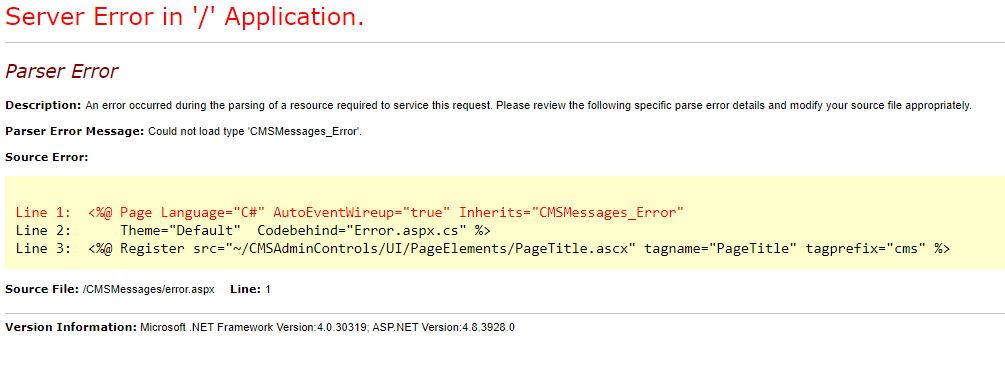
After installing IIS URL Rewrite module I now get this error not sure how to get past it:
Answers:
Thank you for visiting the Q&A section on Magenaut. Please note that all the answers may not help you solve the issue immediately. So please treat them as advisements. If you found the post helpful (or not), leave a comment & I’ll get back to you as soon as possible.
Method 1
Delete .vs folder if it exists. Go to Properties. In Web tab click Create Virtual Directory button
Method 2
The problem named ERR_CONNECTION_RESET is an issue which pops up when the site you are trying to visit is unable to build a connection with the destination site. This trouble starts without your knowledge, because it is altered by third-party programs, but can also be because of anti-virus or other third-party firewalls. We have some methods to fix this error, so just try one after another till you sort it out but in case of detailed solutions just go for this website: ERR_CONNECTION_RESET
Method 3
Installing IIS URL Rewrite module resolved this for me.
All methods was sourced from stackoverflow.com or stackexchange.com, is licensed under cc by-sa 2.5, cc by-sa 3.0 and cc by-sa 4.0