I am working to enter info in the input field with using selenium with python.
The element I’m trying to access is
<input type="tel" autocomplete="off" autocorrect="off" autocapitalize="none" spellcheck="false" class="number" data-braintree-name="number" name="credit-card-number" id="credit-card-number" maxlength="22" placeholder="•••• •••• •••• ••••" aria-describedby="field-description-number" style="background-image: url("data:image/png;base64,iVBORw0KGgoAAAANSUhEUgAAACAAAAAgCAYAAABzenr0AAAAAXNSR0IArs4c6QAAAfBJREFUWAntVk1OwkAUZkoDKza4Utm61iP0AqyIDXahN2BjwiHYGU+gizap4QDuegWN7lyCbMSlCQjU7yO0TOlAi6GwgJc0fT/fzPfmzet0crmD7HsFBAvQbrcrw+Gw5fu+AfOYvgylJ4TwCoVCs1ardYTruqfj8fgV5OUMSVVT93VdP9dAzpVvm5wJHZFbg2LQ2pEYOlZ/oiDvwNcsFoseY4PBwMCrhaeCJyKWZU37KOJcYdi27QdhcuuBIb073BvTNL8ln4NeeR6NRi/wxZKQcGurQs5oNhqLshzVTMBewW/LMU3TTNlO0ieTiStjYhUIyi6DAp0xbEdgTt+LE0aCKQw24U4llsCs4ZRJrYopB6RwqnpA1YQ5NGFZ1YQ41Z5S8IQQdP5laEBRJcD4Vj5DEsW2gE6s6g3d/YP/g+BDnT7GNi2qCjTwGd6riBzHaaCEd3Js01vwCPIbmWBRx1nwAN/1ov+/drgFWIlfKpVukyYihtgkXNp4mABK+1GtVr+SBhJDbBIubVw+Cd/TDgKO2DPiN3YUo6y/nDCNEIsqTKH1en2tcwA9FKEItyDi3aIh8Gl1sRrVnSDzNFDJT1bAy5xpOYGn5fP5JuL95ZjMIn1ya7j5dPGfv0A5eAnpZUY3n5jXcoec5J67D9q+VuAPM47D3XaSeL4AAAAASUVORK5CYII="); background-repeat: no-repeat; background-attachment: scroll; background-size: 16px 18px; background-position: 98% 50%; cursor: auto;" aria-invalid="true">
I have tried
Finding by Xpath
driver.find_element_by_xpath("//input[@id='credit-card-number']").send_keys(creditcardnumber)
Finding by Name
driver.find_element_by_name("credit-card-number").send_keys(creditcardnumber)
Finding by ID
driver.find_element_by_id('credit-card-number').send_keys(creditcardnumber)
I need help with locating the element for input.I get an error
Unable to locate the element
Update
Here is the URL for reference.
Answers:
Thank you for visiting the Q&A section on Magenaut. Please note that all the answers may not help you solve the issue immediately. So please treat them as advisements. If you found the post helpful (or not), leave a comment & I’ll get back to you as soon as possible.
Method 1
The error message
Unable to locate the element
usually because element generated by javascript, use WebDriverWait
inputCC = WebDriverWait(driver, 15).until(
    lambda driver: driver.find_element_by_xpath("//input[@id='credit-card-number']")
)
inputCC.send_keys(creditcardnumber)
other possibility is the element located in iframe
Method 2
As you are trying to send a character sequence within an <input> field sems to be a Credit Card Number and historically Credit Card Number resides within <iframes>.
So if the the desired elements are within an <iframe> so you have to:
- Induce WebDriverWait for the desired frame to be available and switch to it.
- Induce WebDriverWait for the desired element to be clickable.
-
You can use the following solution:
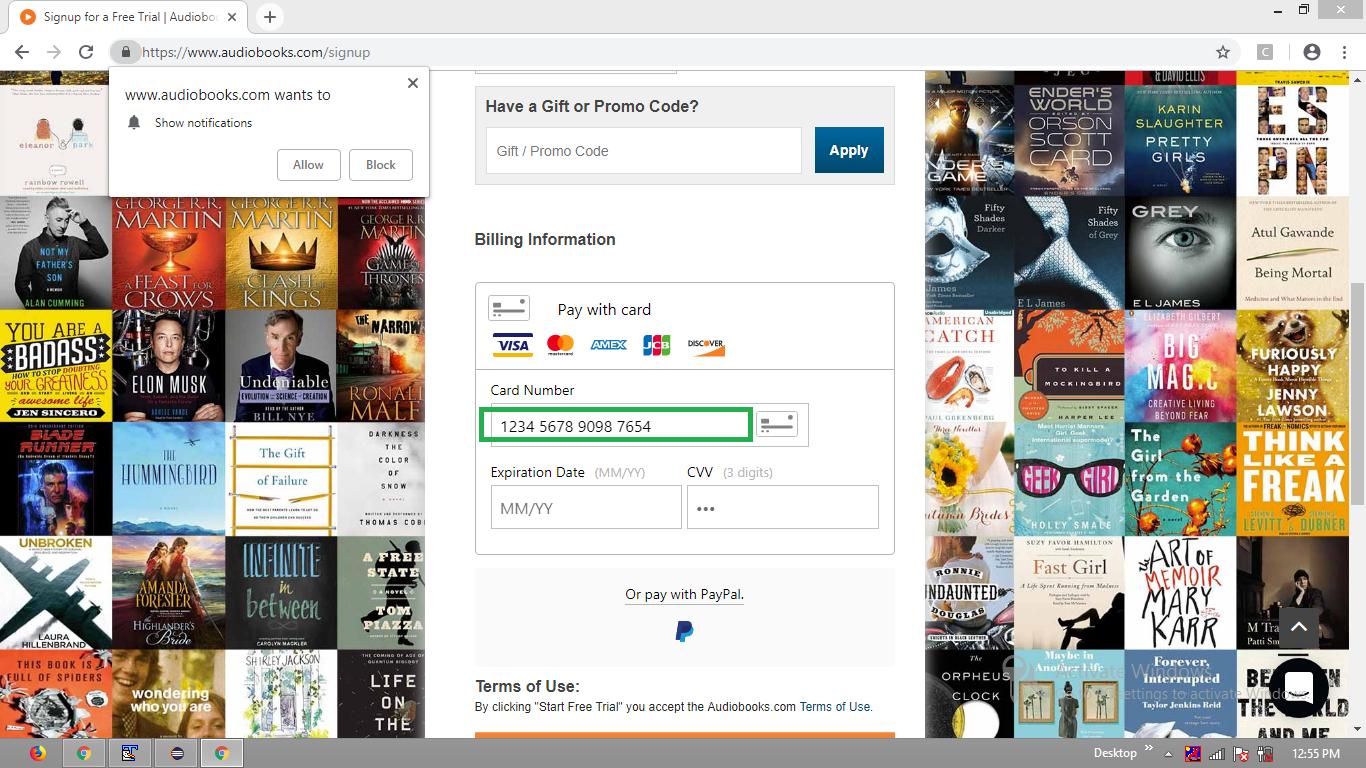
from selenium import webdriver from selenium.webdriver.common.by import By from selenium.webdriver.support.ui import WebDriverWait from selenium.webdriver.support import expected_conditions as EC options = webdriver.ChromeOptions() options.add_argument("start-maximized") options.add_argument('disable-infobars') driver = webdriver.Chrome(chrome_options=options, executable_path=r'C:UtilityBrowserDriverschromedriver.exe') driver.get("https://www.audiobooks.com/signup") WebDriverWait(driver, 20).until(EC.frame_to_be_available_and_switch_to_it((By.XPATH,"//iframe[@id='braintree-hosted-field-number']"))) WebDriverWait(driver, 20).until(EC.element_to_be_clickable((By.XPATH, "//input[@class='number' and @id='credit-card-number']"))).send_keys("1234567890987654") - Browser Snapshot
All methods was sourced from stackoverflow.com or stackexchange.com, is licensed under cc by-sa 2.5, cc by-sa 3.0 and cc by-sa 4.0