I recently installed VS2012 and working on work projects that I used to work on with VS2010. I never had an issue with VS2010 not recognizing asp prefixed tags but VS2012 is. I tried deleting the ReflectedSchemas folder under
C:Users[User_name]AppDataRoamingMicrosoftVisualStudio11.0
but still not working. Anyone ran into this issue in VS2012?
Answers:
Thank you for visiting the Q&A section on Magenaut. Please note that all the answers may not help you solve the issue immediately. So please treat them as advisements. If you found the post helpful (or not), leave a comment & I’ll get back to you as soon as possible.
Method 1
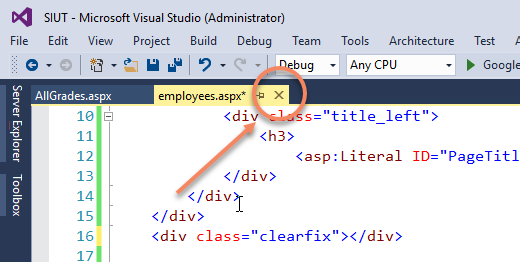
Closing and reopening the file (.aspx file not solution) from solution explorer worked for me in visual studio 2015. Before trying anything else you can give it a try.
Method 2
Do you happen to have something like this in your Web.Config:
<pages>
  <controls>
    <add tagPrefix="asp" namespace="System.Web.UI" assembly="System.Web.Extensions, Version=3.5.0.0, Culture=neutral, PublicKeyToken=31BF3856AD364E35" />
    <add tagPrefix="asp" namespace="System.Web.UI.WebControls" assembly="System.Web.Extensions, Version=3.5.0.0, Culture=neutral, PublicKeyToken=31BF3856AD364E35" />
  </controls>
</pages>
In that case, remove the entries for the asp tagPrefix (remove the entire section if no other tagPrefixes are left). This worked for me.
Method 3
If you are having this “Unrecognised tag prefix ‘asp’ in VS2012” problem in a Content Page,
Check whether the Master page, under which you are adding the content page is missing the
**<body>** or <form>Tag!
If it is missing this tag by any chance, then this <asp> tag is not recognized.
Method 4
For a project setup using .Net 4.0 following lines work.
    <pages>
        <controls>
            <add tagPrefix="asp" namespace="System.Web.UI" assembly="System.Web.Extensions, Version=4.0.0.0, Culture=neutral, PublicKeyToken=31BF3856AD364E35"/>
            <add tagPrefix="asp" namespace="System.Web.UI.WebControls" assembly="System.Web.Extensions, Version=4.0.0.0, Culture=neutral, PublicKeyToken=31BF3856AD364E35"/>
            <add tagPrefix="asp" namespace="System.Web.UI.DataVisualization.Charting" assembly="System.Web.DataVisualization, Version=4.0.0.0, Culture=neutral, PublicKeyToken=31bf3856ad364e35"/>
        </controls>
    </pages>
Method 5
RuudvanFalier’s answer got me thinking about tagPrefixes and so I removed the following in my aspx page and then added it back and the warning went away for me.
<%@ Register Assembly="AjaxControlToolkit" Namespace="AjaxControlToolkit" TagPrefix="asp" %>
Method 6
<%@ Page Title="" Language="VB" MasterPageFile="something" AutoEventWireup="false" CodeFile="something" Inherits="something" %>
<br/><br/>
Please give an ‘enter’ after first line. it worked for me
Method 7
Caused due to carelessness
My Problem Fixed
I removed the structure below,
which might be used by .net to identify elements, when i put it back everything worked fine
<!DOCTYPE html>

<html xmlns="http://www.w3.org/1999/xhtml">
<head runat="server">
    <title></title>
</head>
<body>
    <form id="form1" runat="server">
    <div>

    </div>
    </form>
</body>
</html>
Method 8
Simply closing the solution and re-opening it worked for me (or closing Visual Studio and re-opening it).
Method 9
just cut the page directive line from the page save it without it. Paste the page directive line back and save again. This worked for me. I am using vs2019..
Method 10
I managed to get rid of these errors by changing the .Net version (in project properties) from 4.5 back to 3.5. I then changed it back to 4.5 and the errors didn’t return.
Method 11
For me, this error start occurring after an error I got during the publishing process (I’ve set it to compile the .aspx pages as well). Watch out that double-clicking the error will not load your solution source code but a copy in the obj subfolder. i.e. check that you’ve got your actual source code open.
Yes, it’s a brain-dead error. Yes, I just spent 10 minutes debugging it.
Method 12
You can try to write master page in your aspx page tag
like:
MasterPageFile=”~/Master.Master”
Method 13
Sorry for not answering this question before. Though I’m assuming VS2012 service pack or update fixed this issue for me.
Method 14
<%@ Register Assembly="AjaxControlToolkit" Namespace="AjaxControlToolkit" TagPrefix="ajaxToolkit" %>
Add this on your top of the ASP page after one line where content page is bind to master page. Hope your problem will be fix. It worked for me.
Current: ASP developer at Flippertech
Method 15
If this error comes on those page which inherits master page, then one possible cause is !DOCTYPE tag that you probably used somewhere in your page to declare !DOCTYPE as html. Since asp is a asp.net prefix tag not html therefor this error occurs.
Method 16
I had this issue on a asp.net 4 site. Adding 3.5 compatibility fixed it.
<pages controlRenderingCompatibilityVersion="3.5" clientIDMode="AutoID"/>
Method 17
In my case none of the existing solutions worked, but one of them rang a bell. I had added some tags(to include some JavaScript and CSS files references) within the at the MasterPage in my VS2017 solution, like this:
<asp:ContentPlaceHolder ID="Content1" runat="server">

    <script type="text/javascript" src="behavior.js"></script>

</asp:ContentPlaceHolder>
I removed those script tags and the error disappeared. Curious thing although, was that I had other pages which also inherited from that same MasterPage but the error wasn’t present there. However, the error appeared on this specific page which I created in the solution after adding the scripts to the MasterPage. My idea was to avoid adding those same scripts on each and every page inheriting from the MasterPage, so I added those scripts back again to the MasterPage, just to check…. and the error didn’t show up again.
My theory here is that some internal file in Visual Studio gets corrupted, and if you add some scripting or any content to the Master Page and then delete it, or you just modify the MasterPage in order to save changes, those changes rewrite some internal file at Visual Studio, which is used to parse the ASP and HTML content. In other words, it’s like “refreshing” the IDE so it parses your page correctly. It’s just a theory, but it worked anyway, so I hope this solution works for other people too.
All methods was sourced from stackoverflow.com or stackexchange.com, is licensed under cc by-sa 2.5, cc by-sa 3.0 and cc by-sa 4.0