Is it possible in asp.net to update or create a web service reference from a wsdl file on our local drives?
If so, could you please describe it ?
Answers:
Thank you for visiting the Q&A section on Magenaut. Please note that all the answers may not help you solve the issue immediately. So please treat them as advisements. If you found the post helpful (or not), leave a comment & I’ll get back to you as soon as possible.
Method 1
Follow these steps.
-
Open the
Solution/ProjectinVisual Studio -
Right Click on
Solution Exploreron the project for which you want to add web reference. -
Select
Add Service Reference. (This will open a Add Service Reference dialogue box.) -
Click on
Advanced...button located at bottom of the dialogue box. (This will open another dialogue box named Service Reference Settings.) -
Click on
Add Web Referencebutton located at bottom of the dialogue box. (Again a dialogue box Add Web Reference would appear.) -
Enter OR Copy & Paste full path for the
WSDLfile from your local drive as theURL. -
Click on
Gobutton besides theURLbox. -
Edit
Web Reference Nameif you want to. -
Click on
Add Reference.
And you are done.
Method 2
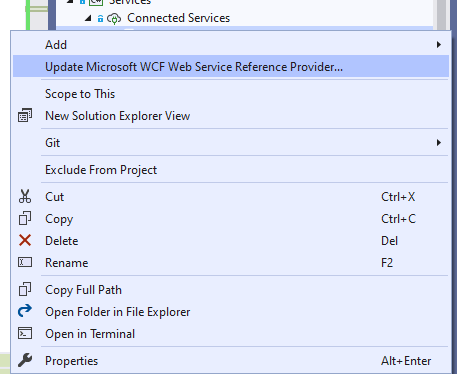
It’s been long time from accepted answer. If you are using VS2019 you can simply click on the service and select “Update…”
Method 3
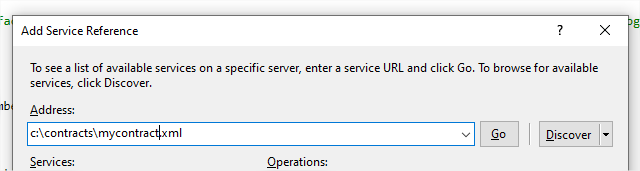
No need to add the service as Web Reference. You can do it setting the “Address” Field as the path of the file, for e.g.:
c:contractsmycontract.xml
and then “Go”.
All methods was sourced from stackoverflow.com or stackexchange.com, is licensed under cc by-sa 2.5, cc by-sa 3.0 and cc by-sa 4.0