I’m having trouble ironing out the file/image upload in ASP.NET MVC 6. Most tutorials appear to be outdated, and even some of the new ones seem to reference things that don’t make sense.
In my view:
<div class="form-group">
    @using (Html.BeginForm("Create", "PostNin", FormMethod.Post, new { enctype = "multipart/form-data" }))
    {
        <label asp-for="NinImageString" class="control-label"></label>
        <input type="file" name="files" class="form-control" />
    }

    @*<input asp-for="NinImageString" class="form-control" />
    <span asp-validation-for="NinImageString" class="text-danger"></span>*@
</div>
<div class="form-group">
    <label asp-for="NinImageCaption" class="control-label"></label>
    <input asp-for="NinImageCaption" class="form-control" />
    <span asp-validation-for="NinImageCaption" class="text-danger"></span>
</div>
And then in my controller:
// GET: PostNins/Create
public IActionResult Create()
{
    return View();
}

[HttpPost]
[ValidateAntiForgeryToken]
public async Task<IActionResult> Create([Bind("Id,NinFk,NinDigit,NinImageString,NinImageCaption,NinNote")] PostNin postNin, IFormFile files)
{
    // need code here

    if (ModelState.IsValid)
    {
        _context.Add(postNin);
        await _context.SaveChangesAsync();
        return RedirectToAction(nameof(Index));
    }

    return View(postNin);
}
My understanding is that I have to use IFormFile to pull this off.
I would like to upload an image with a caption, and store it into the application folder NinImages where I can access it later. I suppose I have questions about that too, but that’s for another question.
My understanding is that I have to somehow save a copy of the image into the directory system, under wwwroot, then save the path of the file as a string to the database.
SOLUTION:
My new controller looks like below. As a note, the fileTime is only to assign a unique value to each upload, to avoid duplicates. This works in this case because only one file can be uploaded at a time.
[HttpPost]
    [ValidateAntiForgeryToken]
    public async Task<IActionResult> Create([Bind("Id,NinFk,NinDigit,NinImageString,NinImageCaption,NinNote")] PostNin postNin, IFormFile uploadFile)
    {


        if (uploadFile != null && uploadFile.Length > 0)
        {
            var fileTime = DateTime.UtcNow.ToString("yyMMddHHmmss");
            var fileName = fileTime + Path.GetFileName(uploadFile.FileName);
            var filePath = Path.Combine(Directory.GetCurrentDirectory(), "wwwroot/NinFileUploads", fileName);

            postNin.NinImageString = filePath;
            _context.PostNins.Add(postNin);
            _context.SaveChanges();

            using (var fileStream = new FileStream(filePath, FileMode.Create))
            {
                await uploadFile.CopyToAsync(fileStream);
            }
            //if (ModelState.IsValid)
            //{
            //    _context.Add(postNin);
            //    await _context.SaveChangesAsync();
            //    return RedirectToAction(nameof(Index));
            //}
            return RedirectToAction(nameof(Index));

        }
        return View(postNin);
Answers:
Thank you for visiting the Q&A section on Magenaut. Please note that all the answers may not help you solve the issue immediately. So please treat them as advisements. If you found the post helpful (or not), leave a comment & I’ll get back to you as soon as possible.
Method 1
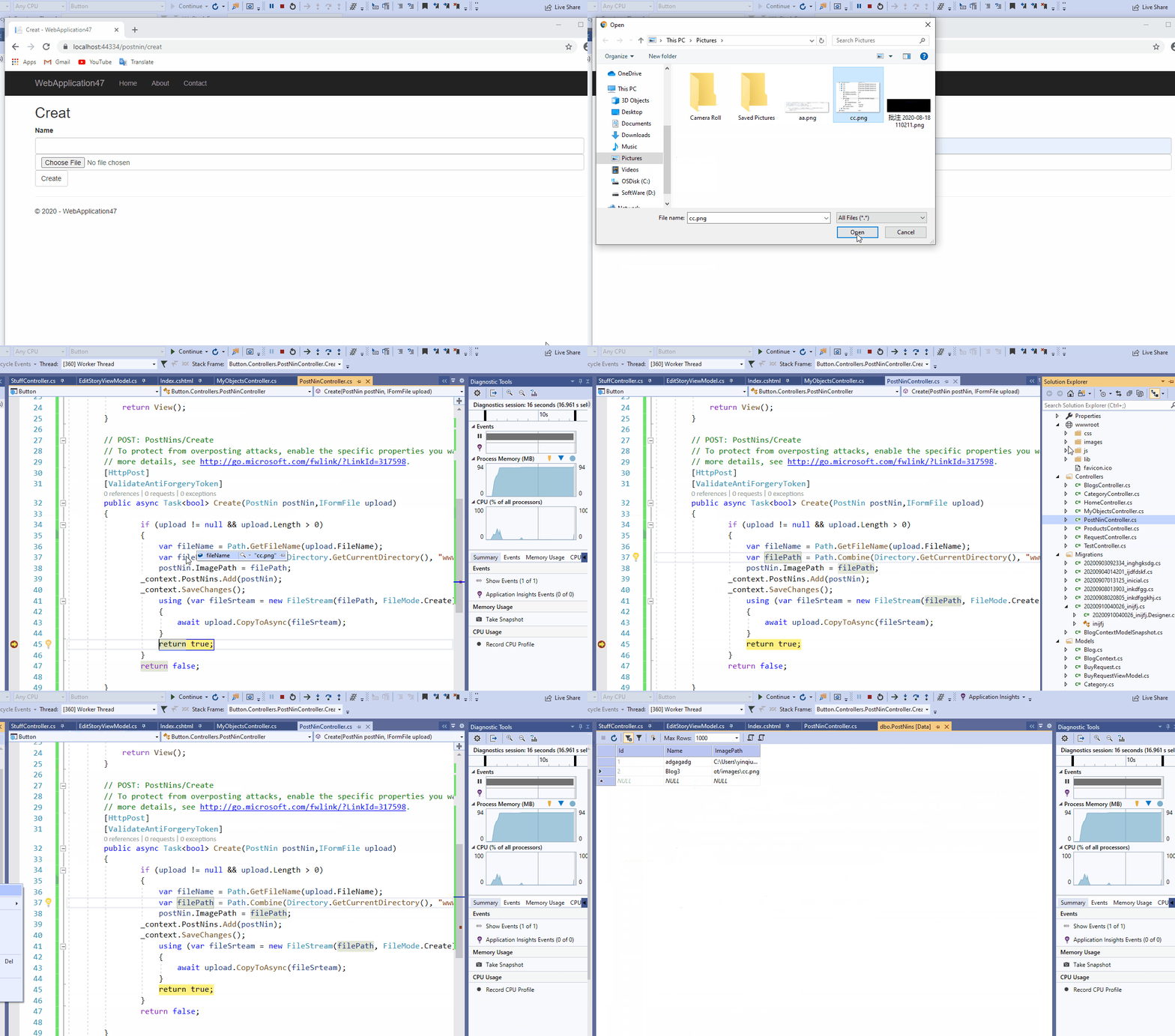
Here is a demo work:
PostNin Class:
public class PostNin
    {
        public int Id { get; set; }
        public string Name { get; set; }
        public string ImagePath { get; set; }
    }
Controller:
public async Task<bool> Create(PostNin postNin,IFormFile upload)
        {
                if (upload != null && upload.Length > 0)
                {
                    var fileName = Path.GetFileName(upload.FileName);
                    var filePath = Path.Combine(Directory.GetCurrentDirectory(), "wwwroot/images", fileName);
                    postNin.ImagePath = filePath;
                    _context.PostNins.Add(postNin);
                    _context.SaveChanges();
                    using (var fileSrteam = new FileStream(filePath, FileMode.Create))
                    {
                        await upload.CopyToAsync(fileSrteam);
                    }
                    return true;
                }
                return false;
        }
Result:
Method 2
You need to set the name attribute for the input element same as Create method parameter, in this solution name attribute and Create method parameter set to uploadFile
HTML
<input type="file" name="uploadFile" class="form-control" />
CS
Create([Bind("Id,NinFk,NinDigit,NinImageString,NinImageCaption,NinNote")] PostNin postNin, IFormFile uploadFile)
Method 3
change the name of the file upload control to files
<input type="file" name="files" class="form-control" />
add [FromForm] before IFormFile files first and try if it works
Create([Bind("Id,NinFk,NinDigit,NinImageString,NinImageCaption,NinNote")] PostNin postNin, [FromForm]IFormFile files)
if it not working try to add new IFormFile files property to PostNin class or create a new class as a model for this action and add [FromForm] before it on the action parameter.
public class PostNinModel {
....
public IFormFile files { get; set; }
...
}

Create([FromForm] PostNinModel postNin)
All methods was sourced from stackoverflow.com or stackexchange.com, is licensed under cc by-sa 2.5, cc by-sa 3.0 and cc by-sa 4.0