I have the following code to the shortcode to display a random quote.
Question: how to make a button display a new random quote? I mean, that would hit the button and show you a new quote (without refreshing the page of course).
function random_quote() {

    // quotes file
     $array = file("/path to txt file");

    // generate a random number between 0 and the total count of $array minus 1
    // we minus 1 from the total quotes because array indices start at 0 rather than 1 by default
    $r = rand(0,count($array)-1);

    // return the quote in the array with an indices of $r - our random number
    return $array[rand(0,count($array)-1)];
}

add_shortcode( 'randomquotes', 'random_quote');
I’m interested in how you can update the content on the page using ajax in WordPress? In my situation, because in fact be exactly that.
Sorry for my bad English. I hope you understand me. Thanks!
Answers:
Thank you for visiting the Q&A section on Magenaut. Please note that all the answers may not help you solve the issue immediately. So please treat them as advisements. If you found the post helpful (or not), leave a comment & I’ll get back to you as soon as possible.
Method 1
First off, this is very borderline within the scope of WPSE, it at all.
Apart from the shortcode to trigger the initial HTML output, this is really just AJAX.
Anyhow, that being said, this is how it’s done:
The PHP
Assuming that the above PHP snippet you supplied is functional, place the following in a php file for the ajax call:
/wp-content/themes/%your_theme%/js/ajax-load-quote.php
 <?php
 /* uncomment the below, if you want to use native WP functions in this file */
// require_once('../../../../wp-load.php');

 $array = file( $_POST['file_path'] ); // file path in $_POST, as from the js
 $r = rand( 0, count($array) - 1 );

 return '<p>' . $array[$r] . '</p>';
 ?>
For future reference and so as to make this answer useful to others: Note that wp-load.php must be included in order to make use of native WordPress functionality. The most commom case likely being either the need for WP_Query or $wpdb.
The HTML Structure
In a page content, a widget or a template file:
<div id="randomquotes">
    <p>I would rather have my ignorance than another man’s knowledge,
       because I have so much more of it.<br />
       -- Mark Twain, American author & Playwright</p>
</div>
<a id="newquote" class="button" href="#" rel="nofollow noreferrer noopener" rel="nofollow noreferrer noopener" title="Gimme a new one!">New Quote</a>
This you can obviously adjust to your liking, but for the sake of this example, this is what we’re going with.
We will generate the above via a shortcode later.
The jQuery
/wp-content/themes/%your_theme%/js/ajax-load-quote.js
function ajaxQuote() {
    var theQuote = jQuery.ajax({
        type: 'POST',
        url: ajaxParams.themeURI+'js/ajax-load-quote.php',
        /* supplying the file path to the ajax loaded php as a $_POST variable */
        data: { file_path: ajaxParams.filePath },
        beforeSend: function() {
            ajaxLoadingScreen(true,'#randomquotes');
        },
        success: function(data) {
            jQuery('#randomquotes').find('p').remove();
            jQuery('#randomquotes').prepend(data);
        },
        complete: function() {
            ajaxLoadingScreen(false,'#randomquotes');
        }
    });
    return theQuote;
}
/* Loading screen to be displayed during the process, optional */
function ajaxLoadingScreen(switchOn,element) {
    /* show loading screen */
    if (switchOn) {
        jQuery(''+element).css({
            'position': 'relative'
        });
        var appendHTML = '<div class="ajax-loading-screen appended">
            <img src="'+ajaxParams.themeURI+'images/ajax-loader.gif"
                alt="Loading ..." width="16" height="16" /></div>';
        if( jQuery(''+element).children('.ajax-loading-screen').length === 0 ) {
            jQuery(''+element).append(appendHTML);
        }
        jQuery(''+element).children('.ajax-loading-screen').first().css({
            'display': 'block',
            'visibility': 'visible',
            'filter': 'alpha(opacity=100)',
            '-ms-filter': '"progid:DXImageTransform.Microsoft.Alpha(Opacity=100)"',
            'opacity': '1'
        });
    } else {
        /* hide the loading screen */
        jQuery(''+element).children('.ajax-loading-screen').css({
            'display': '',
            'visibility': '',
            'filter': '',
            '-ms-filter': '',
            'opacity': ''
        });
        jQuery(''+element).css({
            'position': ''
        });
    }
}
/* triggering the above via the click event */
jQuery('#newquotes').click( function() {
    var theQuote = ajaxQuote();
    return false;
});
Putting it together in functions.php
Below your above snippet (which you will find included modified below), paste the following:
function random_quote( $atts ) {
    /* extracts the value of shortcode argument path */
    extract( shortcode_atts( array(
        'path' => get_template_directory_uri() . '/quotes.txt' // default, if not set
    ), $atts ) );
    $array = file( $path );
    $r = rand( 0, count($array) - 1 );
    $output = '<div id="randomquotes">' .
            '<p>' . $array[$r] . '</p>' .
        '</div>' .
        '<a id="newquote" class="button" href="#" rel="nofollow noreferrer noopener" rel="nofollow noreferrer noopener" title="Gimme a new one!">New Quote</a>';
    /* enqueue the below registered script, if needed */
    wp_enqueue_script( 'ajax-quote' );
    /* supplying the file path to the script */
    wp_localize_script(
        'ajax-quote',
        'ajaxParams',
        array(
            'filePath' => $path,
            'themeURI' => get_template_directory_uri() . '/'
        )
    );
    return $output;
}
add_shortcode( 'randomquotes', 'random_quote');
/* register the js */
function wpse72974_load_scripts() {
    if ( ! is_admin() ) {
        wp_register_script(
           'ajax-quote',
            get_template_directory_uri() . '/js/ajax-load-quote.js',
            array( 'jquery' ),
            '1.0',
            true
        );
    }
}
add_action ( 'init', 'wpse72974_load_scripts' );
Optional: The css for the loading screen
.ajax-loading-screen {
    display: none;
    visibility: hidden;
    position: absolute;
    top: 0;
    right: 0;
    bottom: 0;
    left: 0;
    width: 100%;
    background: #ffffff; /* the background of your site or the container of the quote */
    filter: alpha(opacity=0);
    -ms-filter:"progid:DXImageTransform.Microsoft.Alpha(Opacity=0)";
    opacity: 0;
    -webkit-transition:  opacity .1s;
    -moz-transition:  opacity .1s;
    -ms-transition:  opacity .1s;
    -o-transition: opacity .1s;
    transition: opacity .1s;
    z-index: 9999;
}
.ajax-loading-screen img {
    position: absolute;
    top: 50%;
    left: 50%;
    margin: -8px 0 0 -8px;
}
Resources / Reading
Method 2
You can register a script in a shortcode. It will be printed into the footer, given the theme contains wp_footer().
How it works:
- Register the shortcode callback with
add_shortcode(). - In the shortcode callback, register the script, then return the output.
- In the script add an update button, send a POST request to
admin_url( 'admin-ajax.php' )and fetch new data. Insert the returned data into the element with the shortcode.
Here is a sample script doing that. Two files: a PHP class and a JavaScript file. Both should sit in the same directory, for example ajax-shortcode-demo.
ajax-shortcode-demo.php
<?php
/**
 * Plugin Name: AJAX Shortcode Demo
 * Description: How to use AJAX from a shortcode handler named <code>[ajaxdemo]</code>.
 */

add_action( 'wp_loaded', array ( 'Ajax_Shortcode_Demo', 'get_instance' ) );

class Ajax_Shortcode_Demo
{
    /**
     * Current plugin instance
     *
     * @type NULL|object
     */
    protected static $instance = NULL;

    /**
     * Unique action name to trigger our callback
     *
     * @type string
     */
    protected $ajax_action = 'load_demo_data';

    /**
     * CSS class for the shortcode, reused as JavaScript handle.
     *
     * Must be unique too.
     *
     * @type string
     */
    protected $shortcode_class = 'ajaxdemo';

    /**
     * Remeber if we had regsitered a script on a page already.
     *
     * @type boolean
     */
    protected $script_registered = FALSE;

    /**
     * Create a new instance.
     *
     * @wp-hook wp_loaded
     * @return  object $this
     */
    public static function get_instance()
    {
        NULL === self::$instance and self::$instance = new self;
        return self::$instance;
    }

    /**
     * Constructor. Register shortcode and AJAX callback handlers.
     */
    public function __construct()
    {
        add_shortcode( 'ajaxdemo', array ( $this, 'shortcode_handler' ) );

        // register the AJAX callback
        $callback = array ( $this, 'ajax_callback' );
        // user who are logged in
        add_action( "wp_ajax_$this->ajax_action", $callback );
        // anonymous users
        add_action( "wp_ajax_nopriv_$this->ajax_action", $callback );
    }

    /**
     * Render the shortcode.
     */
    public function shortcode_handler()
    {
        $this->register_scripts();

        return sprintf(
            '<div class="%1$s"><b>%2$s</b></div>',
            $this->shortcode_class,
            $this->get_rand()
        );
    }

    /**
     * Return AJAX result.
     *
     * Must 'echo' and 'die'.
     *
     * @wp-hook wp_ajax_$this->ajax_action
     * @wp-hook wp_ajax_nopriv_$this->ajax_action
     * @return int
     */
    public function ajax_callback()
    {
        echo $this->get_rand();
        exit;
    }

    /**
     * Random number.
     *
     * @return int
     */
    protected function get_rand()
    {
        return rand( 1, 1000 );
    }

    /**
     * Register script and global data object.
     *
     * The data will be printent before the linked script.
     */
    protected function register_scripts()
    {
        if ( $this->script_registered )
            return;

        $this->script_registered = TRUE;

        wp_register_script(
            // unique handle
            $this->shortcode_class,
            // script URL
            plugin_dir_url( __FILE__ ) . '/jquery-ajax-demo.js',
            // dependencies
            array ( 'jquery'),
            // version
            'v1',
            // print in footer
            TRUE
        );

        wp_enqueue_script( $this->shortcode_class );

        $data = array (
            // URL address for AJAX request
            'ajaxUrl'   => admin_url( 'admin-ajax.php' ),
            // action to trigger our callback
            'action'    => $this->ajax_action,
            // selector for jQuery
            'democlass' => $this->shortcode_class
        );

        wp_localize_script( $this->shortcode_class, 'AjaxDemo', $data );
    }
}
jquery-ajax-demo.js
jQuery( function( $ ) {

    var buttonClass = AjaxDemo.democlass + 'Button',
        // insert AJAX result into the shortcode element
        updateDemo = function( response ){
            $( '.' + AjaxDemo.democlass ).find( 'b' ).html( response );
        },
        // fetch AJAX data
        loadDemo = function() {
            $.post( AjaxDemo.ajaxUrl, { action: AjaxDemo.action }, updateDemo );
        };

    // add an update button
    $( '.' + AjaxDemo.democlass )
        .append( ' <button class="' + buttonClass + '">New</button>' );

    // assign the clock handler to the button
    $( '.' + buttonClass ).click( loadDemo );
});
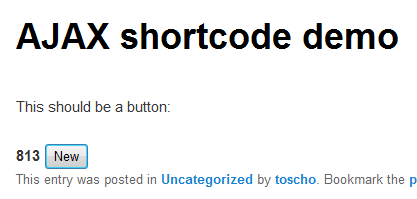
Result in a blog post:
All methods was sourced from stackoverflow.com or stackexchange.com, is licensed under cc by-sa 2.5, cc by-sa 3.0 and cc by-sa 4.0