Im trying to understand how windows authentication works and how to implement it. Ive read quite a few articles and watched some quite length videos on youtube but i still cant my head around what needs to be added to my web.config file/ index.aspx page to make it work properly.
Here is the index.aspx page:
using System;
using System.Collections.Generic;
using System.Linq;
using System.Web;
using System.Web.UI;
using System.Web.UI.WebControls;
using System.Data.SqlClient;
using System.Configuration;
using System.Data;

namespace asset_management_system
{
  public partial class index1 : System.Web.UI.Page
  {

    DataAccessLayer dal = new DataAccessLayer();

    protected void Page_Load(object sender, EventArgs e)
    {

    }

    protected void loginBut_Click(object sender, EventArgs e)
    {

        string username = usernameTB.Text.Trim();
        string password = passwordTB.Text.Trim();

        try
        {
            using (SqlDataReader dr = dal.CheckLoginDetails(username))
            {
                //if username does not exist
                if (!dr.Read())
                {
                    MessageBox.Show("Invalid login details");
                }

                else
                {
                    //if password matches the username then redirect to home page
                    if (dr[0].ToString() == password)
                    {
                        Session["username"] = username;
                        Response.Redirect("Home/home.aspx");
                    }
                    else
                    {
                        MessageBox.Show("Invalid login details");
                    }
                }
            }
        }
        catch (SqlException sqlex) { MessageBox.Show("There may be an issue with the server, please contact the administrator" +
                                                     " and provide this error message: " + sqlex); }
        catch (Exception ex) { MessageBox.Show("error message: " + ex); }


    }//end of loginBut_click method


  }//end of class
}//end of namespace
And here is the web.config file
<?xml version="1.0"?>
<configuration>
<connectionStrings>
<add name="Asset management System DBConnectionString" connectionString="Data Source=STEPHENPSQLEXPRESS;Initial Catalog="Asset management System DB";Integrated Security=True" providerName="System.Data.SqlClient"/>
</connectionStrings>
<system.web>
<compilation debug="true" targetFramework="4.0">
<assemblies>
<add assembly="System.Design, Version=4.0.0.0, Culture=neutral, PublicKeyToken=B03F5F7F11D50A3A"/>
<add assembly="System.Web.Extensions.Design, Version=4.0.0.0, Culture=neutral, PublicKeyToken=31BF3856AD364E35"/>
<add assembly="System.Windows.Forms, Version=4.0.0.0, Culture=neutral, PublicKeyToken=B77A5C561934E089"/>
</assemblies>
</compilation>
<authentication mode="Windows">
</authentication>
<identity impersonate="true"/>
</system.web>
</configuration>
Answers:
Thank you for visiting the Q&A section on Magenaut. Please note that all the answers may not help you solve the issue immediately. So please treat them as advisements. If you found the post helpful (or not), leave a comment & I’ll get back to you as soon as possible.
Method 1
You are confusing SQL authentication with Windows authentication.
In order for this web page to work based on Windows authentication, your web.config needs
<authentication mode="Windows">
When you deploy your page to a web server, you need to disable anonymous authentication to restrict external users. Below is a snippet from an IIS7+ web server’s authentication section:
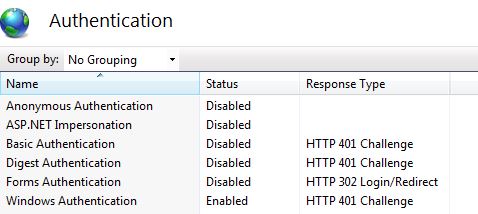
If you need to program against logged in user or its group, you need to use the WindowsIdentity Class.
All methods was sourced from stackoverflow.com or stackexchange.com, is licensed under cc by-sa 2.5, cc by-sa 3.0 and cc by-sa 4.0