When I create a new page within WordPress, I have the option of specifying which template to use from my theme (from a dropdown list on the right-hand side of the interface).
I need to find which of the available templates are unused, so that I can delete them.
How is this done please?
WP version is 4.2.2
Answers:
Thank you for visiting the Q&A section on Magenaut. Please note that all the answers may not help you solve the issue immediately. So please treat them as advisements. If you found the post helpful (or not), leave a comment & I’ll get back to you as soon as possible.
Method 1
What you need to do is compare the values of the meta field _wp_page_template, which contains the page template selected for a single page with the available page templates.
For this you need to construct an array of used templates, because you want the templates used by all the pages, similar as shown here:
Use array_unique to get unique values.
Then you need to get the available page templates, as shown here:
Last but not least, you can use array_diff to compare the arrays of used and available templates, which subsequently gives you the unused templates.
Method 2
Update:
Page Template Usage Info in WordPress 4.4+
In WordPress 4.4 the array_intersect_assoc() was removed from the WP_Theme::get_page_templates() method.
See ticket #13265 and changeset #34995.
We can therefore add the page templates usage info, directly into the template dropdown, with the theme_page_templates filter, without using javascript or some clever object cache tricks explained here by @MikeSchinkel or here by @gmazzap.
Here’s a demo (PHP 5.4+):
add_filter( 'theme_page_templates', function( $page_templates, $obj, $post )
{
    // Restrict to the post.php loading
    if( ! did_action( 'load-post.php' ) )
        return $page_templates;

    foreach( (array) $page_templates as $key => $template )
    {
        $posts = get_posts(
            [
                'post_type'      => 'any',
                'post_status'    => 'any',
                'posts_per_page' => 10,
                'fields'         => 'ids',
                'meta_query'     => [
                    [
                        'key'       => '_wp_page_template',
                        'value'     => $key,
                        'compare'   => '=',
                    ]
                ]
            ]
        );

        $count = count( $posts );

        // Add the count to the template name in the dropdown. Use 10+ for >= 10
        $page_templates[$key] = sprintf(
            '%s (%s)',
            $template,
             $count >= 10 ? '10+' : $count
        );
    }
    return $page_templates;
}, 10, 3 );
Example:
Here we can see how it could look like, with the usage count info added to the template names :
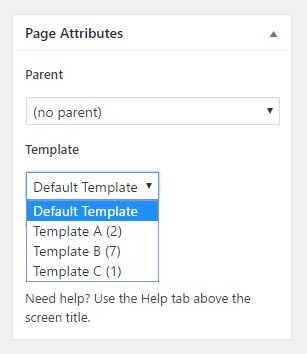
Hope you can adjust this to your needs!
All methods was sourced from stackoverflow.com or stackexchange.com, is licensed under cc by-sa 2.5, cc by-sa 3.0 and cc by-sa 4.0