Under the root directory I have the following structure
..
..
..
web.config
Report Folder
- Login.aspx
- Web.config
  |
  |-> ViewReport
       |
       |-> Report.aspx
In my web.config file in the Report folder I have the following:
    <?xml version="1.0"?>
    <configuration>
        <system.web>
            <authentication mode="Forms">
                <forms loginUrl="Login.aspx" defaultUrl="ViewReport/Report.aspx">
                    <credentials passwordFormat="Clear">
                        <user name="Johl" password="pass888"/>
                    </credentials>
                </forms>
             </authentication>
         </system.web>

        <location path="ViewReport/Report.aspx">
            <system.web>
                <authorization>
                    <allow users="Johl"/>
                    <deny users="*"/>
                </authorization>
            </system.web>
         </location>
     </configuration>
When I start debugging I get the following message:
It is an error to use a section registered as allowDefinition=’MachineToApplication’ beyond application level. This error can be caused by a virtual directory not being configured as an application in IIS.
NOTE that in my root web.config I have something like the following:
In my root, I already have the following:
         <system.web>
            <authentication mode="Forms">
                <forms loginUrl="Str/StrUserLogin.aspx" timeout="2880" slidingExpiration="true"  />
               </authentication>
            <authorization>
                <allow users="*" />
            </authorization>
         </system.web>
Answers:
Thank you for visiting the Q&A section on Magenaut. Please note that all the answers may not help you solve the issue immediately. So please treat them as advisements. If you found the post helpful (or not), leave a comment & I’ll get back to you as soon as possible.
Method 1
Create a virtual directory at the site root. This can be done via project properties in VS under the Web tab.
It’s also possible that you have things defined in the sub-directory that should be in the root config file. See similar question here:
Error to use a section registered as allowDefinition=’MachineToApplication’ beyond application level
Method 2
Converting your folder/project into an application in IIS can resolved this error.
Method 3
This error seems to occur if you try to open an asp.net WEBSITE and run it while it was originally encapsulated by a SOLUTION.
Do this: Close the website, find the related solution (.sln-file) further up in the file system and open this in stead. Inside the solution you will now be able to use your website without getting this error.
It would be nice if Microsoft could guide people in the right direction when they get lost in asp.net like this. The present error message about allowDefinition=MachineToApplication is not understandable for normal humans like me.
Method 4
If you put the published files in inetpub/wwwroot/../ Make sure to add the root folder as an application in IIS Manager.
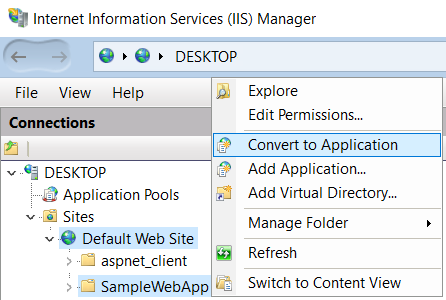
Method 5
The contents of the web.config in the subdirectory should be placede in the root directory. The configuration in the subdirectory is making IIS treat the subdirectory as the application root but it is not the application root. This is why you get the error allowDefinition=’MachineToApplication’.
Method 6
I deleted my bin and obj folder for the project and then rebuilt the solution and everything was working fine…not a technically savvy answer but it works.
Method 7
Just add this below lines in your csproject file to clean up the obj/bin folder automatically.
<Target Name="BeforeBuild">
  <!-- Remove obj folder -->
  <RemoveDir Directories="$(BaseIntermediateOutputPath)" />
  <!-- Remove bin folder -->
  <RemoveDir Directories="$(BaseOutputPath)" />
</Target>
Method 8
I opened the web site from IIS instead of file system and it worked.
Method 9
In my case, my website was working before deploying the new version.
I found an incorrect Web.config inside Views folder. I replaced it with original file and the problem resolved.
Method 10
This error occur if your web.config file and your all aspx file are not in the same folder. so please put all the files in the same folder.
Thanks.
All methods was sourced from stackoverflow.com or stackexchange.com, is licensed under cc by-sa 2.5, cc by-sa 3.0 and cc by-sa 4.0