For whatever reason when I published my server for the first time to Azure some really long password was generated for me that for whatever reason I didn’t think would be an issue.
Apparently I need this to publish to my server.
http://i.imgur.com/w5K1ySZ.png
It does not match my Azure server admin password which I can easily change from the management portal. Is there a way to see what this password is and/or change it?
Answers:
Thank you for visiting the Q&A section on Magenaut. Please note that all the answers may not help you solve the issue immediately. So please treat them as advisements. If you found the post helpful (or not), leave a comment & I’ll get back to you as soon as possible.
Method 1
Is there a way to see what this password is and/or change it?
Click the link in Azure portal -> Your Website -> Dashboard -> Quick glance -> Download the publish profile.
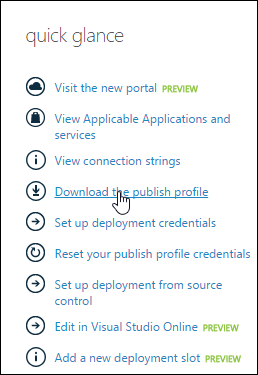
Download the file and your publishing password should be there in plain text in form userPWD="7vasdfa....".
If you want to reset that you can click the link Azure portal -> Your Website -> Dashboard -> Quick glance -> Reset your publish profile credentials.
Method 2
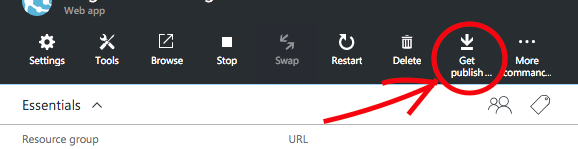
For the same solution as Kaspars Ozols presented but for the new Azure Portal you can go to the Web app in question and click the “Get publishing profile”
Method 3
Updating thread since it is now 9/2018.
Goto Azure Portal -> Dashboard -> App Service (that you are deploying to) -> Get publish profile (in the top middle of browser)
Once you have the file downloaded, look for the userPWD arg.
Method 4
No it is not the same. Reason is pretty clear – security concern!
My “Azure Admin Password” is to manage all my Azure Resources. While when I publish a web site to Azure I would expect to have some other credentials, that do not have to all my azure services.
What you see there is a Deployment Credential. This is best explained in the Wiki Page for the Kudu Project. Note that Azure Web Sites run Kudu.
All methods was sourced from stackoverflow.com or stackexchange.com, is licensed under cc by-sa 2.5, cc by-sa 3.0 and cc by-sa 4.0