I have a small doubt which I could not google the answer, So thought I could find the answer here.
Why should we add
 <asp:ScriptManager ID="ScriptManager1" runat="server">
 </asp:ScriptManager>
control in order to use
<asp:UpdatePanel runat="server"> in out aspx page.
hope some one can give the answer.
Answers:
Thank you for visiting the Q&A section on Magenaut. Please note that all the answers may not help you solve the issue immediately. So please treat them as advisements. If you found the post helpful (or not), leave a comment & I’ll get back to you as soon as possible.
Method 1
ScriptManager control registers the script for the Microsoft AJAX Library with the page. This enables client script support features such as partial-page rendering and Web-service calls.
You must use a ScriptManager control on a page to enable the following features of ASP.NET AJAX:
1. Client-script functionality of the Microsoft AJAX Library, and any custom script that you want to send to the browser.
protected void Button1_Click(object sender, EventArgs e)
{
    Page.ClientScript.RegisterStartupScript(
        this.GetType(),"myscript","alert('hello world!');");
}
2. Partial-page rendering, which enables regions on the page to be independently refreshed without a postback. The ASP.NET AJAX UpdatePanel, UpdateProgress, and Timer controls require a ScriptManager control to support partial-page rendering.
3. JavaScript proxy classes for Web services, which enable you to use client script to access Web services by exposing Web services as strongly typed objects.
[WebMethod]
public int Add(int a, int b) { return a + b; }

function CallAdd()
{
    // method will return immediately
    // processing done asynchronously
    WebService.Add(0,6, OnMethodSucceeded, OnMethodFailed);
}
4. JavaScript classes to access ASP.NET authentication and profile application services.
Sys.Services.AuthenticationService.login
Sys.Services.AuthenticationService.logout

<script type="text/javascript">
    function MyMethod(username, password)
    {
        Sys.Services.AuthenticationService.login(username,
            password,false,null,null,null,null,"User Context");
    }
</script>
See more at http://msdn.microsoft.com/en-us/magazine/cc163354.aspx
Method 2
Besides above answers, I would like to add some points for the reason behind using ScriptManager control. The controls that you mentioned UpdatePanel and ScriptManager are used for the ASP.NET AJAX Enabled sites.
- We use them, firstly, because in traditional webpages the entire page is loaded after a postback, the HTML sent to the browser is much larger
than it needs to be. - Second,
because the entire page is replaced, the browser has to dismiss the old one and then draw the new one. This causes the page to “flicker,” which results in an unattractive user experience.
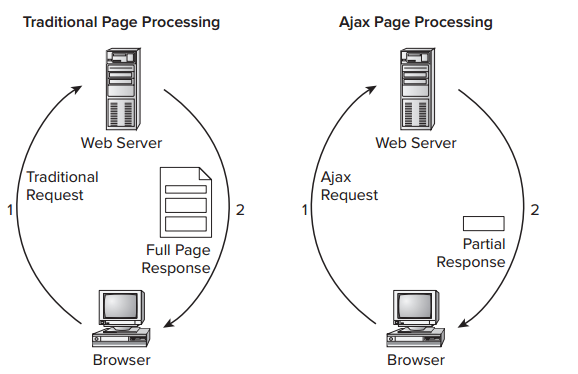
The ScriptManager control serves as the bridge between the client page and the server. As it is like a bridge, you’ve to use this control if any of the other AJAX controls needs to be added. It manages
script resources (the JavaScript files used at the client), takes care of partial-page updates as shown
earlier, and handles interaction with your web site for things like
web services and the ASP.NET
application services
such as membership, roles, and profile. Whenever one of the controls within the UpdatePanel causes a postback to
the server, only the content within that UpdatePanel is refreshed.
If you analyze the data that gets sent from the server to the browser (using a network analysis tool like
Fiddler or Wireshark), you would see that only a limited amount of data gets sent to the client.
You usually place the
ScriptManagercontrol directly in a content
page if you think you need Ajax capabilities on only a handful of
pages.If you’re going to use Ajax functionality in many of your ASPX pages,
you can place theScriptManagerin the master page, so it’s available
in all pages that are based on this master.
You can only have one ScriptManager
per page (i.e. only one bridge, if there happens two bridges then the page request/response may get confused from where to go!? :D), so if you add one to a master page, you can’t add another one
to a content page. In order to access a ScriptManager control that is
defined in a master page from a content page, you can use the ScriptManagerProxy.
Method 3
The ScriptManager control manages client script for AJAX-enabled ASP.NET Web pages.
So in order to use the UpdatePanel or any other AJAX controls, we must have to use the ScriptManager control at the beginning.
All methods was sourced from stackoverflow.com or stackexchange.com, is licensed under cc by-sa 2.5, cc by-sa 3.0 and cc by-sa 4.0