Some files are not served off of IIS because they are typically part of the building blocks of the website itself. For ASP.NET these are files like *.cs, *.dll, *.config, *.cshtml, etc.
You can find a list of them tied up in the IIS management setting “Filter requests” here:
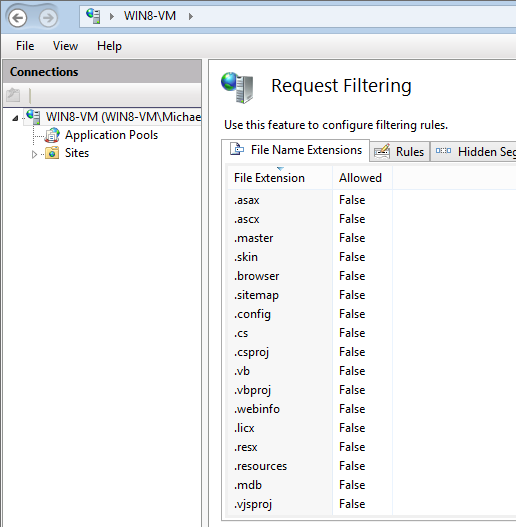
But if you need to programmatically access this list, it seems tough to find. Is there a good list of these default extensions?
BTW, the IIS website has info on how to enable / disable these globally here:
http://www.iis.net/configreference/system.webserver/security/requestfiltering/fileextensions
Answers:
Thank you for visiting the Q&A section on Magenaut. Please note that all the answers may not help you solve the issue immediately. So please treat them as advisements. If you found the post helpful (or not), leave a comment & I’ll get back to you as soon as possible.
Method 1
If I’m not mistaken, you’ll find them in the root web.config of the machine:
%windir%Microsoft.NETFrameworkframework_versionCONFIG
Which is also where you’ll find the machine.config file.
e.g.
<add path="*.ascx" verb="*" type="System.Web.HttpForbiddenHandler" validate="True" />
REF:
As to how you’d programmatically get to it – I haven’t tried. The IIS_USRS built-in group has access to it and this doc expands on it.
Hth…
Method 2
Here’s the list I build out of the IIS UI since I couldn’t find it anywhere. Hope you find it helpful.
disallowed extensions
.asax
.ascx
.master
.skin
.browser
.sitemap
.config
.cs
.csproj
.vb
.vbproj
.webinfo
.licx
.resx
.resources
.mdb
.vjsproj
.java
.jsl
.ldb
.dsdgm
.ssdgm
.lsad
.ssmap
.cd
.dsprototype
.lsaprototype
.sdm
.sdmDocument
.mdf
.ldf
.ad
.dd
.ldd
.sd
.adprototype
.lddprototype
.exclude
.refresh
.compiled
.msgx
.vsdisco
.rules
Method 3
on localhost you can alter the applicationHost.config file, a systems file that you can edit in VS and go to the requestFiltering section, change and save.
All methods was sourced from stackoverflow.com or stackexchange.com, is licensed under cc by-sa 2.5, cc by-sa 3.0 and cc by-sa 4.0