I know that I can use something like string[3:4] to get a substring in Python, but what does the 3 mean in somesequence[::3]?
Answers:
Thank you for visiting the Q&A section on Magenaut. Please note that all the answers may not help you solve the issue immediately. So please treat them as advisements. If you found the post helpful (or not), leave a comment & I’ll get back to you as soon as possible.
Method 1
it means ‘nothing for the first argument, nothing for the second, and jump by three’. It gets every third item of the sequence sliced.
Extended slices is what you want. New in Python 2.3
Method 2
Python sequence slice addresses can be written as a[start:end:step] and any of start, stop or end can be dropped. a[::3] is every third element of the sequence.
Method 3
seq[::n] is a sequence of each n-th item in the entire sequence.
Example:
>>> range(10)[::2]
[0, 2, 4, 6, 8]
The syntax is:
seq[start:end:step]
So you can do (in Python 2):
>>> range(100)[5:18:2]
[5, 7, 9, 11, 13, 15, 17]
Method 4
Explanation
s[i:j:k] is, according to the documentation, “slice of s from i to j with step k”. When i and j are absent, the whole sequence is assumed and thus s[::k] means “every k-th item”.
Examples
First, let’s initialize a list:
>>> s = range(20)
>>> s
[0, 1, 2, 3, 4, 5, 6, 7, 8, 9, 10, 11, 12, 13, 14, 15, 16, 17, 18, 19]
Let’s take every 3rd item from s:
>>> s[::3]
[0, 3, 6, 9, 12, 15, 18]
Let’s take every 3rd item from s[2:]:
>>> s[2:]
[2, 3, 4, 5, 6, 7, 8, 9, 10, 11, 12, 13, 14, 15, 16, 17, 18, 19]
>>> s[2::3]
[2, 5, 8, 11, 14, 17]
Let’s take every 3rd item from s[5:12]:
>>> s[5:12]
[5, 6, 7, 8, 9, 10, 11]
>>> s[5:12:3]
[5, 8, 11]
Let’s take every 3rd item from s[:10]:
>>> s[:10]
[0, 1, 2, 3, 4, 5, 6, 7, 8, 9]
>>> s[:10:3]
[0, 3, 6, 9]
Method 5
TL;DR
This visual example will show you how to a neatly select elements in a NumPy Matrix (2 dimensional array) in a pretty entertaining way (I promise). Step 2 below illustrate the usage of that “double colons” :: in question.
(Caution: this is a NumPy array specific example with the aim of illustrating the a use case of “double colons” :: for jumping of elements in multiple axes. This example does not cover native Python data structures like List).
One concrete example to rule them all…
Say we have a NumPy matrix that looks like this:
In [1]: import numpy as np

In [2]: X = np.arange(100).reshape(10,10)

In [3]: X
Out[3]:
array([[ 0,  1,  2,  3,  4,  5,  6,  7,  8,  9],
       [10, 11, 12, 13, 14, 15, 16, 17, 18, 19],
       [20, 21, 22, 23, 24, 25, 26, 27, 28, 29],
       [30, 31, 32, 33, 34, 35, 36, 37, 38, 39],
       [40, 41, 42, 43, 44, 45, 46, 47, 48, 49],
       [50, 51, 52, 53, 54, 55, 56, 57, 58, 59],
       [60, 61, 62, 63, 64, 65, 66, 67, 68, 69],
       [70, 71, 72, 73, 74, 75, 76, 77, 78, 79],
       [80, 81, 82, 83, 84, 85, 86, 87, 88, 89],
       [90, 91, 92, 93, 94, 95, 96, 97, 98, 99]])
Say for some reason, your boss wants you to select the following elements:
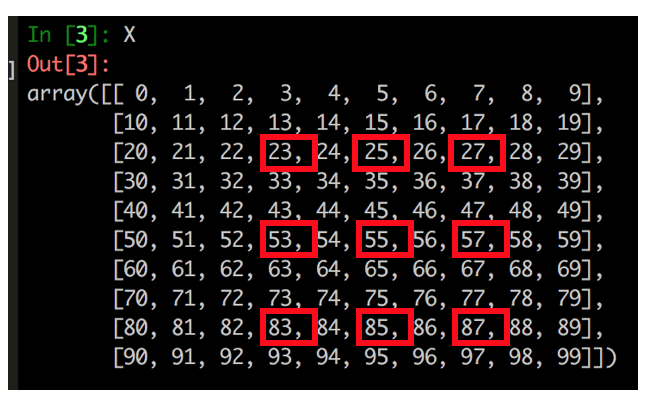
“But How???”… Read on! (We can do this in a 2-step approach)
Step 1 – Obtain subset
Specify the “start index” and “end index” in both row-wise and column-wise directions.
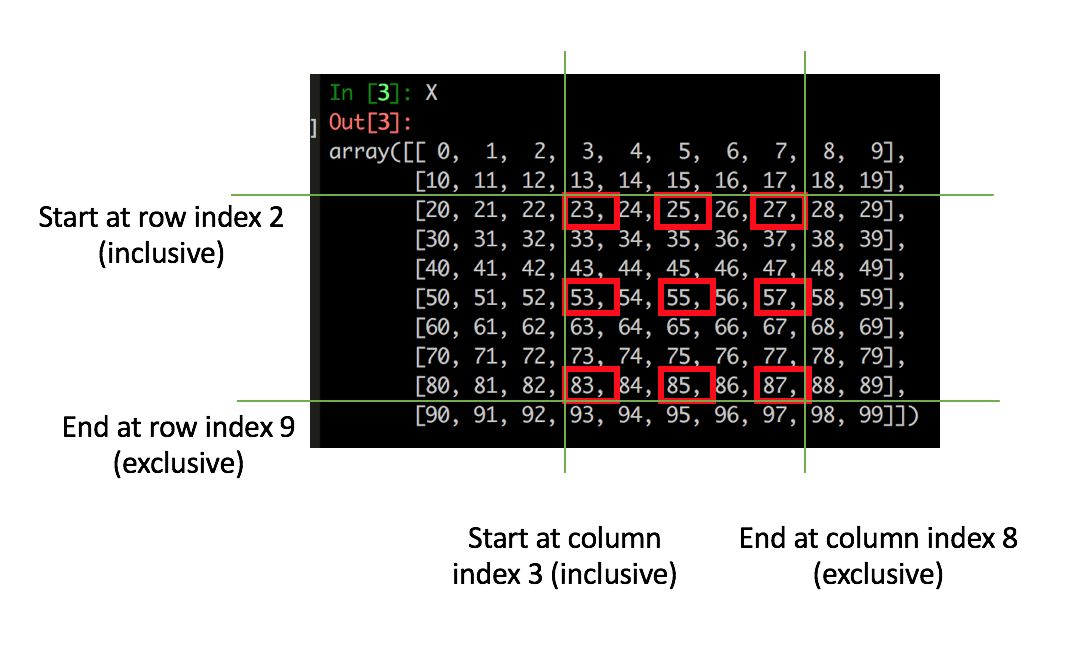
In code:
In [5]: X2 = X[2:9,3:8]

In [6]: X2
Out[6]:
array([[23, 24, 25, 26, 27],
       [33, 34, 35, 36, 37],
       [43, 44, 45, 46, 47],
       [53, 54, 55, 56, 57],
       [63, 64, 65, 66, 67],
       [73, 74, 75, 76, 77],
       [83, 84, 85, 86, 87]])
Notice now we’ve just obtained our subset, with the use of simple start and end indexing technique. Next up, how to do that “jumping”… (read on!)
Step 2 – Select elements (with the “jump step” argument)
We can now specify the “jump steps” in both row-wise and column-wise directions (to select elements in a “jumping” way) like this:
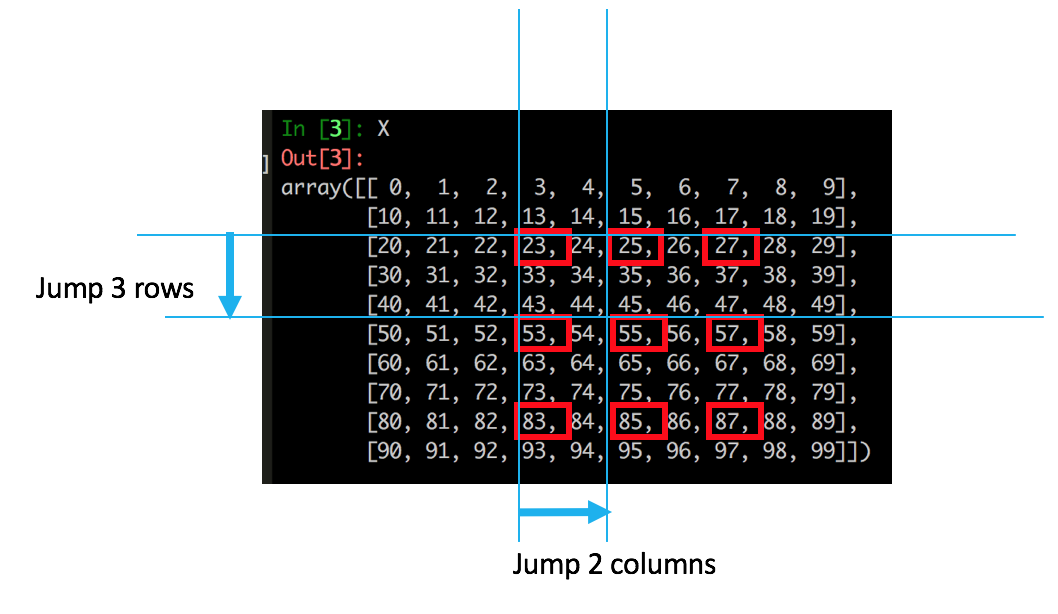
In code (note the double colons):
In [7]: X3 = X2[::3, ::2]

In [8]: X3
Out[8]:
array([[23, 25, 27],
       [53, 55, 57],
       [83, 85, 87]])
We have just selected all the elements as required! 🙂
Consolidate Step 1 (start and end) and Step 2 (“jumping”)
Now we know the concept, we can easily combine step 1 and step 2 into one consolidated step – for compactness:
In [9]: X4 = X[2:9,3:8][::3,::2]

    In [10]: X4
    Out[10]:
    array([[23, 25, 27],
           [53, 55, 57],
           [83, 85, 87]])
Done!
Method 6
When slicing in Python the third parameter is the step. As others mentioned, see Extended Slices for a nice overview.
With this knowledge, [::3] just means that you have not specified any start or end indices for your slice. Since you have specified a step, 3, this will take every third entry of something starting at the first index. For example:
>>> '123123123'[::3]
'111'
Method 7
You can also use this notation in your own custom classes to make it do whatever you want
class C(object):
    def __getitem__(self, k):
        return k

# Single argument is passed directly.
assert C()[0] == 0

# Multiple indices generate a tuple.
assert C()[0, 1] == (0, 1)

# Slice notation generates a slice object.
assert C()[1:2:3] == slice(1, 2, 3)

# If you omit any part of the slice notation, it becomes None.
assert C()[:] == slice(None, None, None)
assert C()[::] == slice(None, None, None)
assert C()[1::] == slice(1, None, None)
assert C()[:2:] == slice(None, 2, None)
assert C()[::3] == slice(None, None, 3)

# Tuple with a slice object:
assert C()[:, 1] == (slice(None, None, None), 1)

# Ellipsis class object.
assert C()[...] == Ellipsis
We can then open up slice objects as:
s = slice(1, 2, 3)
assert s.start == 1
assert s.stop == 2
assert s.step == 3
This is notably used in Numpy to slice multi-dimensional arrays in any direction.
Of course, any sane API should use ::3 with the usual “every 3” semantic.
The related Ellipsis is covered further at: What does the Ellipsis object do?
Method 8
The third parameter is the step. So [::3] would return every 3rd element of the list/string.
Method 9
remember that the foundations is what a[start:end:step] means. From there you can get a[1::2] get every odd index, a[::2] get every even, a[2::2] get every even starting at 2, a[2:4:2] get every even starting at 2 and ending at 4. Inspired by https://stackoverflow.com/a/3453102/1601580
Method 10
Did I miss or nobody mentioned reversing with [::-1] here?
# Operating System List
systems = ['Windows', 'macOS', 'Linux']
print('Original List:', systems)

# Reversing a list
#Syntax: reversed_list = systems[start:stop:step]
reversed_list = systems[::-1]

# updated list
print('Updated List:', reversed_list)
source:
https://www.programiz.com/python-programming/methods/list/reverse
Method 11
Python uses the :: to separate the End, the Start, and the Step value.
All methods was sourced from stackoverflow.com or stackexchange.com, is licensed under cc by-sa 2.5, cc by-sa 3.0 and cc by-sa 4.0