When we add a database field in django we generally write:
models.CharField(max_length=100, null=True, blank=True)
The same is done with ForeignKey, DecimalField etc. What is the basic difference in having
null=Trueonlyblank=Trueonlynull=True,blank=True
in respect to different (CharField, ForeignKey, ManyToManyField, DateTimeField) fields. What are the advantages/disadvantages of using 1/2/3?
Answers:
Thank you for visiting the Q&A section on Magenaut. Please note that all the answers may not help you solve the issue immediately. So please treat them as advisements. If you found the post helpful (or not), leave a comment & I’ll get back to you as soon as possible.
Method 1
null=True sets NULL (versus NOT NULL) on the column in your DB. Blank values for Django field types such as DateTimeField or ForeignKey will be stored as NULL in the DB.
blank determines whether the field will be required in forms. This includes the admin and your custom forms. If blank=True then the field will not be required, whereas if it’s False the field cannot be blank.
The combo of the two is so frequent because typically if you’re going to allow a field to be blank in your form, you’re going to also need your database to allow NULL values for that field. The exception is CharFields and TextFields, which in Django are never saved as NULL. Blank values are stored in the DB as an empty string ('').
A few examples:
models.DateTimeField(blank=True) # raises IntegrityError if blank

models.DateTimeField(null=True) # NULL allowed, but must be filled out in a form
Obviously, Those two options don’t make logical sense to use (though there might be a use case for null=True, blank=False if you want a field to always be required in forms, optional when dealing with an object through something like the shell.)
models.CharField(blank=True) # No problem, blank is stored as ''

models.CharField(null=True) # NULL allowed, but will never be set as NULL
CHAR and TEXT types are never saved as NULL by Django, so null=True is unnecessary. However, you can manually set one of these fields to None to force set it as NULL. If you have a scenario where that might be necessary, you should still include null=True.
Method 2
This is how the ORM maps blank & null fields for Django 1.8
class Test(models.Model):
    charNull        = models.CharField(max_length=10, null=True)
    charBlank       = models.CharField(max_length=10, blank=True)
    charNullBlank   = models.CharField(max_length=10, null=True, blank=True)

    intNull         = models.IntegerField(null=True)
    intBlank        = models.IntegerField(blank=True)
    intNullBlank    = models.IntegerField(null=True, blank=True)

    dateNull        = models.DateTimeField(null=True)
    dateBlank       = models.DateTimeField(blank=True)
    dateNullBlank   = models.DateTimeField(null=True, blank=True)
The database fields created for PostgreSQL 9.4 are :
CREATE TABLE Test (
  id              serial                    NOT NULL,

  "charNull"      character varying(10),
  "charBlank"     character varying(10)     NOT NULL,
  "charNullBlank" character varying(10),

  "intNull"       integer,
  "intBlank"      integer                   NOT NULL,
  "intNullBlank"  integer,

  "dateNull"      timestamp with time zone,
  "dateBlank"     timestamp with time zone  NOT NULL,
  "dateNullBlank" timestamp with time zone,
  CONSTRAINT Test_pkey PRIMARY KEY (id)
)
The database fields created for MySQL 5.6 are :
CREATE TABLE Test (
     `id`            INT(11)     NOT  NULL    AUTO_INCREMENT,

     `charNull`      VARCHAR(10) NULL DEFAULT NULL,
     `charBlank`     VARCHAR(10) NOT  NULL,
     `charNullBlank` VARCHAR(10) NULL DEFAULT NULL,

     `intNull`       INT(11)     NULL DEFAULT NULL,
     `intBlank`      INT(11)     NOT  NULL,
     `intNullBlank`  INT(11)     NULL DEFAULT NULL,

     `dateNull`      DATETIME    NULL DEFAULT NULL,
     `dateBlank`     DATETIME    NOT  NULL,
     `dateNullBlank` DATETIME    NULL DEFAULT NULL
)
Method 3
It’s crucial to understand that the options in a Django model field definition serve (at least) two purposes: defining the database tables, and defining the default format and validation of model forms. (I say “default” because the values can always be overridden by providing a custom form.) Some options affect the database, some options affect forms, and some affect both.
When it comes to null and blank, other answers have already made clear that the former affects the database table definition and the latter affects model validation. I think the distinction can be made even clearer by looking at use cases for all four possible configurations:
-
null=False,blank=False: This is the default configuration and means that the value is required in all circumstances. -
null=True,blank=True: This means that the field is optional in all circumstances. (As noted below, though, this is not the recommended way to make string-based fields optional.) -
null=False,blank=True: This means that the form doesn’t require a value but the database does. There are a number of use cases for this:-
The most common use is for optional string-based fields. As noted in the documentation, the Django idiom is to use the empty string to indicate a missing value. If
NULLwas also allowed you would end up with two different ways to indicate a missing value. -
Another common situation is that you want to calculate one field automatically based on the value of another (in your
save()method, say). You don’t want the user to provide the value in a form (henceblank=True), but you do want the database to enforce that a value is always provided (null=False). -
Another use is when you want to indicate that a
ManyToManyFieldis optional. Because this field is implemented as a separate table rather than a database column,nullis meaningless. The value ofblankwill still affect forms, though, controlling whether or not validation will succeed when there are no relations.
-
The most common use is for optional string-based fields. As noted in the documentation, the Django idiom is to use the empty string to indicate a missing value. If
-
null=True,blank=False: This means that the form requires a value but the database doesn’t. This may be the most infrequently used configuration, but there are some use cases for it:- It’s perfectly reasonable to require your users to always include a value even if it’s not actually required by your business logic. After all, forms are only one way of adding and editing data. You may have code that is generating data which doesn’t need the same stringent validation that you want to require of a human editor.
-
Another use case that I’ve seen is when you have a
ForeignKeyfor which you don’t wish to allow cascade deletion. That is, in normal use the relation should always be there (blank=False), but if the thing it points to happens to be deleted, you don’t want this object to be deleted too. In that case you can usenull=Trueandon_delete=models.SET_NULLto implement a simple kind of soft deletion.
Method 4
As said in Django Model Field reference: Link
Field options
The following arguments are available to all field types. All are optional.
null
Field.nullIf
True, Django will store empty values asNULLin the database. Default isFalse.Avoid using
nullon string-based fields such asCharFieldand
TextFieldbecause empty string values will always be stored as empty
strings, not asNULL. If a string-based field hasnull=True, that
means it has two possible values for “no data”:NULL, and the empty
string. In most cases, it’s redundant to have two possible values for
“no data”; the Django convention is to use the empty string, not
NULL.For both string-based and non-string-based fields, you will also need
to setblank=Trueif you wish to permit empty values in forms, as
thenullparameter only affects database storage (seeblank).Note
When using the Oracle database backend, the value NULL will be stored to denote the empty string regardless of this attribute
blank
Field.blankIf
True, the field is allowed to be blank. Default isFalse.Note that this is different than
null.nullis purely
database-related, whereasblankis validation-related. If a field
hasblank=True, form validation will allow entry of an empty value.
If a field hasblank=False, the field will be required.
Method 5
You may have your answer however till this day it’s difficult to judge whether to put null=True or blank=True or both to a field. I personally think it’s pretty useless and confusing to provide so many options to developers. Let the handle the nulls or blanks however they want.
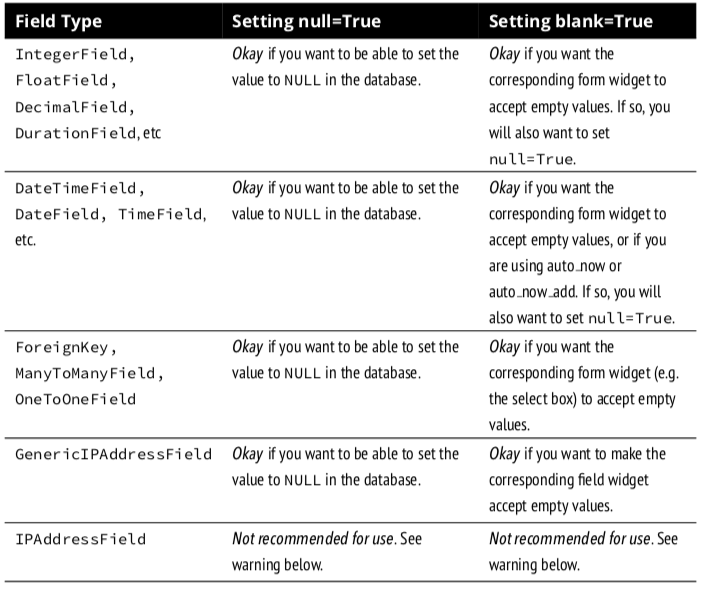
I follow this table, from Two Scoops of Django: 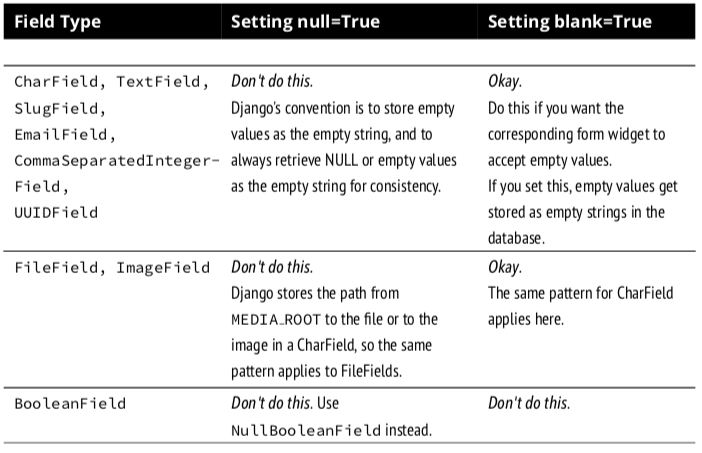
Method 6
Simply null=True defines database should accept NULL values, on other hand blank=True defines on form validation this field should accept blank values or not(If blank=True it accept form without a value in that field and blank=False[default value] on form validation it will show This field is required error.
null=True/False related to database
blank=True/False related to form validation
Method 7
Here is an example of the field with blank= True and null=True
description = models.TextField(blank=True, null= True)
In this case:
blank = True: tells our form that it is ok to leave the description field blank
and
null = True: tells our database that it is ok to record a null value in our db field and not give an error.
Method 8
If you set null=True, it will allow the value of your database column to be set as NULL. If you only set blank=True, django will set the default new value for the column equal to "".
There’s one point where null=True would be necessary even on a CharField or TextField and that is when the database has the unique flag set for the column. In this case you’ll need to use this:
a_unique_string = models.CharField(blank=True, null=True, unique=True)
Preferrably skip the null=True for non-unique CharField or TextField. Otherwise some fields will be set as NULL while others as "" , and you’ll have to check the field value for NULL everytime.
Method 9
The default values of null and blank are False.
Null: It is database-related. Defines if a given database column will accept null values or not.
Blank: It is validation-related. It will be used during forms validation, when calling form.is_valid().
That being said, it is perfectly fine to have a field with null=True and blank=False. Meaning on the database level the field can be NULL, but in the application level it is a required field.
Now, where most developers get it wrong: Defining null=True for string-based fields such as CharField and TextField. Avoid doing that. Otherwise, you will end up having two possible values for “no data”, that is: None and an empty string. Having two possible values for “no data” is redundant. The Django convention is to use the empty string, not NULL.
Method 10
null = True
Means there is no constraint of database for the field to be filled, so you can have an object with null value for the filled that has this option.
blank = True
Means there is no constraint of validation in django forms. so when you fill a modelForm for this model you can leave field with this option unfilled.
Method 11
Here, is the main difference of null=True and blank=True:
The default value of both null and blank is False. Both of these values work at field level i.e., whether we want to keep a field null or blank.
null=True will set the field’s value to NULL i.e., no data. It is basically for the databases column value.
date = models.DateTimeField(null=True)
blank=True determines whether the field will be required in forms. This includes the admin and your own custom forms.
title = models.CharField(blank=True) // title can be kept blank.
In the database ("") will be stored.
null=True blank=True This means that the field is optional in all circumstances.
epic = models.ForeignKey(null=True, blank=True)
// The exception is CharFields() and TextFields(), which in Django are never saved as NULL. Blank values a
Method 12
null = True || blank = True || null = True && blank = True
class TestModel(models.Model):
    field1 = models.CharField(max_length=100, null=True)
    field2 = models.CharField(max_length=100, blank=True)   # it's not a correct way
    field3 = models.CharField(max_length=100, null=True, blank=True)
THE DB FIELDS FOR: MySQL
CREATE TABLE TestModel (
     `id`        INT(10)        NOT     NULL      AUTO_INCREMENT,

     `field1`    VARCHAR(100)   NULL    DEFAULT   NULL,
     `field2`    VARCHAR(100)   NOT     NULL,
     `field3`    VARCHAR(100)   NULL    DEFAULT   NULL,
)
case-01: null = True
db:   db   field is accepts null value
form: form field is `required`

NB: DB IS ACCEPTS NULL VALUE, BUT FORM FIELD IS REQUIRED. SO FORM IS
SUBMITTED WHEN THIS FIELD HAVE SOME VALUE. it's good.
case-02: blank = True
db:   db   field is not accepts null value
form: form field is `optional`

NB: FORM IS VALID WITHOUT ANY VALUE, BUT DB IS NOT ACCEPTS NULL VALUE.
SO THE FORM IS SUBMITTED WITHOUT ANY VALUE THEN BOOM. it's worst.
case-03: null = True && blank = True
db:   db   field is accepts null value
form: form field is `optional`

NB: HERE FORM FIELD IS OPTIONAL & FORM IS VALID WITHOUT ANY VALUE
& DB ALSO ACCEPTS NULL VALUE. SO, IT'S BEST TO USE `null=True && blank=True`
🙂
Method 13
When we save anything in Django admin two steps validation happens, on Django level and on Database level. We can’t save text in a number field.
Database has data type NULL, it’s nothing. When Django creates columns in the database it specifies that they can’t be empty. And if you will try to save NULL you will get the database error.
Also on Django-Admin level, all fields are required by default, you can’t save blank field, Django will throw you an error.
So, if you want to save blank field you need to allow it on Django and Database level.
blank=True – will allow empty field in admin panel
null=True – will allow saving NULL to the database column.
Method 14
null is for database and blank is for fields validation that you want to show on user interface like textfield to get the last name of person.
If lastname=models.charfield (blank=true) it didnot ask user to enter last name as this is the optional field now.
If lastname=models.charfield (null=true) then it means that if this field doesnot get any value from user then it will store in database as an empty string ” “.
Method 15
Simple answer would be: Null is for Database tables while Blank is for Django Forms.
Method 16
Null is purely database-related, whereas blank is validation-related. If a field has blank=True , validation on Django’s admin site will allow entry of an empty value. If a field has blank=False , the field will be required
Method 17
Blank=False # this field is required.
Null=False # this field should not be null

Blank=True # this field is optional.
Null=True # Django uses empty string (''), not NULL.
Note:
Avoid using null=True on string-based fields such as CharField and TextField and FileField/ImageField.
Ref: Django null , Django blank
Method 18
Here is its answer in simple words:-
By null = True we are telling the database that this field of the model could be NULL, by blank = True we are telling Django that this field of the model could be NULL
Method 19
In Very simple words,
Blank is different than null.
null is purely database-related, whereas blank is validation-related(required in form).
If null=True, Django will store empty values as NULL in the database. If a field has blank=True, form validation will allow entry of an empty value. If a field has blank=False, the field will be required.
Method 20
null – default is False
if True, Django will store empty as null in the database.
blank – default is False
if true that field is allowed to be blank
more, goto
https://docs.djangoproject.com/en/3.0/topics/db/models/
Method 21
This table below demonstrates the main differences:
+--------------------------------------------------------------------+
| Purpose                  | null=True        | blank = True         |
|--------------------------|------------------|----------------------|
| Field can be empty in DB | Do this          | Unaffected           |
|--------------------------|------------------|----------------------|
| ModelForm(required field)| Unaffected       | field not required   |
|--------------------------|------------------|----------------------|
| Form Validation          | Unaffected       | field not required   |
|--------------------------|------------------|----------------------|
| on_delete=SET_NULL       | Need this        | Unaffected           |
+--------------------------------------------------------------------+
Method 22
The meaning of null=True and blank=True in the model also depends on how these fields were defined in the form class.
Suppose you have defined the following class:
class Client (models.Model):
    name = models.CharField (max_length=100, blank=True)
    address = models.CharField (max_length=100, blank=False)
If the form class has been defined like this:
class ClientForm (ModelForm):
    class Meta:
        model = Client
        fields = ['name', 'address']
        widgets = {
            'name': forms.TextInput (attrs = {'class': 'form-control form-control-sm'}),
            'address': forms.TextInput (attrs = {'class': 'form-control form-control-sm'})
        }
Then, the ‘name’ field will not be mandatory (due to the blank=True in the model) and the ‘address’ field will be mandatory (due to the blank=False in the model).
However, if the ClientForm class has been defined like this:
class ClientForm (ModelForm):
    class Meta:
        model = Client
        fields = ['name', 'address']

    name = forms.CharField (
        widget = forms.TextInput (attrs = {'class': 'form-control form-control-sm'}),
    )
    address = forms.CharField (
        widget = forms.TextInput (attrs = {'class': 'form-control form-control-sm'}),
    )
Then, both fields (‘name’ and ‘address’) will be mandatory, “since fields defined declaratively are left as-is” (https://docs.djangoproject.com/en/3.0/topics/forms/modelforms/), i.e. the default for the ‘required’ attribute of the form field is True and this will require that the fields ‘name’ and ‘address’ are filled, even if, in the model, the field has been set to blank=True.
Method 23
blank=True can be set to any model field to control whether that field can be left empty when entering a value in a form. Here, we are talking about entering data.
null=True, if we set blank=True for a field, that model field does not receive any value, then the database or Django has to do something with that field when data is written into the database. For any kind of text content an empty string is stored in the database, so there is a value stored in the database. For other kinds of fields like date fields or numbers, we use the special data type “null”. “null” can be used if a field potentially has no value, but by default, Django does not allow “null” values. That is why you need to explicitly set null=True.
Let’s say you set blank=True, for any non-text fields, but you did not specify “null=True”, Django will not know what to store and it would throw an error.
Method 24
When you set null=true it will set null in your database if the field is not filled. If
you set blank=true it will not set any value to the field.
All methods was sourced from stackoverflow.com or stackexchange.com, is licensed under cc by-sa 2.5, cc by-sa 3.0 and cc by-sa 4.0