I’m trying to upload a csv file, which is 250MB. Basically 4 million rows and 6 columns of time series data (1min). The usual procedure is:
location = r'C:UsersNameFolder_1Folder_2file.csv'
df = pd.read_csv(location)
This procedure takes about 20 minutes !!!. Very preliminary I have explored the following options
I wonder if anybody has compared these options (or more) and there’s a clear winner. If nobody answers, In the future I will post my results. I just don’t have time right now.
Answers:
Thank you for visiting the Q&A section on Magenaut. Please note that all the answers may not help you solve the issue immediately. So please treat them as advisements. If you found the post helpful (or not), leave a comment & I’ll get back to you as soon as possible.
Method 1
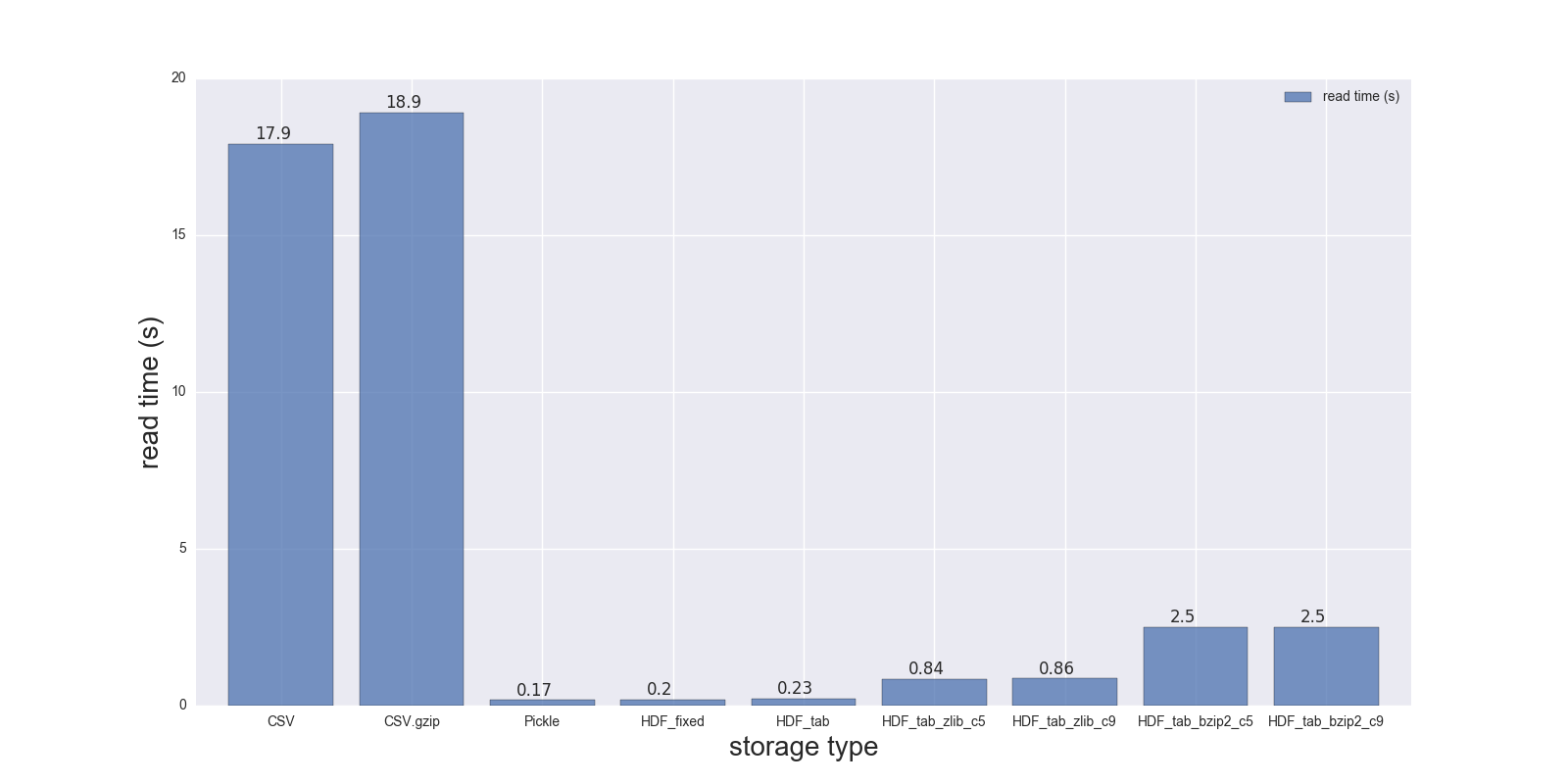
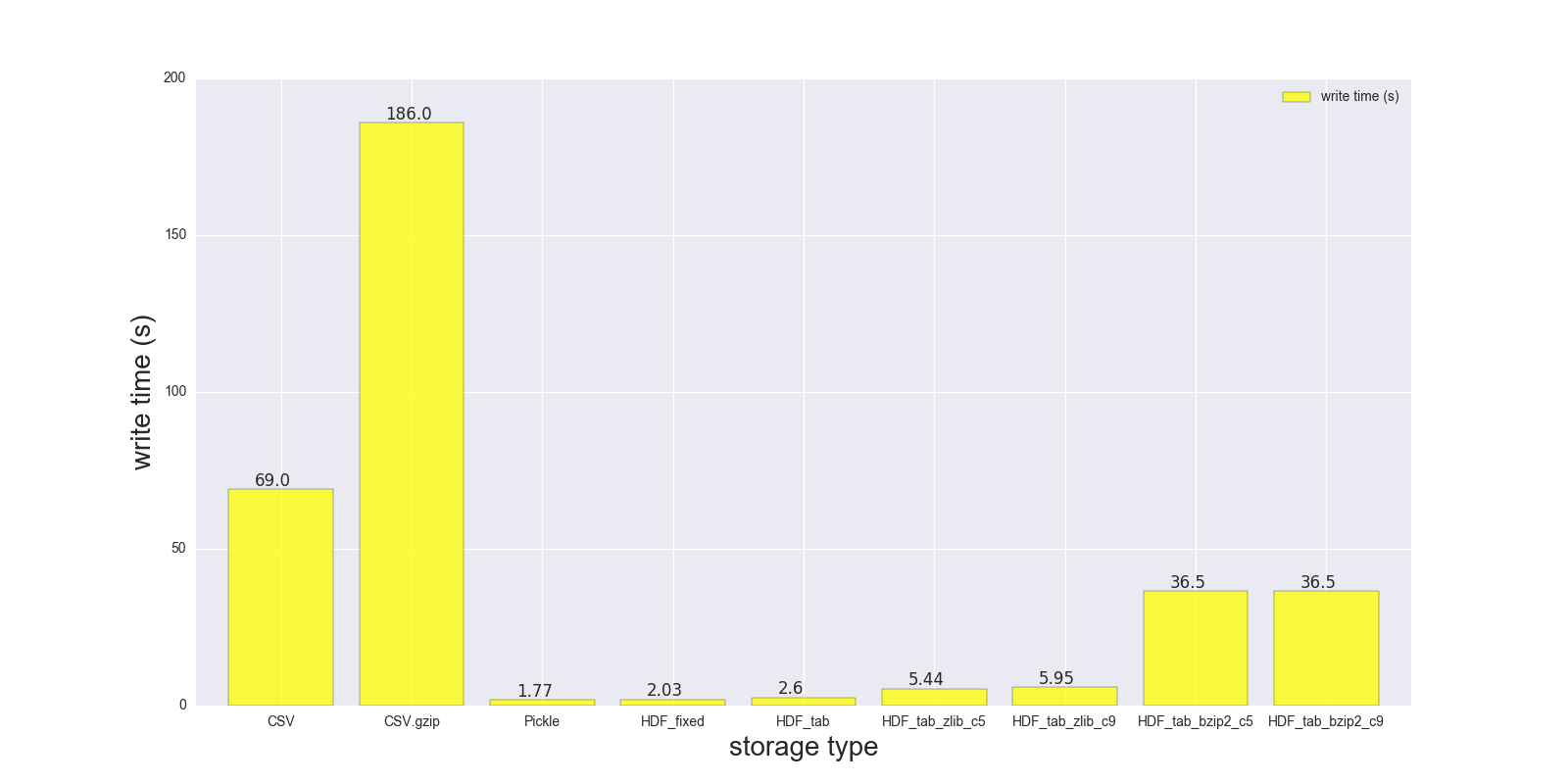
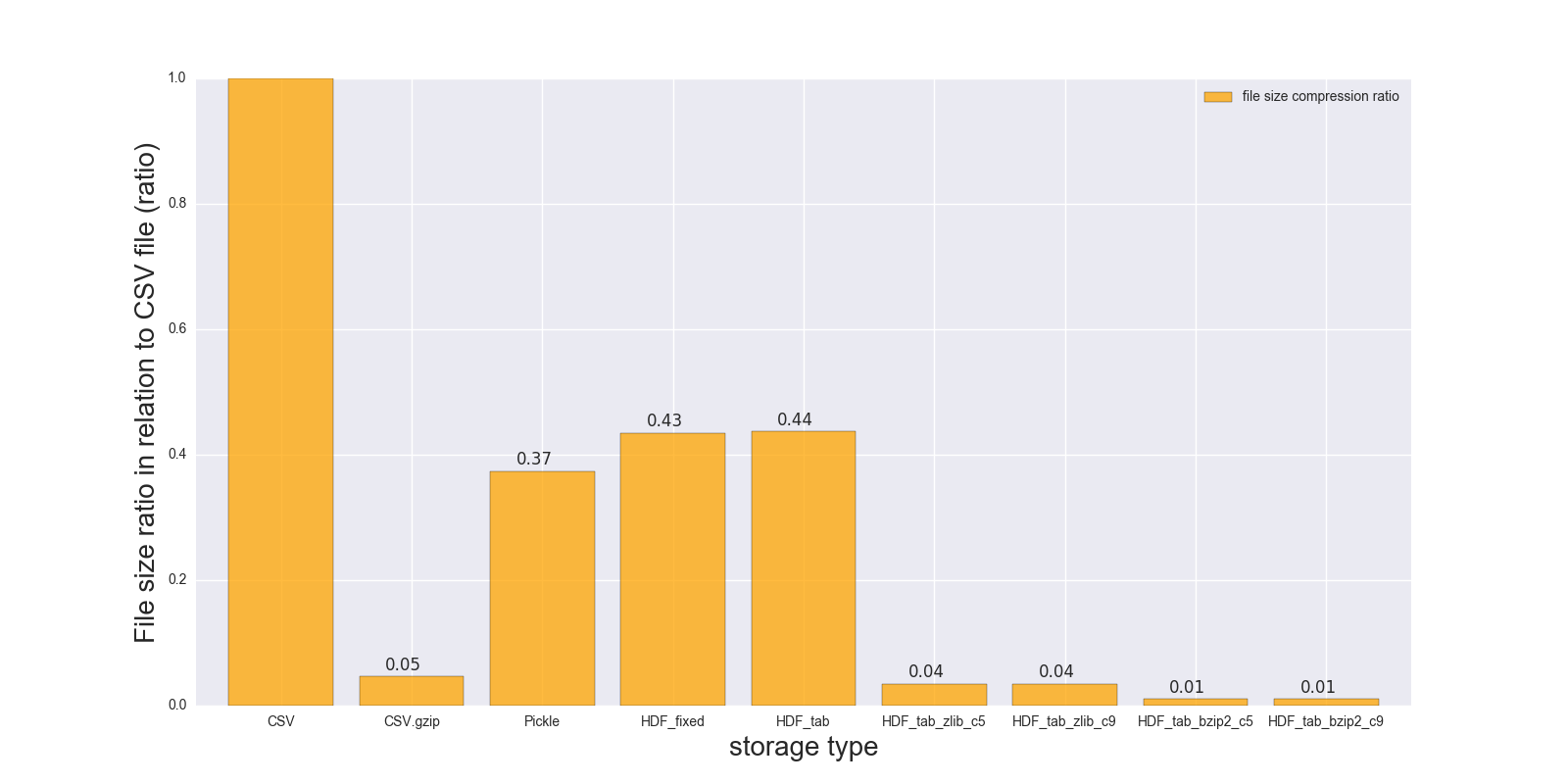
Here are results of my read and write comparison for the DF (shape: 4000000 x 6, size in memory 183.1 MB, size of uncompressed CSV – 492 MB).
Comparison for the following storage formats: (CSV, CSV.gzip, Pickle, HDF5 [various compression]):
                  read_s  write_s  size_ratio_to_CSV
storage
CSV               17.900    69.00              1.000
CSV.gzip          18.900   186.00              0.047
Pickle             0.173     1.77              0.374
HDF_fixed          0.196     2.03              0.435
HDF_tab            0.230     2.60              0.437
HDF_tab_zlib_c5    0.845     5.44              0.035
HDF_tab_zlib_c9    0.860     5.95              0.035
HDF_tab_bzip2_c5   2.500    36.50              0.011
HDF_tab_bzip2_c9   2.500    36.50              0.011
reading
writing/saving
file size ratio in relation to uncompressed CSV file
RAW DATA:
CSV:
In [68]: %timeit df.to_csv(fcsv)
1 loop, best of 3: 1min 9s per loop

In [74]: %timeit pd.read_csv(fcsv)
1 loop, best of 3: 17.9 s per loop
CSV.gzip:
In [70]: %timeit df.to_csv(fcsv_gz, compression='gzip')
1 loop, best of 3: 3min 6s per loop

In [75]: %timeit pd.read_csv(fcsv_gz)
1 loop, best of 3: 18.9 s per loop
Pickle:
In [66]: %timeit df.to_pickle(fpckl)
1 loop, best of 3: 1.77 s per loop

In [72]: %timeit pd.read_pickle(fpckl)
10 loops, best of 3: 173 ms per loop
HDF (format='fixed') [Default]:
In [67]: %timeit df.to_hdf(fh5, 'df')
1 loop, best of 3: 2.03 s per loop

In [73]: %timeit pd.read_hdf(fh5, 'df')
10 loops, best of 3: 196 ms per loop
HDF (format='table'):
In [37]: %timeit df.to_hdf('D:\temp\.data\37010212_tab.h5', 'df', format='t')
1 loop, best of 3: 2.6 s per loop

In [38]: %timeit pd.read_hdf('D:\temp\.data\37010212_tab.h5', 'df')
1 loop, best of 3: 230 ms per loop
HDF (format='table', complib='zlib', complevel=5):
In [40]: %timeit df.to_hdf('D:\temp\.data\37010212_tab_compress_zlib5.h5', 'df', format='t', complevel=5, complib='zlib')
1 loop, best of 3: 5.44 s per loop

In [41]: %timeit pd.read_hdf('D:\temp\.data\37010212_tab_compress_zlib5.h5', 'df')
1 loop, best of 3: 854 ms per loop
HDF (format='table', complib='zlib', complevel=9):
In [36]: %timeit df.to_hdf('D:\temp\.data\37010212_tab_compress_zlib9.h5', 'df', format='t', complevel=9, complib='zlib')
1 loop, best of 3: 5.95 s per loop

In [39]: %timeit pd.read_hdf('D:\temp\.data\37010212_tab_compress_zlib9.h5', 'df')
1 loop, best of 3: 860 ms per loop
HDF (format='table', complib='bzip2', complevel=5):
In [42]: %timeit df.to_hdf('D:\temp\.data\37010212_tab_compress_bzip2_l5.h5', 'df', format='t', complevel=5, complib='bzip2')
1 loop, best of 3: 36.5 s per loop

In [43]: %timeit pd.read_hdf('D:\temp\.data\37010212_tab_compress_bzip2_l5.h5', 'df')
1 loop, best of 3: 2.5 s per loop
HDF (format='table', complib='bzip2', complevel=9):
In [42]: %timeit df.to_hdf('D:\temp\.data\37010212_tab_compress_bzip2_l9.h5', 'df', format='t', complevel=9, complib='bzip2')
1 loop, best of 3: 36.5 s per loop

In [43]: %timeit pd.read_hdf('D:\temp\.data\37010212_tab_compress_bzip2_l9.h5', 'df')
1 loop, best of 3: 2.5 s per loop
PS i can’t test feather on my Windows notebook
DF info:
In [49]: df.shape
Out[49]: (4000000, 6)

In [50]: df.info()
<class 'pandas.core.frame.DataFrame'>
RangeIndex: 4000000 entries, 0 to 3999999
Data columns (total 6 columns):
a    datetime64[ns]
b    datetime64[ns]
c    datetime64[ns]
d    datetime64[ns]
e    datetime64[ns]
f    datetime64[ns]
dtypes: datetime64[ns](6)
memory usage: 183.1 MB

In [41]: df.head()
Out[41]:
                    a                   b                   c
0 1970-01-01 00:00:00 1970-01-01 00:01:00 1970-01-01 00:02:00
1 1970-01-01 00:01:00 1970-01-01 00:02:00 1970-01-01 00:03:00
2 1970-01-01 00:02:00 1970-01-01 00:03:00 1970-01-01 00:04:00
3 1970-01-01 00:03:00 1970-01-01 00:04:00 1970-01-01 00:05:00
4 1970-01-01 00:04:00 1970-01-01 00:05:00 1970-01-01 00:06:00

                    d                   e                   f
0 1970-01-01 00:03:00 1970-01-01 00:04:00 1970-01-01 00:05:00
1 1970-01-01 00:04:00 1970-01-01 00:05:00 1970-01-01 00:06:00
2 1970-01-01 00:05:00 1970-01-01 00:06:00 1970-01-01 00:07:00
3 1970-01-01 00:06:00 1970-01-01 00:07:00 1970-01-01 00:08:00
4 1970-01-01 00:07:00 1970-01-01 00:08:00 1970-01-01 00:09:00
File sizes:
{ .data }  » ls -lh 37010212.*                                                                          /d/temp/.data
-rw-r--r-- 1 Max None 492M May  3 22:21 37010212.csv
-rw-r--r-- 1 Max None  23M May  3 22:19 37010212.csv.gz
-rw-r--r-- 1 Max None 214M May  3 22:02 37010212.h5
-rw-r--r-- 1 Max None 184M May  3 22:02 37010212.pickle
-rw-r--r-- 1 Max None 215M May  4 10:39 37010212_tab.h5
-rw-r--r-- 1 Max None 5.4M May  4 10:46 37010212_tab_compress_bzip2_l5.h5
-rw-r--r-- 1 Max None 5.4M May  4 10:51 37010212_tab_compress_bzip2_l9.h5
-rw-r--r-- 1 Max None  17M May  4 10:42 37010212_tab_compress_zlib5.h5
-rw-r--r-- 1 Max None  17M May  4 10:36 37010212_tab_compress_zlib9.h5
Conclusion:
Pickle and HDF5 are much faster, but HDF5 is more convenient – you can store multiple tables/frames inside, you can read your data conditionally (look at where parameter in read_hdf()), you can also store your data compressed (zlib – is faster, bzip2 – provides better compression ratio), etc.
PS if you can build/use feather-format – it should be even faster compared to HDF5 and Pickle
PPS: don’t use Pickle for big data frames, as you may end up with SystemError: error return without exception set error message. It’s also described here and here.
Method 2
you can use datatable to load the csv file and then covert it to pandas dataframe, it is considerably faster than loading with pandas read_csv()
import datatable as dt

dt_df = dt.fread(csv_file)
pd_df = dt_df.to_pandas()
On csv file of 1 Go, pandas read_csv take about 34 minutes, while datable fread take only 40 second, which is a huge difference (x51 faster).
You can also work only with datatable dataframe, without the need to convert to pandas dataframe (this depends on the functionality that you want). A useful introduction to datatable : https://www.kaggle.com/sudalairajkumar/getting-started-with-python-datatable
All methods was sourced from stackoverflow.com or stackexchange.com, is licensed under cc by-sa 2.5, cc by-sa 3.0 and cc by-sa 4.0