Is there an efficient mass string concatenation method in Python (like StringBuilder in C# or StringBuffer in Java)?
I found following methods here:
- Simple concatenation using
+ - Using a string list and the
joinmethod - Using
UserStringfrom theMutableStringmodule - Using a character array and the
arraymodule - Using
cStringIOfrom theStringIOmodule
What should be used and why?
Answers:
Thank you for visiting the Q&A section on Magenaut. Please note that all the answers may not help you solve the issue immediately. So please treat them as advisements. If you found the post helpful (or not), leave a comment & I’ll get back to you as soon as possible.
Method 1
You may be interested in this: An optimization anecdote by Guido. Although it is worth remembering also that this is an old article and it predates the existence of things like ''.join (although I guess string.joinfields is more-or-less the same)
On the strength of that, the array module may be fastest if you can shoehorn your problem into it. But ''.join is probably fast enough and has the benefit of being idiomatic and thus easier for other Python programmers to understand.
Finally, the golden rule of optimization: don’t optimize unless you know you need to, and measure rather than guessing.
You can measure different methods using the timeit module. That can tell you which is fastest, instead of random strangers on the Internet making guesses.
Method 2
If you know all components beforehand once, use the literal string interpolation, also known as f-strings or formatted strings, introduced in Python 3.6.
Given the test case from mkoistinen’s answer, having strings
domain = 'some_really_long_example.com'
lang = 'en'
path = 'some/really/long/path/'
The contenders and their execution time on my computer using Python 3.6 on Linux as timed by IPython and the timeit module are
-
f'http://{domain}/{lang}/{path}'– 0.151 µs -
'http://%s/%s/%s' % (domain, lang, path)– 0.321 µs -
'http://' + domain + '/' + lang + '/' + path– 0.356 µs -
''.join(('http://', domain, '/', lang, '/', path))– 0.249 µs (notice that building a constant-length tuple is slightly faster than building a constant-length list).
Thus the shortest and the most beautiful code possible is also fastest.
The speed can be contrasted with the fastest method for Python 2, which is + concatenation on my computer; and that takes 0.203 µs with 8-bit strings, and 0.259 µs if the strings are all Unicode.
(In alpha versions of Python 3.6 the implementation of f'' strings was the slowest possible – actually the generated byte code is pretty much equivalent to the ''.join() case with unnecessary calls to str.__format__ which without arguments would just return self unchanged. These inefficiencies were addressed before 3.6 final.)
Method 3
''.join(sequenceofstrings) is what usually works best — simplest and fastest.
Method 4
It depends on what you’re doing.
After Python 2.5, string concatenation with the + operator is pretty fast. If you’re just concatenating a couple of values, using the + operator works best:
>>> x = timeit.Timer(stmt="'a' + 'b'")
>>> x.timeit()
0.039999961853027344

>>> x = timeit.Timer(stmt="''.join(['a', 'b'])")
>>> x.timeit()
0.76200008392333984
However, if you’re putting together a string in a loop, you’re better off using the list joining method:
>>> join_stmt = """
... joined_str = ''
... for i in xrange(100000):
...   joined_str += str(i)
... """
>>> x = timeit.Timer(join_stmt)
>>> x.timeit(100)
13.278000116348267

>>> list_stmt = """
... str_list = []
... for i in xrange(100000):
...   str_list.append(str(i))
... ''.join(str_list)
... """
>>> x = timeit.Timer(list_stmt)
>>> x.timeit(100)
12.401000022888184
…but notice that you have to be putting together a relatively high number of strings before the difference becomes noticeable.
Method 5
As per John Fouhy’s answer, don’t optimize unless you have to, but if you’re here and asking this question, it may be precisely because you have to.
In my case, I needed to assemble some URLs from string variables… fast. I noticed no one (so far) seems to be considering the string format method, so I thought I’d try that and, mostly for mild interest, I thought I’d toss the string interpolation operator in there for good measure.
To be honest, I didn’t think either of these would stack up to a direct ‘+’ operation or a ”.join(). But guess what? On my Python 2.7.5 system, the string interpolation operator rules them all and string.format() is the worst performer:
# concatenate_test.py

from __future__ import print_function
import timeit

domain = 'some_really_long_example.com'
lang = 'en'
path = 'some/really/long/path/'
iterations = 1000000

def meth_plus():
    '''Using + operator'''
    return 'http://' + domain + '/' + lang + '/' + path

def meth_join():
    '''Using ''.join()'''
    return ''.join(['http://', domain, '/', lang, '/', path])

def meth_form():
    '''Using string.format'''
    return 'http://{0}/{1}/{2}'.format(domain, lang, path)

def meth_intp():
    '''Using string interpolation'''
    return 'http://%s/%s/%s' % (domain, lang, path)

plus = timeit.Timer(stmt="meth_plus()", setup="from __main__ import meth_plus")
join = timeit.Timer(stmt="meth_join()", setup="from __main__ import meth_join")
form = timeit.Timer(stmt="meth_form()", setup="from __main__ import meth_form")
intp = timeit.Timer(stmt="meth_intp()", setup="from __main__ import meth_intp")

plus.val = plus.timeit(iterations)
join.val = join.timeit(iterations)
form.val = form.timeit(iterations)
intp.val = intp.timeit(iterations)

min_val = min([plus.val, join.val, form.val, intp.val])

print('plus %0.12f (%0.2f%% as fast)' % (plus.val, (100 * min_val / plus.val), ))
print('join %0.12f (%0.2f%% as fast)' % (join.val, (100 * min_val / join.val), ))
print('form %0.12f (%0.2f%% as fast)' % (form.val, (100 * min_val / form.val), ))
print('intp %0.12f (%0.2f%% as fast)' % (intp.val, (100 * min_val / intp.val), ))
The results:
# Python 2.7 concatenate_test.py
plus 0.360787868500 (90.81% as fast)
join 0.452811956406 (72.36% as fast)
form 0.502608060837 (65.19% as fast)
intp 0.327636957169 (100.00% as fast)
If I use a shorter domain and shorter path, interpolation still wins out. The difference is more pronounced, though, with longer strings.
Now that I had a nice test script, I also tested under Python 2.6, 3.3 and 3.4, here’s the results. In Python 2.6, the plus operator is the fastest! On Python 3, join wins out. Note: these tests are very repeatable on my system. So, ‘plus’ is always faster on 2.6, ‘intp’ is always faster on 2.7 and ‘join’ is always faster on Python 3.x.
# Python 2.6 concatenate_test.py
plus 0.338213920593 (100.00% as fast)
join 0.427221059799 (79.17% as fast)
form 0.515371084213 (65.63% as fast)
intp 0.378169059753 (89.43% as fast)

# Python 3.3 concatenate_test.py
plus 0.409130576998 (89.20% as fast)
join 0.364938726001 (100.00% as fast)
form 0.621366866995 (58.73% as fast)
intp 0.419064424001 (87.08% as fast)

# Python 3.4 concatenate_test.py
plus 0.481188605998 (85.14% as fast)
join 0.409673971997 (100.00% as fast)
form 0.652010936996 (62.83% as fast)
intp 0.460400978001 (88.98% as fast)

# Python 3.5 concatenate_test.py
plus 0.417167026084 (93.47% as fast)
join 0.389929617057 (100.00% as fast)
form 0.595661019906 (65.46% as fast)
intp 0.404455224983 (96.41% as fast)
Lesson learned:
- Sometimes, my assumptions are dead wrong.
- Test against the system environment. You’ll be running in production.
- String interpolation isn’t dead yet!
tl;dr:
- If you using Python 2.6, use the ‘+’ operator.
- if you’re using Python 2.7, use the ‘%’ operator.
- if you’re using Python 3.x, use ”.join().
Method 6
It pretty much depends on the relative sizes of the new string after every new concatenation.
With the + operator, for every concatenation, a new string is made. If the intermediary strings are relatively long, the + becomes increasingly slower, because the new intermediary string is being stored.
Consider this case:
from time import time
stri=''
a='aagsdfghfhdyjddtyjdhmfghmfgsdgsdfgsdfsdfsdfsdfsdfsdfddsksarigqeirnvgsdfsdgfsdfgfg'
l=[]

# Case 1
t=time()
for i in range(1000):
    stri=stri+a+repr(i)
print time()-t

# Case 2
t=time()
for i in xrange(1000):
    l.append(a+repr(i))
z=''.join(l)
print time()-t

# Case 3
t=time()
for i in range(1000):
    stri=stri+repr(i)
print time()-t

# Case 4
t=time()
for i in xrange(1000):
    l.append(repr(i))
z=''.join(l)
print time()-t
Results
1 0.00493192672729
2 0.000509023666382
3 0.00042200088501
4 0.000482797622681
In the case of 1&2, we add a large string, and join() performs about 10 times faster.
In case 3&4, we add a small string, and ‘+’ performs slightly faster.
Method 7
Update: Python3.11 has some optimizations for % formatting yet it maybe still better to stick with f-strings.
For Python 3.8.6/3.9, I had to do some dirty hacks, because perfplot was giving out some errors. Here assume that x[0] is a a and x[1] is b:
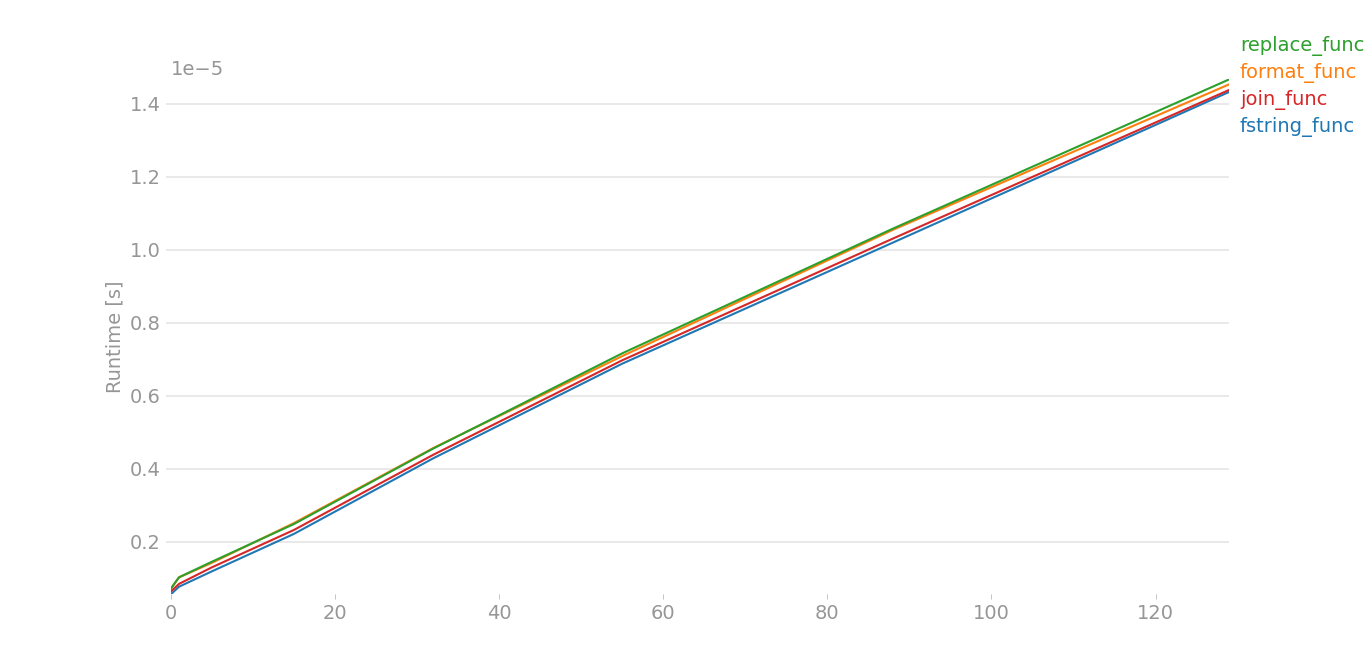
The plot is nearly same for large data. For small data,
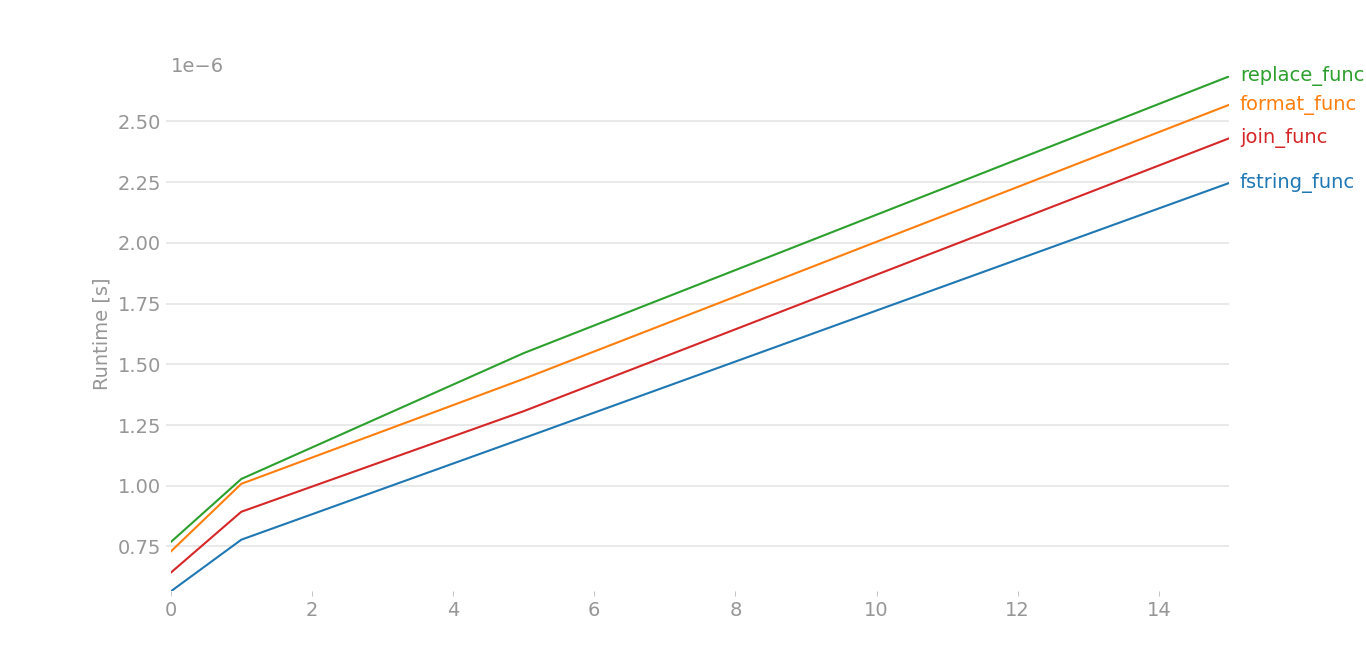
Taken by perfplot and this is the code, large data == range(8), small data == range(4).
import perfplot

from random import choice
from string import ascii_lowercase as letters

def generate_random(x):
    data = ''.join(choice(letters) for i in range(x))
    sata = ''.join(choice(letters) for i in range(x))
    return [data,sata]

def fstring_func(x):
    return [ord(i) for i in f'{x[0]}{x[1]}']

def format_func(x):
    return [ord(i) for i in "{}{}".format(x[0], x[1])]

def replace_func(x):
    return [ord(i) for i in "|~".replace('|', x[0]).replace('~', x[1])]

def join_func(x):
    return [ord(i) for i in "".join([x[0], x[1]])]

perfplot.show(
    setup=lambda n: generate_random(n),
    kernels=[
        fstring_func,
        format_func,
        replace_func,
        join_func,
    ],
    n_range=[int(k ** 2.5) for k in range(4)],
)
When medium data is there, and four strings are there x[0], x[1], x[2], x[3] instead of two strings:
def generate_random(x):
    a =  ''.join(choice(letters) for i in range(x))
    b =  ''.join(choice(letters) for i in range(x))
    c =  ''.join(choice(letters) for i in range(x))
    d =  ''.join(choice(letters) for i in range(x))
    return [a,b,c,d]
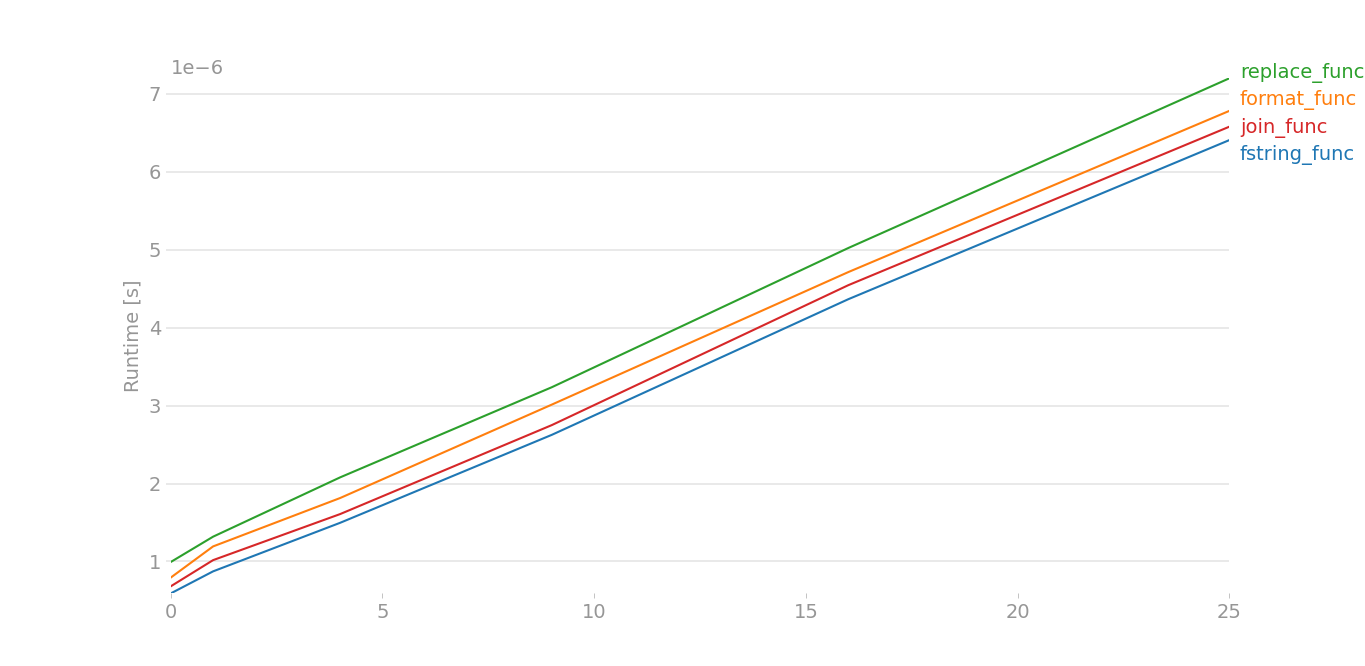
Better to stick with f-strings. Also the speed of %s is similar to .format().
Method 8
I ran into a situation where I needed to have an appendable string of unknown size. These are the benchmark results (python 2.7.3):
$ python -m timeit -s 's=""' 's+="a"'
10000000 loops, best of 3: 0.176 usec per loop

$ python -m timeit -s 's=[]' 's.append("a")'
10000000 loops, best of 3: 0.196 usec per loop

$ python -m timeit -s 's=""' 's="".join((s,"a"))'
100000 loops, best of 3: 16.9 usec per loop

$ python -m timeit -s 's=""' 's="%s%s"%(s,"a")'
100000 loops, best of 3: 19.4 usec per loop
This seems to show that ‘+=’ is the fastest. The results from the skymind link are a bit out of date.
(I realize that the second example is not complete. The final list would need to be joined. This does show, however, that simply preparing the list takes longer than the string concatenation.)
Method 9
One year later, let’s test mkoistinen’s answer with Python 3.4.3:
- plus 0.963564149000 (95.83% as fast)
- join 0.923408469000 (100.00% as fast)
- form 1.501130934000 (61.51% as fast)
- intp 1.019677452000 (90.56% as fast)
Nothing changed. join is still the fastest method. With string interpolation (intp) being arguably the best choice in terms of readability, you might want to use string interpolation nevertheless.
Method 10
Probably the “new f-strings in Python 3.6″ is the most efficient way of concatenating strings.
Using %s
>>> timeit.timeit("""name = "Some"
... age = 100
... '%s is %s.' % (name, age)""", number = 10000)
0.0029734770068898797
Using .format
>>> timeit.timeit("""name = "Some"
... age = 100
... '{} is {}.'.format(name, age)""", number = 10000)
0.004015227983472869
Using f-strings
>>> timeit.timeit("""name = "Some"
... age = 100
... f'{name} is {age}.'""", number = 10000)
0.0019175919878762215
Method 11
For a small set of short strings (i.e. 2 or 3 strings of no more than a few characters), plus is still way faster. Using mkoistinen’s wonderful script in Python 2 and 3:
plus 2.679107467004 (100.00% as fast)
join 3.653773699996 (73.32% as fast)
form 6.594011374000 (40.63% as fast)
intp 4.568015249999 (58.65% as fast)
So when your code is doing a huge number of separate small concatenations, plus is the preferred way if speed is crucial.
Method 12
Inspired by JasonBaker’s benchmarks, here’s a simple one, comparing 10 "abcdefghijklmnopqrstuvxyz" strings, showing that .join() is faster; even with this tiny increase in variables:
Concatenation
>>> x = timeit.Timer(stmt='"abcdefghijklmnopqrstuvxyz" + "abcdefghijklmnopqrstuvxyz" + "abcdefghijklmnopqrstuvxyz" + "abcdefghijklmnopqrstuvxyz" + "abcdefghijklmnopqrstuvxyz" + "abcdefghijklmnopqrstuvxyz" + "abcdefghijklmnopqrstuvxyz" + "abcdefghijklmnopqrstuvxyz" + "abcdefghijklmnopqrstuvxyz" + "abcdefghijklmnopqrstuvxyz" + "abcdefghijklmnopqrstuvxyz"')
>>> x.timeit()
0.9828147209324385
Join
>>> x = timeit.Timer(stmt='"".join(["abcdefghijklmnopqrstuvxyz", "abcdefghijklmnopqrstuvxyz", "abcdefghijklmnopqrstuvxyz", "abcdefghijklmnopqrstuvxyz", "abcdefghijklmnopqrstuvxyz", "abcdefghijklmnopqrstuvxyz", "abcdefghijklmnopqrstuvxyz", "abcdefghijklmnopqrstuvxyz", "abcdefghijklmnopqrstuvxyz", "abcdefghijklmnopqrstuvxyz", "abcdefghijklmnopqrstuvxyz"])')
>>> x.timeit()
0.6114138159765048
All methods was sourced from stackoverflow.com or stackexchange.com, is licensed under cc by-sa 2.5, cc by-sa 3.0 and cc by-sa 4.0