I create new asp.net mvc project in visual studio 2015.The project has a wwwroot file.What is this?

Answers:
Thank you for visiting the Q&A section on Magenaut. Please note that all the answers may not help you solve the issue immediately. So please treat them as advisements. If you found the post helpful (or not), leave a comment & I’ll get back to you as soon as possible.
Method 1
Quoting the official website:
The wwwroot folder is new in ASP.NET 5.0. All of the static files in
your project go into this folder. These are assets that the app will
serve directly to clients, including HTML files, CSS files, image
files, and JavaScript files. The wwwroot folder is the root of your
web site. That is, http://some.hostname/ points to wwwroot, all URLs for
static content are relative to the wwwroot folder.Code files should be placed outside of wwwroot. That includes all of your C# files and Razor files. > Having a wwwroot folder keeps a clean separation between code files and static files.
It’s worth mentioning that the term wwwroot itself is certainly not new and it’s actually a convention used across many platforms (including J2EE applications and IIS itself with its c:inetpubwwwroot directory).
Similar conventions in the Unix/Linux world are htdocs, public_html and www.
Method 2
The wwwroot folder is new in ASP.NET 5 to store all of the static files in your project. Any files including HTML files, CSS files, image files, and JavaScript files which are sent to the user’s browser should be stored inside this folder.
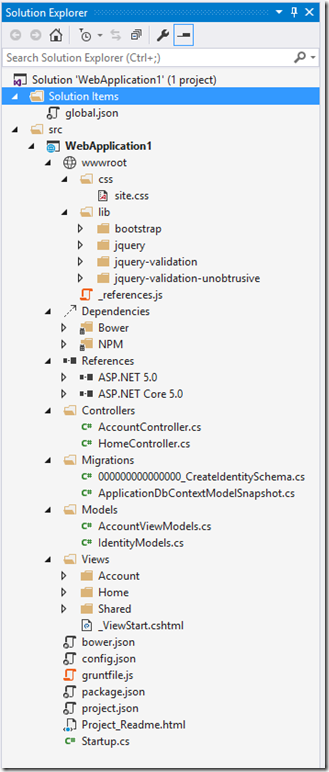
Code files should be placed outside of wwwroot, including C# files and Razor views. Having a wwwroot folder keeps a clean separation between code files and static files. It brings clarity to the items that will be sent to the server and the items that should remain on the dev machine. If you look at the screenshot, wwwroot folder has css and lib sub folders. Css folder is a place to keep your custom css files, while lib folder is used by Bower package manager. The lib folder contains the packages downloaded by Bower and can contain css, js and images.
The screenshot shows that lib folder has a bootstrap package folder. If you expand it, you will find css, js, as well all other assets related to the bootstrap package.
In MVC4, we used the content folder to keep style sheets as well as scripts folder for referenced scripts. These folders are gone now, so it’s important to understand that there is no single folder for style sheets or scripts. They could be in any of the folders within wwwroot.
It’s interesting to note that if you wish to reference the css, js, or img files in your razor views, using the ~ keyword ensures direct path to the wwwroot folder. So suppose you wanted to reference site.css in your view, you can access it using the <link rel="stylesheet" href="~/css/site.css" /> syntax.
You can see that the ~ keyword points to the wwwroot folder.
All methods was sourced from stackoverflow.com or stackexchange.com, is licensed under cc by-sa 2.5, cc by-sa 3.0 and cc by-sa 4.0