I am attempting to use partial views for the first time and I need some help. I am posting a string from Javascript to my ASP controller so that I can query my database using that string. Like so:
JavaScript
function findEmployees(userCounty) {
    $.ajax({
        type: "POST",
        url: '@Url.Action("Index", "Contact")',
        data: JSON.stringify(userCounty),
        contentType: "application/json",
        error: function (e) {
            console.log(e)
            console.log("error")
        }
    });
}
Controller
    [HttpPost]
    public ActionResult Index([FromBody]string userCounty)
    {
        string county = userCounty.Substring(0, userCounty.IndexOf(" "));
        var query = from SOP in _context.SalesOffice_Plant
                    where SOP.County == county
                    select new SalesOffice_Plant
                    {
                        Employee = SOP.Employee
                    };

        return PartialView(query.ToList());
    }
    [HttpGet]
    public ActionResult Index()
    {
        ViewData["Title"] = "Contact Us";
        ViewBag.Current = "Contact";

        return View();
    }
When I set break points – I can see that the string is passed correctly and my LINQ query works just fine. My problem occurs when I want to render a table of the employees in my Index page. The JavaScript returns a value to the controller after the page loads. This means I needed a way to “refresh the page”. I was told to use a partial view to solve this problem and this is what I came up with.
Index.cshtml
@model IEnumerable<Project.Models.SalesOffice_Plant>
//A bunch of Html
@await Html.PartialAsync("_IndexPartial")
//More Html
_IndexPartial.cshtml
@model IEnumerable<Project.Models.SalesOffice_Plant>
<table class="table">
<tbody>
    @foreach (var item in Model)
    {
        <tr>
            <td>
                @Html.DisplayFor(modelItem => item.Employee)
            </td>
        </tr>
    }
</tbody>
Ideally, I would like a table of Employees to be generated and displayed in the Index.cshtml. However, when I load the page I get and error telling me that my @await Html.PartialAsync(“_IndexPartial”) ‘is not set to an instance of an object.
Any pointers in the right direction would be very helpful.
Answers:
Thank you for visiting the Q&A section on Magenaut. Please note that all the answers may not help you solve the issue immediately. So please treat them as advisements. If you found the post helpful (or not), leave a comment & I’ll get back to you as soon as possible.
Method 1
When you use ajax,it would not reload your page after backend code finishing,so you need to use .html() method to render the backend result to html.
Here is a whole working demo:
Model:
public class SalesOffice_Plant
{
    public int Id { get; set; }
    public string County { get; set; }
    public string Employee { get; set; }
}
View(Index.cshtml):
<button type="button" onclick="findEmployees('a  ')">Find</button>
<div id="employee">
</div>

@section Scripts
{
    <script>
    function findEmployees(userCounty) {
        $.ajax({
            type: "POST",
            url: '@Url.Action("Index", "Contact")',
            data: JSON.stringify(userCounty),
            contentType: "application/json",
            error: function (e) {
                console.log(e)
                console.log("error")
            },
            success: function (res) {
                $("#employee").html(res);    //add this...
            }
        });
    }
    </script>
}
Partial View(_IndexPartial.cshtml):
@model IEnumerable<SalesOffice_Plant>
<table class="table">
    <tbody>
        @foreach (var item in Model)
        {
            <tr>
                <td>
                    @Html.DisplayFor(modelItem => item.Employee)
                </td>
            </tr>
        }
    </tbody>
</table>
Controller:
[HttpPost]
public ActionResult Index([FromBody] string userCounty)
{
    string county = userCounty.Substring(0, userCounty.IndexOf(" "));
    var query = from SOP in _context.SalesOffice_Plant
                where SOP.County == county
                select new SalesOffice_Plant
                {
                    Employee = SOP.Employee
                };
    return PartialView("_IndexPartial", query.ToList());  //must specify the partial view name
                                                          //otherwise it will match the action name as partial view name
}
[HttpGet]
public ActionResult Index()
{
    ViewData["Title"] = "Contact Us";
    ViewBag.Current = "Contact";
    return View();
}
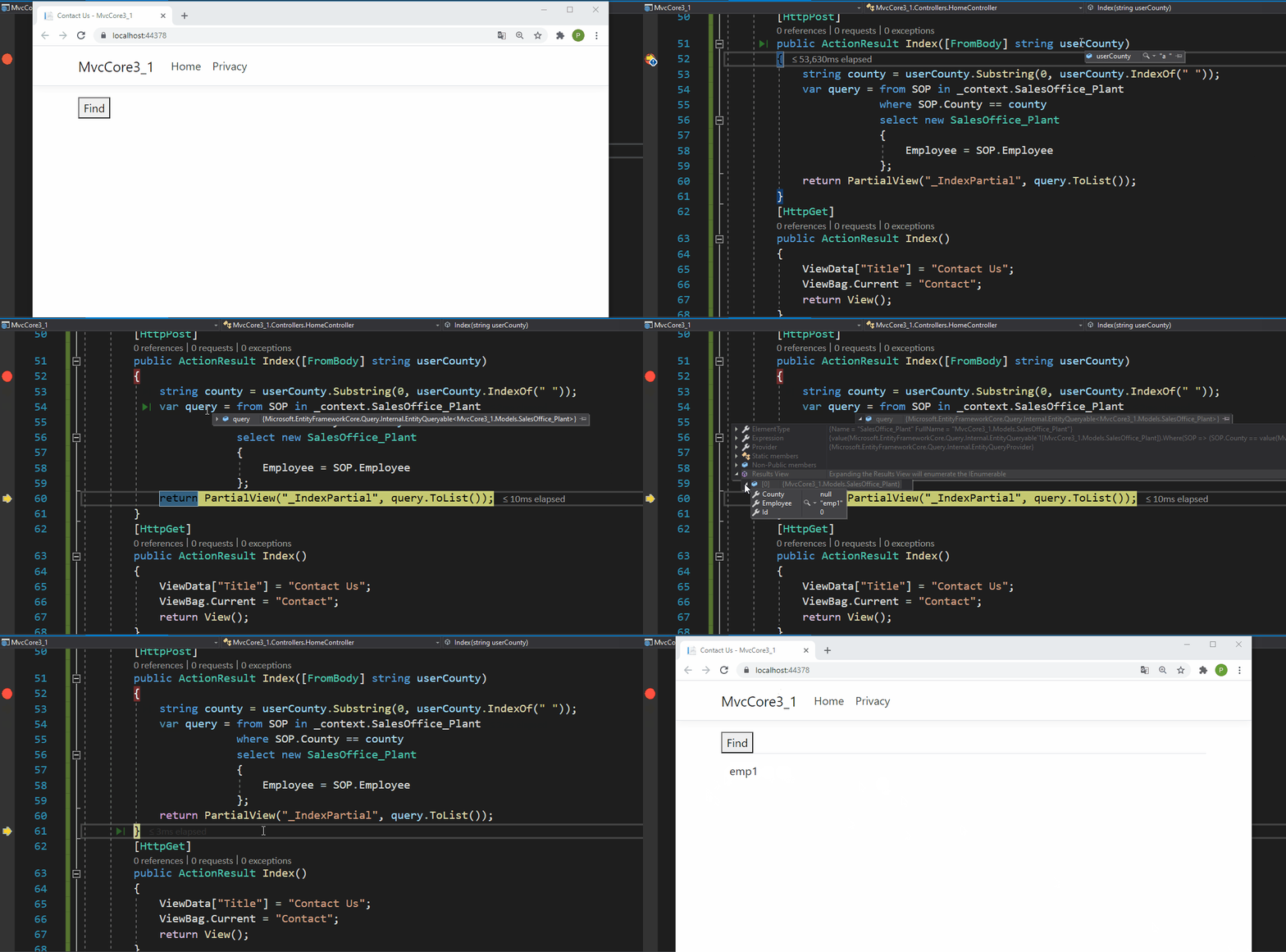
Result:
All methods was sourced from stackoverflow.com or stackexchange.com, is licensed under cc by-sa 2.5, cc by-sa 3.0 and cc by-sa 4.0