I am not sure whether this counts more as an OS issue, but I thought I would ask here in case anyone has some insight from the Python end of things.
I’ve been trying to parallelise a CPU-heavy for loop using joblib, but I find that instead of each worker process being assigned to a different core, I end up with all of them being assigned to the same core and no performance gain.
Here’s a very trivial example…
from joblib import Parallel,delayed
import numpy as np

def testfunc(data):
    # some very boneheaded CPU work
    for nn in xrange(1000):
        for ii in data[0,:]:
            for jj in data[1,:]:
                ii*jj

def run(niter=10):
    data = (np.random.randn(2,100) for ii in xrange(niter))
    pool = Parallel(n_jobs=-1,verbose=1,pre_dispatch='all')
    results = pool(delayed(testfunc)(dd) for dd in data)

if __name__ == '__main__':
    run()
…and here’s what I see in htop while this script is running:
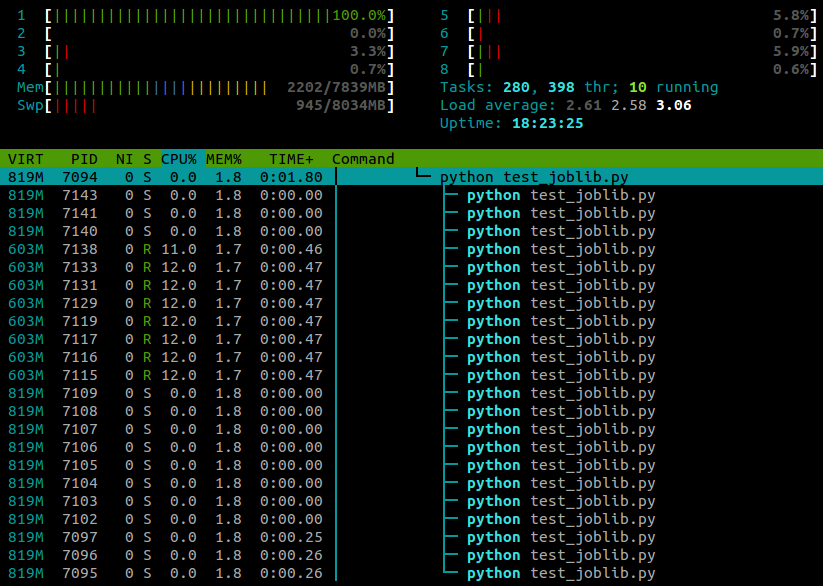
I’m running Ubuntu 12.10 (3.5.0-26) on a laptop with 4 cores. Clearly joblib.Parallel is spawning separate processes for the different workers, but is there any way that I can make these processes execute on different cores?
Answers:
Thank you for visiting the Q&A section on Magenaut. Please note that all the answers may not help you solve the issue immediately. So please treat them as advisements. If you found the post helpful (or not), leave a comment & I’ll get back to you as soon as possible.
Method 1
After some more googling I found the answer here.
It turns out that certain Python modules (numpy, scipy, tables, pandas, skimage…) mess with core affinity on import. As far as I can tell, this problem seems to be specifically caused by them linking against multithreaded OpenBLAS libraries.
A workaround is to reset the task affinity using
os.system("taskset -p 0xff %d" % os.getpid())
With this line pasted in after the module imports, my example now runs on all cores:
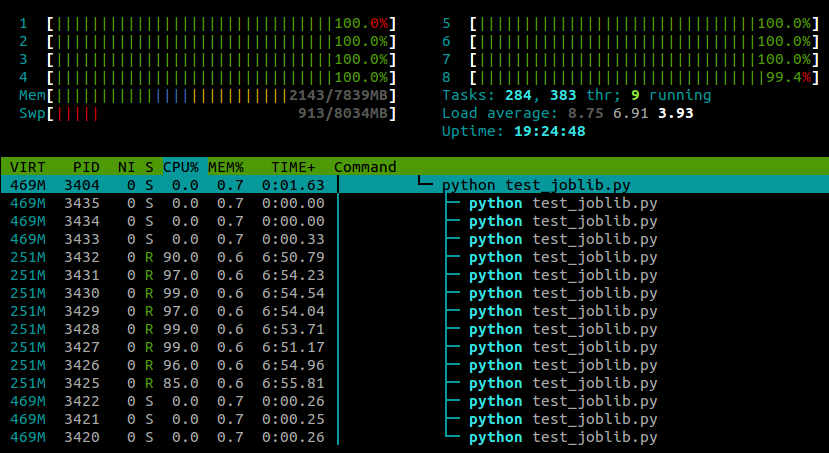
My experience so far has been that this doesn’t seem to have any negative effect on numpy‘s performance, although this is probably machine- and task-specific .
Update:
There are also two ways to disable the CPU affinity-resetting behaviour of OpenBLAS itself. At run-time you can use the environment variable OPENBLAS_MAIN_FREE (or GOTOBLAS_MAIN_FREE), for example
OPENBLAS_MAIN_FREE=1 python myscript.py
Or alternatively, if you’re compiling OpenBLAS from source you can permanently disable it at build-time by editing the Makefile.rule to contain the line
NO_AFFINITY=1
Method 2
Python 3 now exposes the methods to directly set the affinity
>>> import os
>>> os.sched_getaffinity(0)
{0, 1, 2, 3}
>>> os.sched_setaffinity(0, {1, 3})
>>> os.sched_getaffinity(0)
{1, 3}
>>> x = {i for i in range(10)}
>>> x
{0, 1, 2, 3, 4, 5, 6, 7, 8, 9}
>>> os.sched_setaffinity(0, x)
>>> os.sched_getaffinity(0)
{0, 1, 2, 3}
Method 3
This appears to be a common problem with Python on Ubuntu, and is not specific to joblib:
- Both multiprocessing.map and joblib use only 1 cpu after upgrade from Ubuntu 10.10 to 12.04
- Python multiprocessing utilizes only one core
- multiprocessing.Pool processes locked to a single core
I would suggest experimenting with CPU affinity (taskset).
All methods was sourced from stackoverflow.com or stackexchange.com, is licensed under cc by-sa 2.5, cc by-sa 3.0 and cc by-sa 4.0