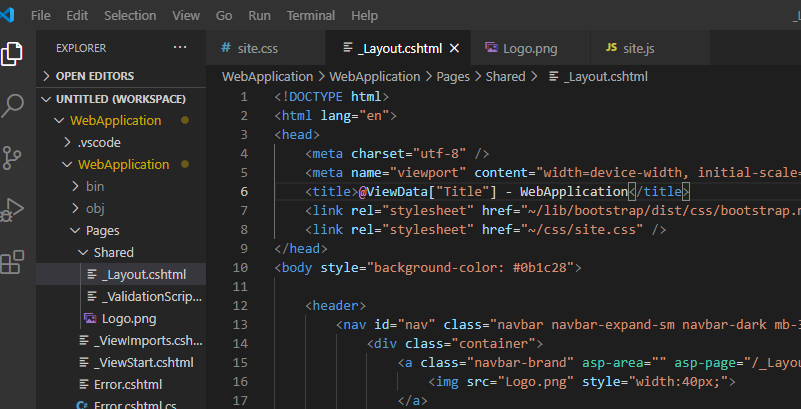
<header>
    <nav id="nav" class="navbar navbar-expand-sm navbar-dark mb-3 fixed-top">
        <div class="container">
            <a class="navbar-brand" asp-area="" asp-page="/_Layout">
                <img src="Logo.png" style="width:40px;">
            </a>
        </div>
   </nav>
</header>
Image not showing on the browser, the image is located in the same folder as the HTML file.
Answers:
Thank you for visiting the Q&A section on Magenaut. Please note that all the answers may not help you solve the issue immediately. So please treat them as advisements. If you found the post helpful (or not), leave a comment & I’ll get back to you as soon as possible.
Method 1
In the web application, create a wwwroot folder. Inside that create an images folder. Put your image in there.
Application
    wwwroot
        images
            Logo.png
Your link:
<img src="~/images/Logo.png" />
Note 1: anchor link should probably not be asp-page="/_Layout". Probably asp-page="/Index", or similar.
Note 2: my app is a little different. I’m not positive you need a wwwroot folder, but I think the image should be in a different folder than ‘Shared’.
All methods was sourced from stackoverflow.com or stackexchange.com, is licensed under cc by-sa 2.5, cc by-sa 3.0 and cc by-sa 4.0