There are two query_posts() functions technically speaking. One query_posts() is actually WP_Query::query_posts() and the other is in global space.
Asking from sanity:
If global query_posts() is that “evil” why isn’t deprecated?
Or why isn’t marked as _doing_it_wong.
Answers:
Thank you for visiting the Q&A section on Magenaut. Please note that all the answers may not help you solve the issue immediately. So please treat them as advisements. If you found the post helpful (or not), leave a comment & I’ll get back to you as soon as possible.
Method 1
Essential question
Let’s dig into the trio: ::query_posts, ::get_posts and class WP_Query to understand ::query_posts better.
The cornerstone for getting the data in WordPress is the WP_Query class. Both methods ::query_posts and ::get_posts use that class.
Note that the class
WP_Queryalso contains the methods with the same name:WP_Query::query_postsandWP_Query::get_posts, but we actually only consider the global methods, so don’t get confused.
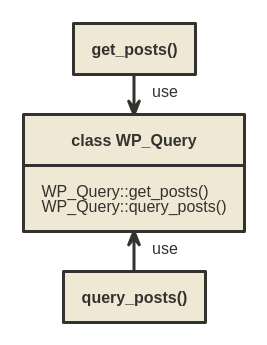
Understanding the WP_Query
The class called
WP_Queryhas been introduced back in 2004. All fields having the ☂ (umbrella) mark where present back in 2004. The additional fields were added later.
Here is the WP_Query structure:
class WP_Query (as in WordPress v4.7)
    public $query; ☂
    public $query_vars = array(); ☂
    public $tax_query;
    public $meta_query = false;
    public $date_query = false;
    public $queried_object; ☂
    public $queried_object_id; ☂
    public $request;
    public $posts; ☂
    public $post_count = 0; ☂
    public $current_post = -1; ☂
    public $in_the_loop = false;
    public $post; ☂
    public $comments;
    public $comment_count = 0;
    public $current_comment = -1;
    public $comment;
    public $found_posts = 0;
    public $max_num_pages = 0;
    public $max_num_comment_pages = 0;
    public $is_single = false; ☂
    public $is_preview = false; ☂
    public $is_page = false; ☂
    public $is_archive = false; ☂
    public $is_date = false; ☂
    public $is_year = false; ☂
    public $is_month = false; ☂
    public $is_day = false; ☂
    public $is_time = false; ☂
    public $is_author = false; ☂
    public $is_category = false; ☂
    public $is_tag = false;
    public $is_tax = false;
    public $is_search = false; ☂
    public $is_feed = false; ☂
    public $is_comment_feed = false;
    public $is_trackback = false; ☂
    public $is_home = false; ☂
    public $is_404 = false; ☂
    public $is_embed = false;
    public $is_paged = false;
    public $is_admin = false; ☂
    public $is_attachment = false;
    public $is_singular = false;
    public $is_robots = false;
    public $is_posts_page = false;
    public $is_post_type_archive = false;
    private $query_vars_hash = false;
    private $query_vars_changed = true;
    public $thumbnails_cached = false;
    private $stopwords;
    private $compat_fields = array('query_vars_hash', 'query_vars_changed');
    private $compat_methods = array('init_query_flags', 'parse_tax_query');
    private function init_query_flags()
WP_Query is the Swiss army knife.
Some things about WP_Query:
- it is something you can control via arguments you pass
- it is greedy by default
- it holds the substance for looping
- it is saved in the global space x2
- it can be primary or secondary
- it uses helper classes
- it has a handy
pre_get_postshook - it even has support for nested loops
- it holds the SQL query string
- it holds the number of the results
- it holds the results
- it holds the list of all possible query arguments
- it holds the template flags
- …
I cannot explain all these, but some of these are tricky, so let’s provide short tips.
WP_Query is something you can control via arguments you pass
The list of the arguments
---
 attachment
 attachment_id
 author
 author__in
 author__not_in
 author_name
 cache_results
 cat
 category__and
 category__in
 category__not_in
 category_name
 comments_per_page
 day
 embed
 error
 feed
 fields
 hour
 ignore_sticky_posts
 lazy_load_term_meta
 m
 menu_order
 meta_key
 meta_value
 minute
 monthnum
 name
 no_found_rows
 nopaging
 order
 p
 page_id
 paged
 pagename
 post__in
 post__not_in
 post_name__in
 post_parent
 post_parent__in
 post_parent__not_in
 post_type
 posts_per_page
 preview
 s
 second
 sentence
 static
 subpost
 subpost_id
 suppress_filters
 tag
 tag__and
 tag__in
 tag__not_in
 tag_id
 tag_slug__and
 tag_slug__in
 tb
 title
 update_post_meta_cache
 update_post_term_cache
 w
 year
This list from WordPress version 4.7 will certainly change in the future.
This would be the minimal example creating the WP_Query object from the arguments:
// WP_Query arguments
$args = array ( /* arguments*/ );
// creating the WP_Query object
$query = new WP_Query( $args );
// print full list of arguments WP_Query can take
print ( $query->query_vars );
WP_Query is greedy
Created on the idea get all you can WordPress developers decided to get all possible data early as this is good for the performance.
This is why by default when the query takes 10 posts from the database it will also get the terms and the metadata for these posts via separate queries. Terms and metadata will be cached (prefetched).
Note the caching is just for the single request lifetime.
You can disable the caching if you set update_post_meta_cache and update_post_term_cache to false while setting the WP_Query arguments. When caching is disabled the data will be requested from the database only on demand.
For the majority of WordPress blogs caching works well, but there are some occasions when you may disable the caching.
WP_Query uses helper classes
If you checked WP_Query fields there you have these three:
public $tax_query;
public $meta_query;
public $date_query;
You can imagine adding new in the future.

WP_Query holds the substance for looping
In this code:
$query = new WP_Query( $args )
if ( $query->have_posts() ) {
        while ( $query->have_posts() ) {
            $query->the_post();
you may notice the WP_Query has the substance you can iterate. The helper methods are there also. You just set the while loop.
Note.
forandwhileloops are semantically equivalent.
WP_Query primary and secondary
In WordPress you have one primary and zero or more secondary queries.
It is possible not to have the primary query, but this is beyond the scope of this article.
Primary query known as the main query or the regular query. Secondary query also called a custom query.
WordPress uses WP_Rewrite class early to create the query arguments based on the URL. Based on these arguments it stores the two identical objects in the global space. Both of these will hold the main query.
global $wp_query   @since WordPress 1.5
global $wp_the_query @since WordPress 2.1
When we say main query we think of these variables. Other queries can be called secondary or custom.
It is completely legal to use either
global $wp_queryor$GLOBALS['wp_query'], but using the second notation is much more notable, and saves typing an extra line inside the scope of the functions.
$GLOBALS['wp_query']and$GLOBALS['wp_the_query']are separate objects.$GLOBALS['wp_the_query']should remain frozen.
WP_Query has the handy pre_get_posts hook.
This is the action hook. It will apply to any WP_Query instance. You call it like:
add_action( 'pre_get_posts', function($query){

 if ( is_category() && $query->is_main_query() ) {
    // set your improved arguments
    $query->set( ... );
    ...
 }

 return $query;
});
This hook is great and it can alter any query arguments.
Here is what you can read:
Fires after the query variable object is created, but before the actual query is run.
So this hook is arguments manager but cannot create new WP_Query objects. If you had one primary and one secondary query, pre_get_posts cannot create the third one. Or if you just had one primary it cannot create the secondary.
Note in case you need to alter the main query only you can use the
requesthook also.
WP_Query supports nested loops
This scenario may happen if you use plugins, and you call plugin functions from the template.
Here is the showcase example WordPress have helper functions even for the nested loops:
global $id;
while ( have_posts() ) : the_post();

    // the custom $query
    $query = new WP_Query( array(   'posts_per_page' => 5   ) );
    if ( $query->have_posts() ) {

        while ( $query->have_posts() ) : $query->the_post();
            echo '<li>Custom ' . $id . '. ' . get_the_title() . '</li>';
        endwhile;
    }

    wp_reset_postdata();
    echo '<li>Main Query ' . $id . '. ' . get_the_title() . '</li>';

endwhile;
The output will be like this since I installed theme unit test data:
Custom 100. Template: Sticky
Custom 1. Hello world!
Custom 10. Markup: HTML Tags and Formatting
Custom 11. Markup: Image Alignment
Custom 12. Markup: Text Alignment
Custom 13. Markup: Title With Special Characters
Main Query 1. Hello world!
Even though I requested 5 posts in the custom $query it will return me six, because the sticky post will go along.
If there no wp_reset_postdata in the previous example the output will be like this, because of the $GLOBALS['post'] will be invalid.
Custom 1001. Template: Sticky
Custom 1. Hello world!
Custom 10. Markup: HTML Tags and Formatting
Custom 11. Markup: Image Alignment
Custom 12. Markup: Text Alignment
Custom 13. Markup: Title With Special Characters
Main Query 13. Markup: Title With Special Characters
WP_Query has wp_reset_query function
This is like a reset button. $GLOBALS['wp_the_query'] should be frozen all the time, and plugins or themes should never alter it.
Here is what wp_reset_query do:
function wp_reset_query() {
    $GLOBALS['wp_query'] = $GLOBALS['wp_the_query'];
    wp_reset_postdata();
}
Remarks on get_posts
get_posts looks like
File: /wp-includes/post.php
1661: function get_posts( $args = null ) {
1662:   $defaults = array(
1663:       'numberposts' => 5,
1664:       'category' => 0, 'orderby' => 'date',
1665:       'order' => 'DESC', 'include' => array(),
1666:       'exclude' => array(), 'meta_key' => '',
1667:       'meta_value' =>'', 'post_type' => 'post',
1668:       'suppress_filters' => true
1669:   );
... // do some argument parsing
1685:   $r['ignore_sticky_posts'] = true;
1686:   $r['no_found_rows'] = true;
1687:
1688:   $get_posts = new WP_Query;
1689:   return $get_posts->query($r);
The line numbers may change in the future.
It is just a wrapper around WP_Query that returns the query object posts.
The ignore_sticky_posts set to true means the sticky posts may show up only in a natural position. There will be no sticky posts in the front. The other no_found_rows set to true means WordPress database API will not use SQL_CALC_FOUND_ROWS in order to implement pagination, reducing the load on the database to execute found rows count.
This is handy when you don’t need pagination. We understand now we can mimic this function with this query:
$args = array ( 'ignore_sticky_posts' => true, 'no_found_rows' => true);
$query = new WP_Query( $args );
print( $query->request );
Here is the corresponding SQL request:
SELECT wp_posts.ID FROM wp_posts WHERE 1=1 AND wp_posts.post_type = 'post' AND (wp_posts.post_status = 'publish' OR wp_posts.post_status = 'private') ORDER BY wp_posts.post_date DESC LIMIT 0, 10
Compare what we have now with the previous SQL request where SQL_CALC_FOUND_ROWS exists.
SELECT SQL_CALC_FOUND_ROWS wp_posts.ID FROM wp_posts WHERE 1=1 AND wp_posts.post_type = 'post' AND (wp_posts.post_status = 'publish' OR wp_posts.post_status = 'private') ORDER BY wp_posts.post_date DESC LIMIT 0, 10
The request without SQL_CALC_FOUND_ROWS will be faster.
Remarks on query_posts
Tip: At first in 2004 there was only
global $wp_query. As of WordPress 2.1 version$wp_the_querycame.
Tip:$GLOBALS['wp_query']and$GLOBALS['wp_the_query']are separate objects.
query_posts() is WP_Query wrapper. It returns the reference to the main WP_Query object, and at the same time it will set the global $wp_query.
File: /wp-includes/query.php
function query_posts($args) {
    $GLOBALS['wp_query'] = new WP_Query();
    return $GLOBALS['wp_query']->query($args);
}
In PHP4 everything, including objects, was passed by value. query_posts was like this:
File: /wp-includes/query.php (WordPress 3.1)
function &query_posts($args) {
    unset($GLOBALS['wp_query']);
    $GLOBALS['wp_query'] =& new WP_Query();
    return $GLOBALS['wp_query']->query($args);
}
Please note in typical scenario with one primary and one secondary query we have these three variables:
$GLOBALS['wp_the_query']
$GLOBALS['wp_query'] // should be the copy of first one
$custom_query // secondary
Let’s say each of these three takes 1M of memory. Total would be 3M of memory.
If we use query_posts, $GLOBALS['wp_query'] will be unset and created again.
PHP5+ should be smart emptying the $GLOBALS['wp_query'] object, just like in PHP4 we did it with the unset($GLOBALS['wp_query']);
function query_posts($args) {
    $GLOBALS['wp_query'] = new WP_Query();
    return $GLOBALS['wp_query']->query($args);
}
As a result query_posts consumes 2M of memory in total, while get_posts consumes 3M of memory.
Note in query_posts we are not returning the actual object, but a reference to the object.
From php.net:
A PHP reference is an alias, which allows two different variables to write to the same value. As of PHP 5, an object variable doesn’t contain the object itself as value anymore. It only contains an object identifier which allows object accessors to find the actual object. When an object is sent by argument, returned or assigned to another variable, the different variables are not aliases: they hold a copy of the identifier, which points to the same object.Also in PHP5+ the assign (=) operator is smart. It will use shallow copy and not hard object copy. When we write like this
$GLOBALS['wp_query'] = $GLOBALS['wp_the_query'];only the data will be copied, not the whole object since these share the same object type.
Here is one example
print( md5(serialize($GLOBALS['wp_the_query']) ) );
print( md5(serialize($GLOBALS['wp_query'] ) ) );
query_posts( '' );
print( md5(serialize($GLOBALS['wp_the_query']) ) );
print( md5(serialize($GLOBALS['wp_query'] ) ) );
Will result:
f14153cab65abf1ea23224a1068563ef
f14153cab65abf1ea23224a1068563ef
f14153cab65abf1ea23224a1068563ef
d6db1c6bfddac328442e91b6059210b5
Try to reset the query:
print( md5(serialize($GLOBALS['wp_the_query'] ) ) );
print( md5(serialize($GLOBALS['wp_query'] ) ) );
query_posts( '' );
wp_reset_query();
print( md5(serialize($GLOBALS['wp_the_query'] ) ) );
print( md5(serialize($GLOBALS['wp_query'] ) ) );
Will result:
f14153cab65abf1ea23224a1068563ef
f14153cab65abf1ea23224a1068563ef
f14153cab65abf1ea23224a1068563ef
f14153cab65abf1ea23224a1068563ef
You can create problems even if you use WP_Query
print( md5(serialize($GLOBALS['wp_the_query'] ) ) );
print( md5(serialize($GLOBALS['wp_query'] ) ) );
global $wp_query;
$wp_query = new WP_Query( array( 'post_type' => 'post' ) );
print( md5(serialize($GLOBALS['wp_the_query'] ) ) );
print( md5(serialize($GLOBALS['wp_query'] ) ) );
Of course, the solution would be to use wp_reset_query function again.
print( md5(serialize($GLOBALS['wp_the_query'] ) ) );
print( md5(serialize($GLOBALS['wp_query'] ) ) );
global $wp_query;
$wp_query = new WP_Query( array( 'post_type' => 'post' ) );
wp_reset_query();
print( md5(serialize($GLOBALS['wp_the_query'] ) ) );
print( md5(serialize($GLOBALS['wp_query'] ) ) );
This is why I think query_posts may be better from the memory standpoint. But you should always do wp_reset_query trick.
Method 2
I have just created a new trac ticket, ticket #36874, to propose the deprecation of query_posts(). Whether or not it will be accepted remains a good question.
The real big issue with query_posts() is, it is still widely used by plugins and themes, even though there have been really good writings on the subject of why you should NEVER EVER use it. I think the most epic post here on WPSE is the following one:
deprecation !== removal, so deprecating query_posts() will not stop its usage by poor quality devs and people in general who do not know WordPress and who use poor quality tutorials as guidelines. Just as some proof, how many questions do we still get here where people use caller_get_posts in WP_Query? It has been deprecated for many years now.
Deprecated functions and arguments can however be removed at any time the core devs see fit, but this will most probably never happen with query_posts() as this will break millions of sites. So yes, we will probably never see the total removal of query_posts() – which might lead to the fact that it will most probably never get deprecated.
This is a starting point though, but one has to remember, deprecating something in WordPress does not stop its use.
UPDATE 19 May 2016
The ticket I raised is now closed and marked as duplicate to a 4 year old ticket, which was closed as wontfix and was reopened and still remain open and unresolved.
Seems the core developers are hanging on to this old faithful little evil. Everyone interested, here is the duplicate 4year old ticket
Method 3
[somewhat rant]
It is the standing core philosophy at this point that nothing is truly deprecated. Deprecation notice, while it is a nice to have, is just going to be ignored if the function will not actually be dropped at some point. There are many people that do not develop with WP_DEBUG on and will not notice the notice if there will not be an actual breakage.
OTOH hand, this function is like goto statement. Personally I never (for smaller definition then expected) used gotobut I can understand the arguments pointing to some situation in which it is not evil by default. Same goes with query_posts, it is a simple way to set up all the globals required to make a simple loop, and can be useful in ajax or rest-api context. I would never use it in those contexts as well, but I can see that there, it is more of an issue of style of coding then a function being evil by itself.
Going a little deeper, the main problem is that globals need to be set at all. That is the main problem not the one function that helps setting them.
All methods was sourced from stackoverflow.com or stackexchange.com, is licensed under cc by-sa 2.5, cc by-sa 3.0 and cc by-sa 4.0