I have two images, both with alpha channels. I want to put one image over the other, resulting in a new image with an alpha channel, just as would occur if they were rendered in layers. I would like to do this with the Python Imaging Library, but recommendations in other systems would be fantastic, even the raw math would be a boon; I could use NumPy.
Answers:
Thank you for visiting the Q&A section on Magenaut. Please note that all the answers may not help you solve the issue immediately. So please treat them as advisements. If you found the post helpful (or not), leave a comment & I’ll get back to you as soon as possible.
Method 1
This appears to do the trick:
from PIL import Image
bottom = Image.open("a.png")
top = Image.open("b.png")

r, g, b, a = top.split()
top = Image.merge("RGB", (r, g, b))
mask = Image.merge("L", (a,))
bottom.paste(top, (0, 0), mask)
bottom.save("over.png")
Method 2
Pillow 2.0 now contains an alpha_composite function that does this.
img3 = Image.alpha_composite(img1, img2)
Method 3
I couldn’t find an alpha composite function in PIL, so here is my attempt at implementing it with numpy:
import numpy as np
from PIL import Image

def alpha_composite(src, dst):
    '''
    Return the alpha composite of src and dst.

    Parameters:
    src -- PIL RGBA Image object
    dst -- PIL RGBA Image object

    The algorithm comes from http://en.wikipedia.org/wiki/Alpha_compositing
    '''
    # http://stackoverflow.com/a/3375291/190597
    # http://stackoverflow.com/a/9166671/190597
    src = np.asarray(src)
    dst = np.asarray(dst)
    out = np.empty(src.shape, dtype = 'float')
    alpha = np.index_exp[:, :, 3:]
    rgb = np.index_exp[:, :, :3]
    src_a = src[alpha]/255.0
    dst_a = dst[alpha]/255.0
    out[alpha] = src_a+dst_a*(1-src_a)
    old_setting = np.seterr(invalid = 'ignore')
    out[rgb] = (src[rgb]*src_a + dst[rgb]*dst_a*(1-src_a))/out[alpha]
    np.seterr(**old_setting)
    out[alpha] *= 255
    np.clip(out,0,255)
    # astype('uint8') maps np.nan (and np.inf) to 0
    out = out.astype('uint8')
    out = Image.fromarray(out, 'RGBA')
    return out
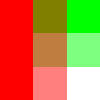
For example given these two images,
img1 = Image.new('RGBA', size = (100, 100), color = (255, 0, 0, 255))
draw = ImageDraw.Draw(img1)
draw.rectangle((33, 0, 66, 100), fill = (255, 0, 0, 128))
draw.rectangle((67, 0, 100, 100), fill = (255, 0, 0, 0))
img1.save('/tmp/img1.png')

img2 = Image.new('RGBA', size = (100, 100), color = (0, 255, 0, 255))
draw = ImageDraw.Draw(img2)
draw.rectangle((0, 33, 100, 66), fill = (0, 255, 0, 128))
draw.rectangle((0, 67, 100, 100), fill = (0, 255, 0, 0))
img2.save('/tmp/img2.png')

alpha_composite produces:
img3 = alpha_composite(img1, img2)
img3.save('/tmp/img3.png')
All methods was sourced from stackoverflow.com or stackexchange.com, is licensed under cc by-sa 2.5, cc by-sa 3.0 and cc by-sa 4.0