With the new WordPress 3.8 under Screen Options they seem to have misplaced the “Columns” feature where you could put your widgets into 1 Column, 2 Columns, 3 Columns, or 4 Columns. My question is how to I force my Dashboard Widgets to only be 1 column, or in other words, take up the whole width of the screen versus just a portion of the screen?
Answers:
Thank you for visiting the Q&A section on Magenaut. Please note that all the answers may not help you solve the issue immediately. So please treat them as advisements. If you found the post helpful (or not), leave a comment & I’ll get back to you as soon as possible.
Method 1
Another solution is to add the columns setting back to the settings.
function wpse126301_dashboard_columns() {
    add_screen_option(
        'layout_columns',
        array(
            'max'     => 2,
            'default' => 1
        )
    );
}
add_action( 'admin_head-index.php', 'wpse126301_dashboard_columns' );
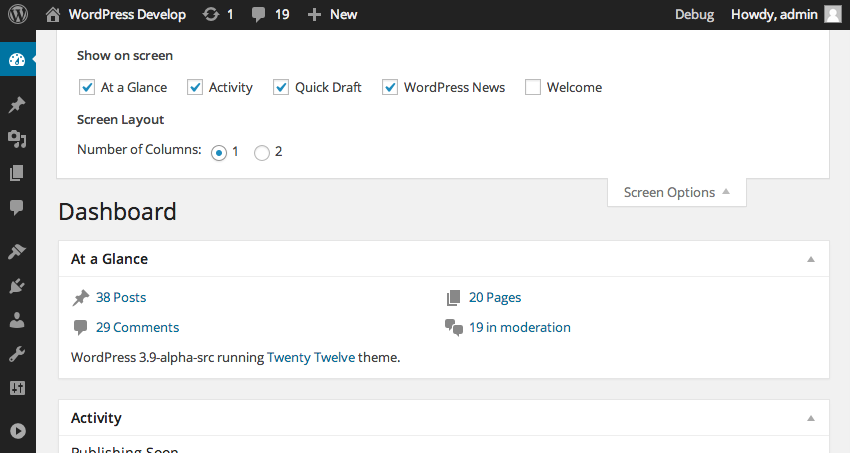
There is a related Trac ticket: #26354
Method 2
This happens because of the new media queries. A very unfortunate change …
Anyway, you can change it by setting a custom width for .postbox-container.
Use 50% for two columns and 100 % for just one column.
add_action( 'admin_head-index.php', function()
{
    ?>
<style>
.postbox-container {
    min-width: 100% !important;
}
.meta-box-sortables.ui-sortable.empty-container {
    display: none;
}
</style>
    <?php
});
All methods was sourced from stackoverflow.com or stackexchange.com, is licensed under cc by-sa 2.5, cc by-sa 3.0 and cc by-sa 4.0