Media Manager once again.
This time I’m looking for a simple hack/hook/filter to change default “Attachment Display Settings” from media manager. The option is “Link To” that is default set to “Media File” and I would like to force it for all users to be default set to “none”.
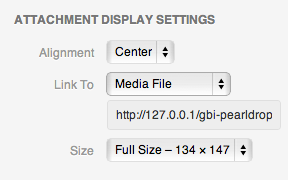
If there is no way to do it with hook/filter (media-template.php lines 282 – 306) – is there a way to attach jQuery file to Media Manager and use it to force change option after Media Manager is loaded?
Answers:
Thank you for visiting the Q&A section on Magenaut. Please note that all the answers may not help you solve the issue immediately. So please treat them as advisements. If you found the post helpful (or not), leave a comment & I’ll get back to you as soon as possible.
Method 1
You can do what you want by overriding appropriate Backbone view, which is responsible for rendering attachments display settings form.
plugin.php
add_action( 'load-post.php', 'wpse8170_media_popup_init' );
add_action( 'load-post-new.php', 'wpse8170_media_popup_init' );
function wpse8170_media_popup_init() {
    wp_enqueue_script( 'wpse8170-media-manager', plugins_url( '/js/media.js', __FILE__ ), array( 'media-editor' ) );
}
media.js
(function() {
    var _AttachmentDisplay = wp.media.view.Settings.AttachmentDisplay;
    wp.media.view.Settings.AttachmentDisplay = _AttachmentDisplay.extend({
        render: function() {
            _AttachmentDisplay.prototype.render.apply(this, arguments);
            this.$el.find('select.link-to').val('none');
            this.model.set('link', 'none');
            this.updateLinkTo();
        }
    });
})();
Method 2
I know this is an old question, but I believe this answer is better suited now, as WordPress does now allow you to hook into this.
The default image size, align and “link to” properties for inserting an image are set through the options image_default_size, image_default_link_type and image_default_align, respectively. You can change this beahviour in a couple of ways:
- In
/wp-admin/options.php - Directly in the options table in the database
- Through
update_option( 'default_image_link_type', 'none' ) - By hooking into the
pre_option_[option]filter
You can hook into the pre_option_[option] filter like this:
function wpse151868_image_default_link_type( $value ) {
    return 'none';
}

add_filter( 'pre_option_image_default_link_type', 'wpse151868_image_default_link_type' );
All methods was sourced from stackoverflow.com or stackexchange.com, is licensed under cc by-sa 2.5, cc by-sa 3.0 and cc by-sa 4.0