We have a normal WordPress gallery on a development webpage.
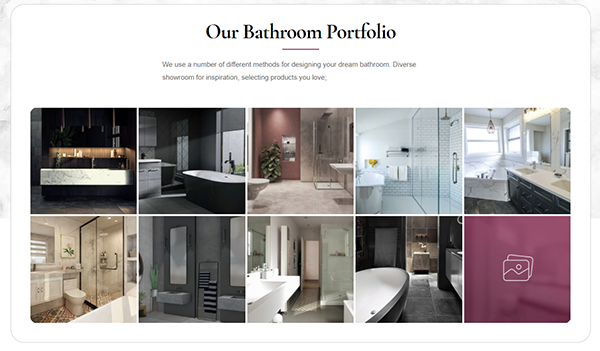
The page is custom content through Advanced Custom Fields, and we are wrapping the section above’s content like so:
<?php
  $content = get_sub_field('wysiwyg');
  if ( function_exists('slb_activate') ) {
    $content = slb_activate($content);
  }
  echo $content;
?>
The lightbox functionality is generated by Simple Lightbox, and slb_activate is a function of this plugin, which adds the lightbox functionality to any gallery in the ACF content.
The designer wants the last image in the gallery (the purple one) to link to a different WordPress page while maintaining the lightbox functionality for the rest of the gallery.
I don’t know if we need a WordPress filter (which to me would be complicated by the slb_activate function, or some jQuery, and target .gallery-item:last-of-type, replacing the URL with a new one?
If so, we’d like to take the page slug (bathrooms) from https://herodevelopment.com.au/allbathroomgear/design-build/bathrooms/ and use this slug to generate a new URL of https://herodevelopment.com.au/allbathroomgear/album/bathrooms/
(so going from /design-build/bathrooms/ to /album/bathrooms/ on the final production website).
I’d appreciate any help, as I am unfortunately not a developer.
Answers:
Thank you for visiting the Q&A section on Magenaut. Please note that all the answers may not help you solve the issue immediately. So please treat them as advisements. If you found the post helpful (or not), leave a comment & I’ll get back to you as soon as possible.
Method 1
By javascript, You should replace the link on the last item with new one and change tag’s attribute, data-slb-active, to “0”.
Please use the following javascript.
jQuery(“#gallery-1 .gallery-item:last-of-type a”).attr(“href”, “https://herodevelopment.com.au/allbathroomgear/album/bathrooms/”).attr(“data-slb-active”, “0”);
Method 2
Replace your code with the following:
<?php
$content = get_sub_field( 'wysiwyg' );
if ( function_exists( 'slb_activate' ) ) {
    $url_request = isset( $_SERVER['REQUEST_URI'] ) ?
        filter_var( wp_unslash( $_SERVER['REQUEST_URI'] ), FILTER_SANITIZE_STRING ) :
        '';
    $url_path    = wp_parse_url( $url_request, PHP_URL_PATH );
    $url_path    = preg_replace( '#/.+/(.+)/#', '/album/$1/', $url_path );
    $content     = str_replace( '/wp-content/uploads/2021/02/gallery-thumb.jpg', $url_path, $content );
    $content     = slb_activate( $content );
}
echo $content;
?>
All methods was sourced from stackoverflow.com or stackexchange.com, is licensed under cc by-sa 2.5, cc by-sa 3.0 and cc by-sa 4.0