What I finally want to achieve are extra settings added to the Image Details box, that will be stored in the image <img> tag as data-* attributes
Example: <img src="..." data-my_setting="...">
MY CODE
I am creating a plugin, and I need to create more settings for when you edit images. So far I have the following code:
jQuery(function($) {

    var imageDetails = wp.media.view.ImageDetails

    wp.media.view.ImageDetails = wp.media.view.ImageDetails.extend({
        // Initialize - Call function to add settings when rendered
        initialize: function() {
            this.on('post-render', this.add_settings);
        },
        // To add the Settings
        add_settings: function() {
            $('.advanced-section').prepend('
                <h2>My Settings</h2>
                <input type="text" class="my_setting">
            ');

            // Set Options
            this.controller.image.set({"data-settings": 'setting-value-here'})
        }
    });

}) // End of jQuery(function($))
I created a new post and added one image, then clicked on it and pressed Edit (the pencil icon in the toolbar that popped up). I ended up on the image details page, and this is what it looked like:
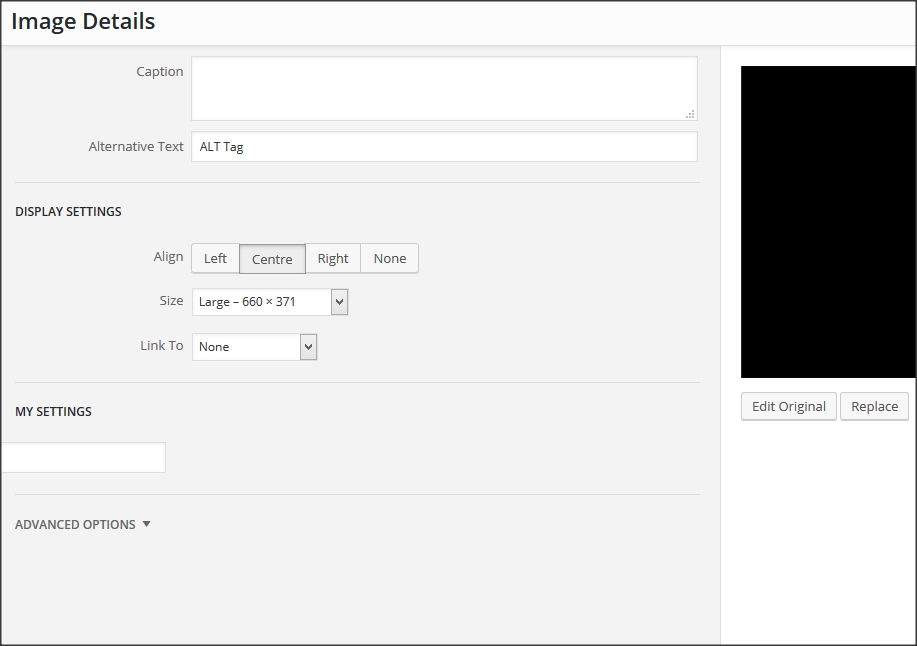
So far, so good. On this line:
this.controller.image.set({"data-settings": 'setting-value-here'})
I would normally use jQuery to get the value of the input, but for testing purposes I changed it to be a static value of 'setting-value-here'. I pressed ‘Update’ in the bottom-right corner of the Image Details box.
THE PROBLEM
In the Text editor, it shows the HTML code as this:

This does not have a data-settings="setting-value-here", how come?
If I replace the line with this:
this.controller.image.set({alt: 'setting-value-here'})
It does change the ALT tag to alt="setting-value-here". So what am I doing wrong trying to set the data-* attribute?
THE SOLUTION
Thanks to @bonger (who got the full bounty of 50 Reputation), I have the following code:
PHP:
function add_my_settings() {
    ob_start();
    wp_print_media_templates();
    $tpl = ob_get_clean();
    if ( ( $idx = strpos( $tpl, 'tmpl-image-details' ) ) !== false
            && ( $before_idx = strpos( $tpl, '<div class="advanced-section">', $idx ) ) !== false ) {
        ob_start();
        ?>
        <div class="my_setting-section">
            <h2><?php _e( 'My Settings' ); ?></h2>
            <div class="my_setting">
                <label class="setting my_setting">
                    <span><?php _e( 'My Setting' ); ?></span>
                        <input type="text" data-setting="my_setting" value="{{ data.model.my_setting }}" />
                    </label>
                </div>
            </div>
        <?php
        $my_section = ob_get_clean();
        $tpl = substr_replace( $tpl, $my_section, $before_idx, 0 );
    }
    echo $tpl;
};

// Hack the output of wp_print_media_templates()
add_action('wp_enqueue_media', $func =
    function() {
        remove_action('admin_footer', 'wp_print_media_templates');
        add_action('admin_footer',  'add_my_settings');
    }
);
JavaScript: (Needs to be enqueued using wp_enqueue_script())
// When Image is Edited
wp.media.events.on('editor:image-edit', function(data) {
    data.metadata.my_setting = data.editor.dom.getAttrib( data.image, 'data-my_setting' );
});

// When Image is Updated
wp.media.events.on('editor:image-update', function(data) {
    data.editor.dom.setAttrib( data.image, 'data-my_setting', data.metadata.my_setting );
});
Answers:
Thank you for visiting the Q&A section on Magenaut. Please note that all the answers may not help you solve the issue immediately. So please treat them as advisements. If you found the post helpful (or not), leave a comment & I’ll get back to you as soon as possible.
Method 1
A way to do it is to use the (very convenient) editor:image-edit and editor:image-update events triggered by the tinymce wpeditimage plugin to get/set the dom directly (updated to wrap in wp_enqueue_media action):
add_action( 'wp_enqueue_media', function () {
    add_action( 'admin_footer', function () {
        ?>
        <script type="text/javascript">
        jQuery(function ($) {
            if (wp && wp.media && wp.media.events) {
                wp.media.events.on( 'editor:image-edit', function (data) {
                    data.metadata.my_setting = data.editor.dom.getAttrib( data.image, 'data-my_setting' );
                } );
                wp.media.events.on( 'editor:image-update', function (data) {
                    data.editor.dom.setAttrib( data.image, 'data-my_setting', data.metadata.my_setting );
                } );
            }
        });
        </script>
        <?php
    }, 11 );
} );
To add and populate the settings field, it’s perhaps groovier to hack the output of wp_print_media_templates() rather than override ImageDetails.initialize() (updated to wrap in wp_enqueue_media action):
add_action( 'wp_enqueue_media', function () {
    remove_action( 'admin_footer', 'wp_print_media_templates' );
    add_action( 'admin_footer', $func = function () {
        ob_start();
        wp_print_media_templates();
        $tpl = ob_get_clean();
        // To future-proof a bit, search first for the template and then for the section.
        if ( ( $idx = strpos( $tpl, 'tmpl-image-details' ) ) !== false
                && ( $before_idx = strpos( $tpl, '<div class="advanced-section">', $idx ) ) !== false ) {
            ob_start();
            ?>
    <div class="my_setting-section">
        <h2><?php _e( 'My Settings' ); ?></h2>
        <div class="my_setting">
            <label class="setting my_setting">
                <span><?php _e( 'My Setting' ); ?></span>
                <input type="text" data-setting="my_setting" value="{{ data.model.my_setting }}" />
            </label>
        </div>
    </div>
            <?php
            $my_section = ob_get_clean();
            $tpl = substr_replace( $tpl, $my_section, $before_idx, 0 );
        }
        echo $tpl;
    } );
} );
All methods was sourced from stackoverflow.com or stackexchange.com, is licensed under cc by-sa 2.5, cc by-sa 3.0 and cc by-sa 4.0