I’m very new to this API, in fact I’ve only spent couple hours on it so far. I’ve done my research but cannot find anything about it…
The issue is, I can’t seem to get the featured image of a post. The JSON returns "featured_media: 0".
getPosts: function() {
  var burl = "http://www.example.com/wp-json/wp/v2/posts";
  var dataDiv = document.getElementById('cards');
  $.ajax({
    url: burl,
    data: data,
    type: 'GET',
    async: false,
    processData: false,
    beforeSend: function (xhr) {
      if (xhr && xhr.overrideMimeType) {
        xhr.overrideMimeType('application/json;charset=utf-8');
      }
    },
    dataType: 'json',
    success: function (data) {
      console.log(data);
      //question: data->featured_image: 0?!
      var theUl = document.getElementById('cards');
      for (var key in data) {
        //data[key]['']...
        //doing my stuff here
      }
    },
    error: function(e) {
      console.log('Error: '+e);
    }
  });
}
I have definitely, set a featured image on the post but data returns:
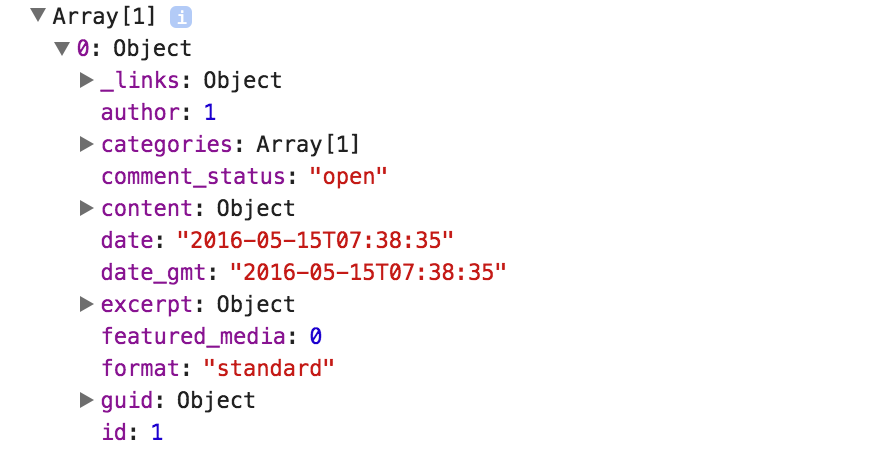
Any help will be appreciated.
Answers:
Thank you for visiting the Q&A section on Magenaut. Please note that all the answers may not help you solve the issue immediately. So please treat them as advisements. If you found the post helpful (or not), leave a comment & I’ll get back to you as soon as possible.
Method 1
You can get it without plugins by adding _embedas param to your query
/?rest_route=/wp/v2/posts&_embed
/wp-json/wp/v2/posts?_embed
Method 2
I would NOT use the better rest API plugin. It did add featured images to the rest api but it also broke it.
This is the simplest solution I was able to find that actually worked. Add the following code to your functions.php:
<?php

function post_featured_image_json( $data, $post, $context ) {
  $featured_image_id = $data->data['featured_media']; // get featured image id
  $featured_image_url = wp_get_attachment_image_src( $featured_image_id, 'original' ); // get url of the original size

  if( $featured_image_url ) {
    $data->data['featured_image_url'] = $featured_image_url[0];
  }

  return $data;
}
add_filter( 'rest_prepare_post', 'post_featured_image_json', 10, 3 );
Method 3
You can get the name of the image with this path:
array_name._embedded[‘wp:featuredmedia’][‘0’].source_url
Method 4
Take a look at a plugin called Better REST API Featured Image. It adds the featured image URL to the original API response.
Method 5
I made a shortcut to my image by adding it directly to the API response.
//Add in functions.php, this hook is for  my 'regions' post type
add_action( 'rest_api_init', 'create_api_posts_meta_field' );

function create_api_posts_meta_field() {
  register_rest_field( 'regions', 'group', array(
         'get_callback'    => 'get_post_meta_for_api',
         'schema'          => null,
      )
  );
}
//Use the post ID to query the image and add it to your payload
function get_post_meta_for_api( $object ) {
  $post_id = $object['id'];
  $post_meta = get_post_meta( $post_id );
  $post_image = get_post_thumbnail_id( $post_id );
  $post_meta["group_image"] = wp_get_attachment_image_src($post_image)[0];

  return $post_meta;
}
Method 6
Try following way
………………..
URL: /wp-json/wp/v2/posts?_embed
image: json["_embedded"]["wp:featuredmedia"][0]["source_url"],
It’s working fine.try
Method 7
I installed the Yoast SEO plugin and found that the featured image URL is available in that.
After
URL: /wp-json/wp/v2/posts?_embed
You can find featured image in: yoast_head_json > robots > og_image > url
Method 8
- Install Yoast SEO plugin
-
Get data from wp rest api to javascript
async function fetchPosts() { const responce = await fetch('https://example.com/wp-json/wp/v2/posts'); return responce.json();} -
I am displaying 10 images in HTML (I used ID = posts in .html file)
 (async () => {
 var images = '';
 for (var i = 0; i < 10; i++) {
     var obj = `<img src = '${(await fetchPosts())[i].yoast_head_json.og_image[0].url}' width="500"></img>`;
     images += obj;
     document.getElementById('posts').innerHTML = `${images}`
 }})()
Method 9
Paste this code in your theme’s functions.php file and use this key for the featured image: featured_image_url
function post_featured_image_json( $data, $post, $context ) {
  $featured_image_id = $data->data['featured_media']; // get featured image id
  $featured_image_url = wp_get_attachment_image_src( $featured_image_id, 'original' ); // get url of the original size

  if( $featured_image_url ) {
    $data->data['featured_image_url'] = $featured_image_url[0];
  }

  return $data;
}
add_filter( 'rest_prepare_post', 'post_featured_image_json', 10, 3 );
All methods was sourced from stackoverflow.com or stackexchange.com, is licensed under cc by-sa 2.5, cc by-sa 3.0 and cc by-sa 4.0