When I trying to access the admin page it gives me the following error:
System check identified no issues (0 silenced).
June 21, 2016 - 15:26:14
Django version 1.9.7, using settings 'librato_chart_sender_web.settings'
Starting development server at http://127.0.0.1:8000/
Quit the server with CONTROL-C.
Internal Server Error: /admin/
Traceback (most recent call last):
  File "/Library/Python/2.7/site-packages/django/core/handlers/base.py", line 149, in get_response
    response = self.process_exception_by_middleware(e, request)
  File "/Library/Python/2.7/site-packages/django/core/handlers/base.py", line 147, in get_response
    response = wrapped_callback(request, *callback_args, **callback_kwargs)
  File "/Library/Python/2.7/site-packages/django/contrib/admin/sites.py", line 265, in wrapper
    return self.admin_view(view, cacheable)(*args, **kwargs)
  File "/Library/Python/2.7/site-packages/django/utils/decorators.py", line 149, in _wrapped_view
    response = view_func(request, *args, **kwargs)
  File "/Library/Python/2.7/site-packages/django/views/decorators/cache.py", line 57, in _wrapped_view_func
    response = view_func(request, *args, **kwargs)
  File "/Library/Python/2.7/site-packages/django/contrib/admin/sites.py", line 233, in inner
    if not self.has_permission(request):
  File "/Library/Python/2.7/site-packages/django/contrib/admin/sites.py", line 173, in has_permission
    return request.user.is_active and request.user.is_staff
AttributeError: 'WSGIRequest' object has no attribute 'user'
[21/Jun/2016 15:26:18] "GET /admin/ HTTP/1.1" 500 78473
Im quite new in django … but I followed this tutorial: https://docs.djangoproject.com/en/1.9/ref/contrib/admin/
I dont have any custom AdminSites and custom AdminModels.
I already googled about this problem but still I cannot solve it for my case in any way. Can you help ?
here is my settings.py:
"""
Django settings for librato_chart_sender_web project.

Generated by 'django-admin startproject' using Django 1.11.dev20160523235928.

For more information on this file, see
https://docs.djangoproject.com/en/dev/topics/settings/

For the full list of settings and their values, see
https://docs.djangoproject.com/en/dev/ref/settings/
"""

import os

# Build paths inside the project like this: os.path.join(BASE_DIR, ...)
BASE_DIR = os.path.dirname(os.path.dirname(os.path.abspath(__file__)))


# Quick-start development settings - unsuitable for production
# See https://docs.djangoproject.com/en/dev/howto/deployment/checklist/

# SECURITY WARNING: keep the secret key used in production secret!
SECRET_KEY = '*<a href="https://getridbug.com/cdn-cgi/l/email-protection" class="__cf_email__" data-cfemail="97a6d7">[email protected]</a>+=wzrqx^6$9z&@<a href="https://getridbug.com/cdn-cgi/l/email-protection" class="__cf_email__" data-cfemail="dcee9cb8e4ae">[email protected]</a>(w$js+ktw45lv2skez(=kz+rwff_'

# SECURITY WARNING: don't run with debug turned on in production!
DEBUG = True

ALLOWED_HOSTS = []


# Application definition

INSTALLED_APPS = [
    'django.contrib.admin',
    'librato_chart_sender',
    'fontawesome',
    'django.contrib.auth',
    'django.contrib.contenttypes',
    'django.contrib.sessions',
    'django.contrib.messages',
    'django.contrib.staticfiles',
]

MIDDLEWARE = [
    'django.middleware.security.SecurityMiddleware',
    'django.contrib.sessions.middleware.SessionMiddleware',
    'django.middleware.common.CommonMiddleware',
    'django.middleware.csrf.CsrfViewMiddleware',
    'django.contrib.auth.middleware.AuthenticationMiddleware',
    'django.contrib.messages.middleware.MessageMiddleware',
    'django.middleware.clickjacking.XFrameOptionsMiddleware',
]

ROOT_URLCONF = 'librato_chart_sender_web.urls'

TEMPLATES = [
    {
        'BACKEND': 'django.template.backends.django.DjangoTemplates',
        'DIRS': [os.path.join(BASE_DIR, 'librato_chart_sender/templates')],
        'APP_DIRS': True,
        'OPTIONS': {
            'context_processors': [
                'django.template.context_processors.debug',
                'django.template.context_processors.request',
                'django.contrib.auth.context_processors.auth',
                'django.contrib.messages.context_processors.messages',
            ],
        },
    },
]

WSGI_APPLICATION = 'librato_chart_sender_web.wsgi.application'


# Database
# https://docs.djangoproject.com/en/dev/ref/settings/#databases

DATABASES = {
    'default': {
        'ENGINE': 'django.db.backends.sqlite3',
        'NAME': os.path.join(BASE_DIR, 'db.sqlite3'),
    }
}


# Password validation
# https://docs.djangoproject.com/en/dev/ref/settings/#auth-password-validators

AUTH_PASSWORD_VALIDATORS = [
    {
        'NAME': 'django.contrib.auth.password_validation.UserAttributeSimilarityValidator',
    },
    {
        'NAME': 'django.contrib.auth.password_validation.MinimumLengthValidator',
    },
    {
        'NAME': 'django.contrib.auth.password_validation.CommonPasswordValidator',
    },
    {
        'NAME': 'django.contrib.auth.password_validation.NumericPasswordValidator',
    },
]


# Internationalization
# https://docs.djangoproject.com/en/dev/topics/i18n/

LANGUAGE_CODE = 'en-us'

TIME_ZONE = 'GMT'

USE_I18N = True

USE_L10N = True

USE_TZ = True


# Static files (CSS, JavaScript, Images)
# https://docs.djangoproject.com/en/dev/howto/static-files/

STATIC_URL = '/static/'
STATICFILES_DIRS = [
    ('css', 'librato_chart_sender/static/css'),
    ('js', 'librato_chart_sender/static/js'),
    ('fonts', 'librato_chart_sender/static/fonts'),
]
and admin.py:
from django.contrib import admin
from .models import Configuration

# Register your models here.

admin.site.register(Configuration)
Answers:
Thank you for visiting the Q&A section on Magenaut. Please note that all the answers may not help you solve the issue immediately. So please treat them as advisements. If you found the post helpful (or not), leave a comment & I’ll get back to you as soon as possible.
Method 1
To resolve this go to settings.py where there is new-style MIDDLEWARE (introduced in Django 1.10)
Change that to old-style MIDDLEWARE_CLASSES
Method 2
I found the answer. The variable name on:
MIDDLEWARE = [
    'django.middleware.security.SecurityMiddleware',
    'django.contrib.sessions.middleware.SessionMiddleware',
    'django.middleware.common.CommonMiddleware',
    'django.middleware.csrf.CsrfViewMiddleware',
    'django.contrib.auth.middleware.AuthenticationMiddleware',
    'django.contrib.messages.middleware.MessageMiddleware',
    'django.middleware.clickjacking.XFrameOptionsMiddleware',
]
MIDDLEWARE is the new-style configuration introduced in Django 1.10. Change the name to MIDDLEWARE_CLASSES and now it works.
So now the code is:
MIDDLEWARE_CLASSES = [
    'django.middleware.security.SecurityMiddleware',
    'django.contrib.sessions.middleware.SessionMiddleware',
    'django.middleware.common.CommonMiddleware',
    'django.middleware.csrf.CsrfViewMiddleware',
    'django.contrib.auth.middleware.AuthenticationMiddleware',
    'django.contrib.messages.middleware.MessageMiddleware',
    'django.middleware.clickjacking.XFrameOptionsMiddleware',
]
Method 3
In case anyone is having this problem with Django 2.0, the following configuration with new-style MIDDLEWARE seems to work (docs here):
MIDDLEWARE = [
    'django.middleware.security.SecurityMiddleware',
    'django.contrib.sessions.middleware.SessionMiddleware',
    'django.middleware.common.CommonMiddleware',
    'django.middleware.csrf.CsrfViewMiddleware',
    'django.contrib.auth.middleware.AuthenticationMiddleware',
    'django.contrib.messages.middleware.MessageMiddleware',
    'django.middleware.clickjacking.XFrameOptionsMiddleware',
]
Method 4
In case anyone is having the same problem in django 2.0.2 or later,
just update
MIDDLEWARE_CLASSES = (
'django.contrib.sessions.middleware.SessionMiddleware',
'django.middleware.common.CommonMiddleware',
'django.middleware.csrf.CsrfViewMiddleware',
'django.contrib.auth.middleware.AuthenticationMiddleware',
'django.contrib.auth.middleware.SessionAuthenticationMiddleware',
'django.contrib.messages.middleware.MessageMiddleware',
'django.middleware.clickjacking.XFrameOptionsMiddleware',
'django.middleware.security.SecurityMiddleware',
)
with
MIDDLEWARE = [
'django.middleware.security.SecurityMiddleware',
'django.contrib.sessions.middleware.SessionMiddleware',
'django.middleware.common.CommonMiddleware',
'django.middleware.csrf.CsrfViewMiddleware',
'django.contrib.auth.middleware.AuthenticationMiddleware',
'django.contrib.messages.middleware.MessageMiddleware',
'django.middleware.clickjacking.XFrameOptionsMiddleware',
]
It worked for me cause i created my project with
django 1.0.x but later updated to django 2.0.2
Method 5
You should not change MIDDLEWARE to MIDDLEWARE_CLASSES. What happens here is more likely that you created the app with django 1.10 and now you are running it with 1.9 or a previous version.
Make sure you use a specific version of django(and all other libraries) so your project doesn’t break when deploying or running on different machines.
If you have a stable codebase simply run:
pip freeze > requirements.txt
And then when deploying or setting up a new env just do:
pip install -r requirements.txt
You should always consider using fixed versions of your libraries(and hopefully virtual envs), and when upgrading dependencies test each version change.
Method 6
My solution was that my Django ver. was 1.9 I reinstalled back to 1.10 without changing MIDDLEWARE to MIDDLEWARE_CLASSES.
Method 7
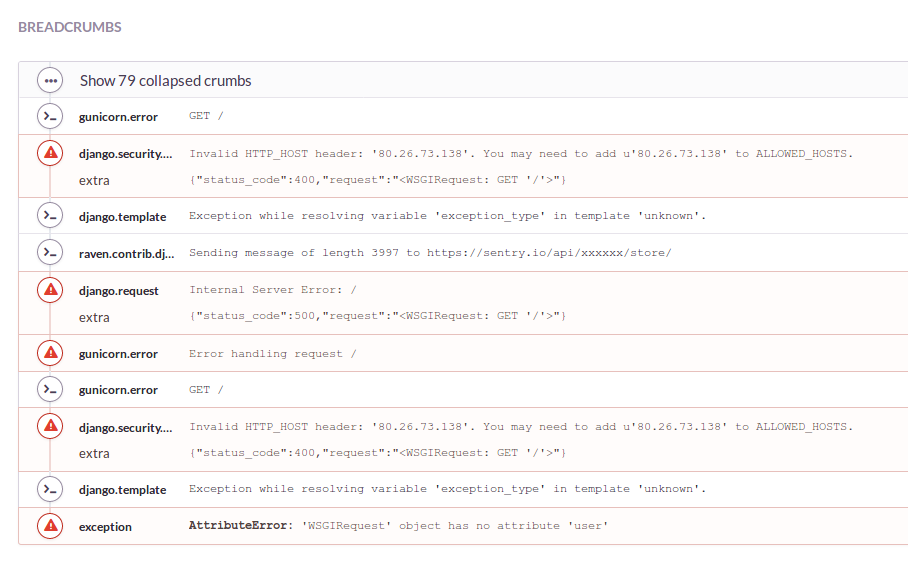
I had a similar error in my production server and thanks to sentry’s breadcrumbs I saw that the error that was raising had to do with my settings, especially the ALLOWED_HOSTS.
Django version 1.10.8 with python 2.7.
My previous settings:
ALLOWED_HOSTS = ['0.0.0.0',
                 'beta.mydomain.co.uk',
                 'mydomain.co.uk',
                 'www.mydomain.co.uk',
                 'alpha.mydomain.co.uk']
Sentry Breadcrumbs screen shot:
After that I looked around and found this:
A value beginning with a period can be used as a subdomain wildcard:
‘.example.com’ will match example.com, www.example.com, and any other
subdomain of example.com.
Link to Django official docs
So my final settings that solved my problem:
ALLOWED_HOSTS = ['0.0.0.0',
                 'mydomain.co.uk',
                 'www.mydomain.co.uk',
                 '.mydomain.co.uk']
Hope this was useful 🙂
All methods was sourced from stackoverflow.com or stackexchange.com, is licensed under cc by-sa 2.5, cc by-sa 3.0 and cc by-sa 4.0