I have the following output:
2015/1/7    8
2015/1/8    49
2015/1/9    40
2015/1/10   337
2015/1/11   11
2015/1/12   3
2015/1/13   9
2015/1/14   102
2015/1/15   62
2015/1/16   10
2015/1/17   30
2015/1/18   30
2015/1/19   1
2015/1/20   3
2015/1/21   23
2015/1/22   12
2015/1/24   6
2015/1/25   3
2015/1/27   2
2015/1/28   16
2015/1/29   1
2015/2/1    12
2015/2/2    2
2015/2/3    1
2015/2/4    10
2015/2/5    13
2015/2/6    2
2015/2/9    2
2015/2/10   25
2015/2/11   1
2015/2/12   6
2015/2/13   12
2015/2/14   2
2015/2/16   8
2015/2/17   8
2015/2/20   1
2015/2/23   1
2015/2/27   1
2015/3/2    3
2015/3/3    2
And I’d like to draw a histogram
2015/1/7  ===
2015/1/8  ===========
2015/1/9  ==========
2015/1/10 ====================================================================
2015/1/11 ===
2015/1/11 =
...
Do you know if there is a bash command that would let me do that?
Answers:
Thank you for visiting the Q&A section on Magenaut. Please note that all the answers may not help you solve the issue immediately. So please treat them as advisements. If you found the post helpful (or not), leave a comment & I’ll get back to you as soon as possible.
Method 1
In perl:
perl -pe 's/ (d+)$/"="x$1/e' file
ecauses the expression to be evaluated, so I get=repeated using the value of$1(the number matched by(d+)).- You could do
"="x($1/3)instead of"="x$1to get shorter lines. (The/is escaped since we’re in the middle of a substitution command.)
In bash (inspired from this SO answer):
while read d n
do
    printf "%st%${n}sn" "$d" = | tr ' ' '='
done < test.txt
printfpads the second string using spaces to get a width of$n(%${n}s), and I replace the spaces with=.- The columns are delimited using a tab (
t), but you can make it prettier by piping tocolumn -ts't'. - You could use
$((n/3))instead of${n}to get shorter lines.
Another version:
unset IFS; printf "%st%*sn" $(sed 's/$/ =/' test.txt) | tr ' ' =
The only drawback I can see is that you’ll need to pipe sed‘s output to something if you want to scale down, otherwise this is the cleanest option. If there is a chance of your input file containing one of [?* you should lead the command w/ set -f;.
Method 2
Try this in perl :
perl -lane 'print $F[0], "t", "=" x ($F[1] / 5)' file
EXPLANATIONS:
-ais an explicitsplit()in@Farray, we get the values with$F[n]xis to tell perl to print a character N times($F[1] / 5): here we get the number and divide it by 5 for a pretty print output (simple arithmetic)
Method 3
Easy with awk
awk '{$2=sprintf("%-*s", $2, ""); gsub(" ", "=", $2); printf("%-10s%sn", $1, $2)}' file

2015/1/7 ========
2015/1/8 =================================================
2015/1/9 ========================================
..
..
Or with my favourite programming language
python3 -c 'import sys
for line in sys.stdin:
  data, width = line.split()
  print("{:<10}{:=<{width}}".format(data, "", width=width))' <file
Method 4
How about:
#! /bin/bash
histo="======================================================================+"

read datewd value

while [ -n "$datewd" ] ; do
   # Use a default width of 70 for the histogram
   echo -n "$datewd      "
   echo ${histo:0:$value}

   read datewd value
done
Which produces:
~/bash $./histogram.sh < histdata.txt
2015/1/7    ========
2015/1/8    =================================================
2015/1/9    ========================================
2015/1/10   ======================================================================+
2015/1/11   ===========
2015/1/12   ===
2015/1/13   =========
2015/1/14   ======================================================================+
2015/1/15   ==============================================================
2015/1/16   ==========
2015/1/17   ==============================
2015/1/18   ==============================
2015/1/19   =
2015/1/20   ===
2015/1/21   =======================
2015/1/22   ============
2015/1/24   ======
2015/1/25   ===
2015/1/27   ==
2015/1/28   ================
2015/1/29   =
2015/2/1    ============
2015/2/2    ==
2015/2/3    =
2015/2/4    ==========
2015/2/5    =============
2015/2/6    ==
2015/2/9    ==
2015/2/10   =========================
2015/2/11   =
2015/2/12   ======
2015/2/13   ============
2015/2/14   ==
2015/2/16   ========
2015/2/17   ========
2015/2/20   =
2015/2/23   =
2015/2/27   =
2015/3/2    ===
2015/3/3    ==
~/bash $
Method 5
You could do something like that with the bar verb in Miller
$ mlr --nidx --repifs --ofs tab bar -f 2 file
2015/1/7    ***.....................................
2015/1/8    *******************.....................
2015/1/9    ****************........................
2015/1/10   ***************************************#
2015/1/11   ****....................................
2015/1/12   *.......................................
.
.
.
Method 6
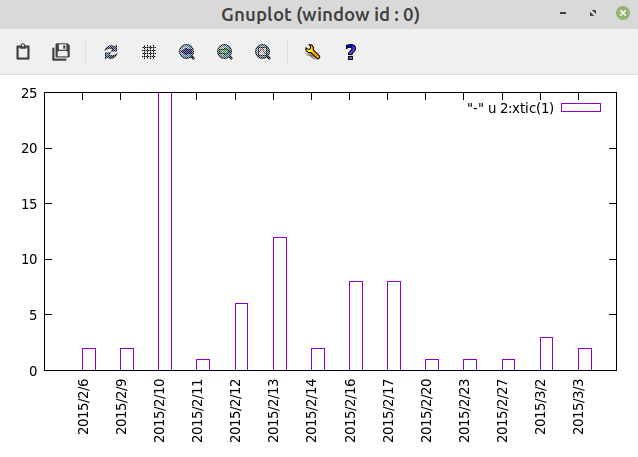
(this is not exactly what you ask, but) With Gnuplot, if you are in X, try:
gnuplot -p -e 'set sty d hist;set xtic rot; plot "file" u 2:xtic(1)'
Method 7
This struck me as a fun traditional command line problem. Here’s my bash script solution:
awk '{if (count[$1]){count[$1] += $2} else {count[$1] = $2}}
        END{for (year in count) {print year, count[year];}}' data |
sed -e 's/// /g' | sort -k1,1n -k2,2n -k3,3n |
awk '{printf("%d/%d/%dt", $1,$2,$3); for (i=0;i<$4;++i) {printf("=")}; printf("n");}'
The little script above assumes the data is in a file imaginatively named “data”.
I’m not too happy with the “run it through sed and sort” line – it would be unnecessary if your month and day-of-month always had 2 digits, but that’s life.
Also, as a historical note, traditional Unixes used to come with a command line plotting utility that could do fairly ugly ASCII graphs and plots. I can’t remember the name, but it looks like GNU plotutils replace the old traditional utility.
Method 8
Try this:
while read value count; do
    printf '%s:t%sn' "${value}" "$(printf "%${count}s" | tr ' ' '=')"
done <path/to/my-output
The only tricky part is the construction of the bar. I do it here by delegating to printf and tr like this SO answer.
As a bonus, it’s POSIX-sh-compliant.
References:
- https://stackoverflow.com/questions/5349718/how-can-i-repeat-a-character-in-bash/5349796#5349796
- https://www.unix.com/man-page/posix/1P/printf/
- https://www.unix.com/man-page/posix/1P/tr/
Method 9
Nice exercise here. I dumped the data in a file called “data” because I am very imaginative.
Well, you asked for it in bash… here it is in pure bash.
cat data | while read date i; do printf "%-10s " $date; for x in $(seq 1 $i); do echo -n "="; done; echo; done
awk is a better option.
awk '{ s=" ";while ($2-->0) s=s"=";printf "%-10s %sn",$1,s }' data
All methods was sourced from stackoverflow.com or stackexchange.com, is licensed under cc by-sa 2.5, cc by-sa 3.0 and cc by-sa 4.0