I am reading this intro to the command line by Mark Bates.
In the first chapter, he mentions that hard links cannot span file systems.
An important thing to note about hard links is that they only work on the current file system. You can not create a hard link to a file on a different file system. To do that you need to use symbolic links, Section 1.4.3.
I only know of one filesystem. The one starting from root (/). This statement that hard links cannot span over file systems doesn’t make sense to me.
The Wikipedia article on Unix file systems is not helpful either.
Answers:
Thank you for visiting the Q&A section on Magenaut. Please note that all the answers may not help you solve the issue immediately. So please treat them as advisements. If you found the post helpful (or not), leave a comment & I’ll get back to you as soon as possible.
Method 1
Hopefully I can answer this in a way that makes sense for you.
A file system in Linux, is generally made up of a partition that is formatted in one of various ways (gotta love choice!) that you store your files on. Be that your system files, or your personal files… they are all stored on a file system. This part you seem to understand.
But what if you partition your hard drive to have more than one partition (think Apple Pie cut up into pieces), or add an additional hard drive (perhaps a USB stick?). For the sake of argument, they all have file systems on them as well.
When you look at the files on your computer, you’re seeing a visual representation of data on your partition’s file system. Each file name corresponds to what is called an inode, which is where your data, behind the scenes, really lives. A hard link lets you have multiple “file names” (for lack of a better description) that point to the same inode. This only works if those hard links are on the same file system. A symbolic link instead points to the “file name”, which then is linked to the inode holding your data. Forgive my crude artwork but hopefully this explains better.
image.jpg             image2.jpg
                     /
           [your data]
here, image.jpg, and image2.jpg both point directly to your data. They are both hardlinks. However…
image.jpg    <-----------  image2.jpg

             [your data]
In this (crude) example, image2.jpg doesn’t point to your data, it points to the image.jpg… which is a link to your data.
Symbolic links can work across file system boundaries (assuming that file system is attached and mounted, like your usb stick). However a hard link cannot. It knows nothing about what is on your other file system, or where your data there is stored.
Hopefully this helps make better sense.
Method 2
The File system is composed by a directory structure composed for directory entries to organize files. Each directory entry associates a file-name with an inode.
Soft links (symbolic) are directory entries that does not contain data, it just points to another entry (a file or directory in the same file system or other file system). And when you delete the pointed file, the symbolic link becomes unusable.
Hard links are directory entry that contains the file name and inode number. When you remove the last hard link, you can no longer access the file.
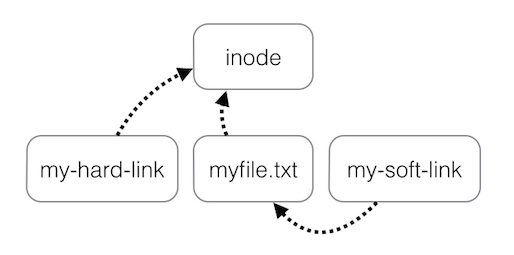
Conclusion:
As the inode is a data structure used to represent a file-system object, it’s internal to the File system, and you can’t point to an inode of another file system.
Thus, hard-links are only valid within the same File system, but soft-links (Symbolic link) can span file systems as they simply point to another directory entry (The interface of the file-system, and not an internal object).
Method 3
Hard links have the effect of keeping their target alive. As long as any hard link is reachable, the system will ensure that its target cannot get released. It is therefore necessary that all media that could contain hard links to a particular inode be mounted any time the system would be trying to determine whether any references exist to it.
Given that inode lifetime is usually determined by maintaining reference counts rather than scanning for references, it might be possible to arrange things to that two or more file systems that held links to each other could be used independently provided there was no need to use links which bridged between the systems, and provided there was no need to use fsck on either one. If inode counts on one of the systems got disturbed, however, the only way to make that system useful again would be to use a form of fsck operation which could scan both file systems for references. Because of that constraint, while it might be possible to allow two inter-linked file systems to be usable independently, the benefits of doing so would probably be too limited to make it worthwhile.
Method 4
The root filesystem can be made up of several filesystems; /usr/local might be mounted on a separate partition and /home might be on another partition on a networked disk somewhere else. In this case, a hard link for /usr/local/bin/git (for example) may not be created outside of /usr/local, because it would span filesystems.
The reason for this is that the inodes are allocated separately for /, /usr/local and /home (again, in this example), and when you create a hard link you really just make an additional name for an inode.
Method 5
A single inode number use to represent file in each file system. All hard links based upon inode number. File system reference link here .
All methods was sourced from stackoverflow.com or stackexchange.com, is licensed under cc by-sa 2.5, cc by-sa 3.0 and cc by-sa 4.0