sudo apt-get install pppoe
will download pppoe package and install it.
Is it possible to just download pppoe package and not install it with apt-get command?
wget http://ftp.us.debian.org/debian/pool/main/p/ppp/ppp_2.4.7-1+4_amd64.deb
ppp_2.4.7-1+4_amd64.deb is in the current directory now.
cd  /tmp
sudo  apt-get install  -d  ppp
Reading package lists... Done
Building dependency tree
Reading state information... Done
The following NEW packages will be installed:
  ppp
0 upgraded, 1 newly installed, 0 to remove and 95 not upgraded.
Need to get 0 B/346 kB of archives.
After this operation, 949 kB of additional disk space will be used.
Download complete and in download only mode
No ppp_2.4.7-1+4_amd64.deb or ppp related package in /tmp.
sudo find /tmp -name ppp*
Nothing found.
Where is the package ppp in /tmp with command
cd  /tmp
sudo  apt-get install  -d  ppp
??
Answers:
Thank you for visiting the Q&A section on Magenaut. Please note that all the answers may not help you solve the issue immediately. So please treat them as advisements. If you found the post helpful (or not), leave a comment & I’ll get back to you as soon as possible.
Method 1
Use --download-only:
sudo apt-get install --download-only pppoe
This will download pppoe and any dependencies you need, and place them in /var/cache/apt/archives. That way a subsequent apt-get install pppoe will be able to complete without any extra downloads.
Method 2
Use this command:
apt-get download pppoe
This command let you download the package into the current directory.
For accessing installed .deb files, you can look in this path:
/var/cache/apt/archives
Method 3
To expand on Hamid’s answer slightly, any of these three very similar commands will work if your only desire is to only download the specified package, and nothing else. (Your use case is not clearly stated, so it’s unclear if that is what you want to do.) They all download the Debian binary package file corresponding to the specified binary Debian package to the current directory. Note that these commands will download only the binary package specified, and none of its dependencies. If you want the dependencies as well, use the answer provided by Stephen Kitt.
apt-get download ppoe

apt download ppoe

aptitude download ppoe
The first two command are part of the apt package, the third is part of the aptitude package. They are all functionally equivalent, as far as I know, though syntax and usage differences between apt and aptitude may cause you to prefer one of them under certain circumstances. And of course apt is a newer command than apt-get – it contains apt-get and apt-cache functionality while discarding some of the historical baggage.
Note also that if any of these commands find the file already in the current directory, they will not download it again. However, I’m not sure what criteria they use to check – or, in other words, how hard it is to fool them. A blank file doesn’t work.
Method 4
Newer versions can use
apt download pppoe
It will be downloaded into the current directory.
(For ubuntu-based distributions whose version >=18.04)
Method 5
When working on one Ubuntu server that had no internet but accessible through the company intranet. Installing packages was challenging.
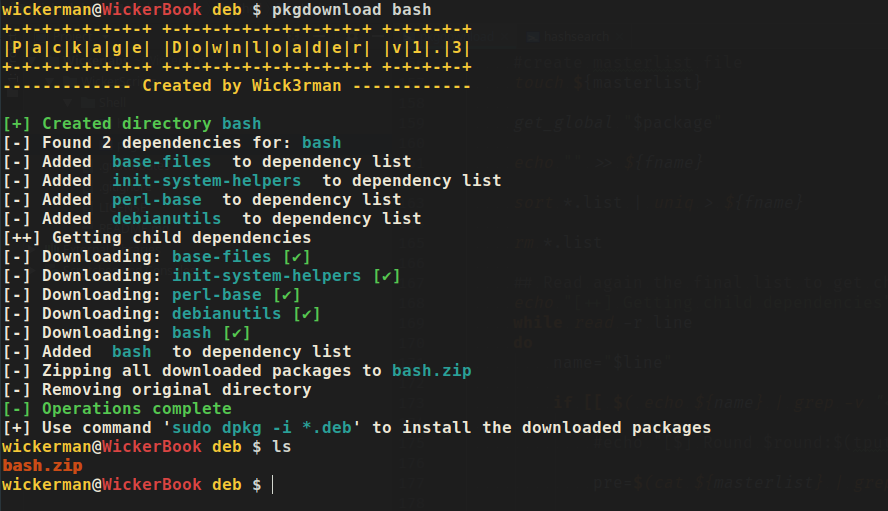
I created a script that will search the dependencies of a required package store them in a list, then go through the list to download other child dependencies because sometimes just one pass of dependency downloading was not enough. After it downloaded the dependencies it bundled them in a zip file that can be moved as a whole to the server. I called this script pkgdownload.
It can be found on my GitHub here
Here’s an image of it at work:
Method 6
apt provides a source retrieval command – apt source.
$ apt source pppoe
Reading package lists... Done
Picking 'rp-pppoe' as source package instead of 'pppoe'
Need to get 239 kB of source archives.
Get:1 http://mirror.location.org/debian stretch/main rp-pppoe 3.12-1.1 (dsc) [1,708 B]
Get:2 http://mirror.location.org/debian stretch/main rp-pppoe 3.12-1.1 (tar) [224 kB]
Get:3 http://mirror.location.org/debian stretch/main rp-pppoe 3.12-1.1 (diff) [13.2 kB]
Fetched 239 kB in 0s (1,241 kB/s)
dpkg-source: info: extracting rp-pppoe in rp-pppoe-3.12
dpkg-source: info: unpacking rp-pppoe_3.12.orig.tar.gz
dpkg-source: info: unpacking rp-pppoe_3.12-1.1.debian.tar.xz
dpkg-source: info: applying 01_auto_ifup.patch
dpkg-source: info: applying 02_change_mac_option.patch
dpkg-source: info: applying 03_man_pages.patch
dpkg-source: info: applying 04_ignore_broadcasted_pado_packets.patch
dpkg-source: info: applying 05_change_default_timeout.patch
dpkg-source: info: applying 06_typo_fixes.patch
For this to work, you need a source repository in your sources.list or sources.list.d directory (/etc/apt/sources.list or /etc/apt/sources.list.d/. Such a line would look something like (replace with suitable mirror and repository sections):
deb-src http://mirror.location.org/debian/ stretch main contrib non-free
Method 7
You can download the package file into a specific directory with wget:
$ wget -O ~/Downloads/ppp_2.4.7-1+4_amd64.deb http://ftp.us.debian.org/debian/pool/main/p/ppp/ppp_2.4.7-1+4_amd64.deb
All methods was sourced from stackoverflow.com or stackexchange.com, is licensed under cc by-sa 2.5, cc by-sa 3.0 and cc by-sa 4.0