Thank you very much for reading this. I am very new to bash so I need your advice in the following:
I want to write a bash script that would read a file with 2 columns
f  2
g  1
s  4
d  5
f  2
g  5
d  9
g  10
h  1
s  5
d  29
My script would actually sort this file based on the first column (alphabet) and produce a file called alpha_sorted.txt and then I want it to do the same thing for the numbers and name it numbers_sorted.txt.
I am very new to this so I would like to ask for your help if possible supplying me with documents or links or even helping out with the code.
The script is meant to be for introductory level so complicating the methods is not advised.
Update
Using john1024’s answer, I have the following problem:
<a href="https://getridbug.com/cdn-cgi/l/email-protection" class="__cf_email__" data-cfemail="9ad2fbe9fbf4dad2fbe9fbf4d9f2e8">[email protected]</a> /cygdrive/c/users/Hasan/Desktop/Bash
$ chmod +x script.sh

<a href="https://getridbug.com/cdn-cgi/l/email-protection" class="__cf_email__" data-cfemail="a1e9c0d2c0cfe1e9c0d2c0cfe2c9d3">[email protected]</a> /cygdrive/c/users/Hasan/Desktop/Bash
$ ./script.sh
cat: alpha_sorted.txt: No such file or directory
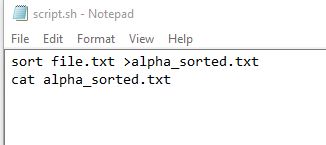
Here is a screenshot of script.sh
Answers:
Thank you for visiting the Q&A section on Magenaut. Please note that all the answers may not help you solve the issue immediately. So please treat them as advisements. If you found the post helpful (or not), leave a comment & I’ll get back to you as soon as possible.
Method 1
Since this is posted this on unix.stackexchange.com, I am going to assume that you have access to the usual unix tools.
Alphabetic sorting on first column:
$ sort file.txt >alpha_sorted.txt
$ cat alpha_sorted.txt
d  29
d  5
d  9
f  2
f  2
g  1
g  10
g  5
h  1
s  4
s  5
Numeric sorting:
$ sort -nk2,2 file.txt >numbers_sorted.txt
$ cat numbers_sorted.txt
g  1
h  1
f  2
f  2
s  4
d  5
g  5
s  5
d  9
g  10
d  29
-n specifies numeric sorting. -k2,2 specifies sorting on the second column.
For more information, see man sort.
Problems editing a Unix script with Notepad
I created a script with DOS line-endings:
$ cat dos.sh
sort file.txt >alpha_sorted.txt
cat alpha_sorted.txt
Although it is not visible, I added a space at the end of the cat command. With this file, I can reproduce the error that you saw:
$ chmod +x dos.sh
$ dos.sh
cat: alpha_sorted.txt: No such file or directory
: No such file or directory
We can correct this problem with a utility such as dos2unix or tr. Using tr:
$ tr -d 'r' <dos.sh >fixed.sh
$ chmod +x fixed.sh
Now, we can run the command successfully:
$ fixed.sh
d  29
d  5
d  9
f  2
f  2
g  1
g  10
g  5
h  1
s  4
s  5
Method 2
There are better ways to sort than to do it purely in bash. This is not a good answer to your question — it’s not simple (because it uses several features of bash that aren’t common-place), and it doesn’t do things “The Unix Way”, which is to use tools that are pre-built for doing one thing and doing it well (such as sorting).
I decided to write this Answer up to help make a larger point that your account’s default shell is built to run commands and redirect I/O. Just because a shell has a multitude of features, like Bash does doesn’t mean it’s the best tool for a particular job. You’ll very often see answers here that suggest using awk or perl (or jq or sort …) instead of trying to hack it into a shell-only script.
That being said, bash can sort — it’s just not built-in. I’ll repeat myself: it’s still not a good idea. But you can do it. Below are four functions, implemented in bash, that sort two different ways on each of the two fields.
The functions use:
- arrays
- local function variables
- mapfile
for ((loops- complex parameter substitution
- bash’s
[[test operator for doing the actual sorting - bash’s
[[test operator for parsing out the two values - bash’s
readbuilt-in
The insertion sort is not efficient (O(n)2), but certainly reasonable for small datasets, such as the 11-line example. The four functions ran in sub-second time for the sample data, but for a randomly-generated 1,000 line input file, the “separate array” sorts took ~15 seconds while the “in-place” versions took ~60 seconds because of all of the re-processing of the values. Compare this to the standard sort utility which sorted the 1,000 line file on either column in sub-thousandths-of-a-second time.
The two “inplace” functions attempt to save a few bytes by creating only one array (and some one-off variables for looping and swapping values); on the plus side, it uses a neat bash function to map file contents into arrays. The “keyed” functions throw caution to the wind and create two separate arrays, one for the desired keys to sort on and the other of the actual values.
function sort_inplace_f1 {
  local array
  mapfile -t array < "$1"
  local i j tmp
  for ((i=0; i <= ${#array[@]} - 2; i++))
  do
    for ((j=i + 1; j <= ${#array[@]} - 1; j++))
    do
      local ivalue jvalue
      [[ ${array[i]} =~ ([^[:space:]]+)[[:space:]]+(.*) ]]
      ivalue="${BASH_REMATCH[1]}"
      [[ ${array[j]} =~ ([^[:space:]]+)[[:space:]]+(.*) ]]
      jvalue=${BASH_REMATCH[1]}
      if [[ $ivalue > $jvalue ]]
      then
        tmp=${array[i]}
        array[i]=${array[j]}
        array[j]=$tmp
      fi
    done
  done
  printf "%sn" "${array[@]}"
}

function sort_inplace_f2 {
  local array
  mapfile -t array < "$1"
  local i j tmp
  for ((i=0; i <= ${#array[@]} - 2; i++))
  do
    for ((j=i + 1; j <= ${#array[@]} - 1; j++))
    do
      local ivalue jvalue
      [[ ${array[i]} =~ ([^[:space:]]+)[[:space:]]+(.*) ]]
      ivalue="${BASH_REMATCH[2]}"
      [[ ${array[j]} =~ ([^[:space:]]+)[[:space:]]+(.*) ]]
      jvalue=${BASH_REMATCH[2]}
      if [[ $ivalue > $jvalue ]]
      then
        tmp=${array[i]}
        array[i]=${array[j]}
        array[j]=$tmp
      fi
    done
  done
  printf "%sn" "${array[@]}"
}

function sort_keyed_f1 {
  local c1 c2 keys values
  while IFS=' ' read -r c1 c2
  do
    keys+=("$c1")
    values+=("$c1 $c2")
  done < "$1"

  local i j tmpk tmpv
  for ((i=0; i <= ${#keys[@]} - 2; i++))
  do
    for ((j=i + 1; j <= ${#keys[@]} - 1; j++))
    do
      if [[ ${keys[i]} > ${keys[j]} ]]
      then
        # swap keys
        tmpk=${keys[i]}
        keys[i]=${keys[j]}
        keys[j]=$tmpk
        # swap values
        tmpv=${values[i]}
        values[i]=${values[j]}
        values[j]=$tmpv
      fi
    done
  done
  printf "%sn" "${values[@]}"
}

function sort_keyed_f2 {
  local c1 c2 keys values
  while IFS=' ' read -r c1 c2
  do
    keys+=("$c2")
    values+=("$c1 $c2")
  done < "$1"

  local i j tmpk tmpv
  for ((i=0; i <= ${#keys[@]} - 2; i++))
  do
    for ((j=i + 1; j <= ${#keys[@]} - 1; j++))
    do
      if [[ ${keys[i]} -gt ${keys[j]} ]]
      then
        # swap keys
        tmpk=${keys[i]}
        keys[i]=${keys[j]}
        keys[j]=$tmpk
        # swap values
        tmpv=${values[i]}
        values[i]=${values[j]}
        values[j]=$tmpv
      fi
    done
  done
  printf "%sn" "${values[@]}"
}
Even after all of that, you still need one of your shell’s core “functions”, that is — to redirect the output to a file:
sort_keyed_f1 input-file > alpha_sorted.txt
sort_keyed_f2 input-file > numbers_sorted.txt
All methods was sourced from stackoverflow.com or stackexchange.com, is licensed under cc by-sa 2.5, cc by-sa 3.0 and cc by-sa 4.0