I use xterm (X-Win32 2012 Build 30 from StarNet Communications Corp) to login from a Windows 7 PC to a Red Enterprise Linux 6 (RHEL6).
My problem is that all multi-byte utf-8 characters comes out garbled in the xterm login shell. For example, here’s how the string “Wilhelm Röntgen” is rendered in the two shell instances (the font used is a Unicode font and is the same font in both shell instances):
 Login shell: Wilhelm Röntgen
 Second shell: Wilhelm Röntgen
If I’ve understood things correctly the software from rom StarNet Communications Corp implements (or emulates) a X terminal (a thin client that runs a X server). I.e. both shell instances runs in a X terminal window on the PC, and communicates with RHEL6 using the X11 protocol. Below is how both shells appear on my desktop, catenating a file with unicode multibye characters to the terminal.
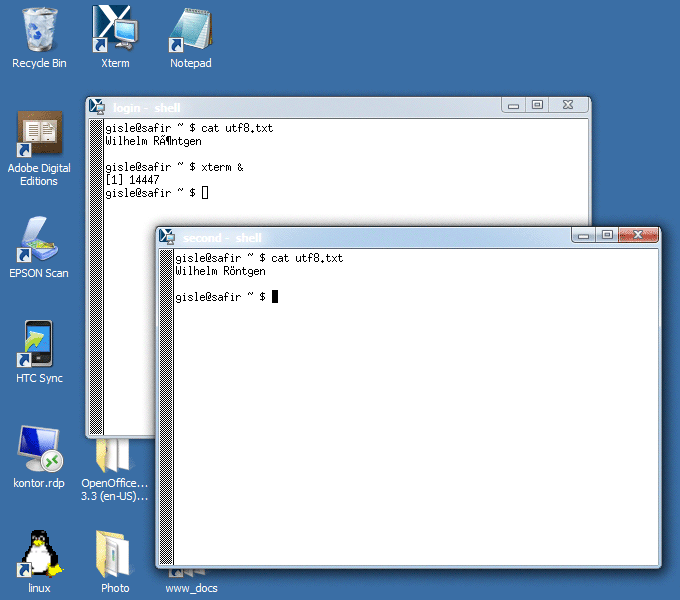
Here is the command I’ve configured X-Win32 to use to start the login shell:
xterm -u8 -ls
However, after I login, I can do xterm in the login shell, and that command that will fork a new xterm instance where locale setting works as expected (i.e. utf-8 characters are rendered correctly).
Here is the relevant settings as they appear in the login shell:
$ locale
LANG=en_US.UTF-8
LC_CTYPE=en_US.UTF-8
LC_NUMERIC="en_US.UTF-8"
LC_TIME="en_US.UTF-8"
LC_COLLATE=C
LC_MONETARY="en_US.UTF-8"
LC_MESSAGES="en_US.UTF-8"
LC_PAPER="en_US.UTF-8"
LC_NAME="en_US.UTF-8"
LC_ADDRESS="en_US.UTF-8"
LC_TELEPHONE="en_US.UTF-8"
LC_MEASUREMENT="en_US.UTF-8"
LC_IDENTIFICATION="en_US.UTF-8"
LC_ALL=

$ printenv XTERM_LOCALE
en_US.UTF-8
I also have the following two lines in .Xresources:
xterm*locale: true
xterm*utf8: 1
It looks like the login shell xterm doesn’t recognise the locale I’ve set, but I don’t understand why not. My xterm is clearly capable of this, since all non-login shells do this by default.
Answers:
Thank you for visiting the Q&A section on Magenaut. Please note that all the answers may not help you solve the issue immediately. So please treat them as advisements. If you found the post helpful (or not), leave a comment & I’ll get back to you as soon as possible.
Method 1
At the time the sshd process on the remote computer forks to run /usr/bin/xterm there are very few environment variable set. In fact the LANG variable is not set. Hence the xterm process does not know that it should display characters in UTF-8. It falls back to xterms defaults. Whatever that might be.
However, the subshell running inside the xterm runs all setup scripts and alike.
Including setting the LANG environment variable.
One needs to understand the difference between the remote xterm process and the shell process running inside of xterm.
The solution is to run the remote xterm process like this:
/usr/bin/env LANG=en_US.UTF-8 /usr/bin/xterm
env(1) is a utility to run a program in a modified environment.
Setting LANG will make the remote xterm display UTF-8 characters properly.
Eskil…
🙂
P.s: Reading the xterm manual page I also found an easier way to achieve this:
xterm -en en_US.UTF-8
P.P.s: I do not think setting resources in ~/.Xresources will take effect unless you merge them in with xrdb. The xterm process on the Linux computer will query the X server running on your windows computer. At the time where xterm starts it is very unlikely that your X-Win32 server has the xterm* resources set. But you might be able to set resources in X-Win32 if it supports that.
Method 2
I think you’re not telling xterm to use a Unicode font. I see that you’re using some xterm-compiled-for-Windows or something, but under Arch (and other distros) when running a real xterm, I start it like this:
xterm -u8 -fn '-misc-fixed-bold-r-normal--15-140-75-75-c-90-iso10646-1'
Another Windows terminal emulator, PuTTY, seems pretty good at showing UTF-8. If you are allowed, you should put PuTTY, set it to use a UTF-8 character set, and connect to the Red Hat server. If PuTTY correctly renders multi-byte UTF-8 characters, you know the problem is not on the server side, but rather in the terminal emulator.
Method 3
The question and followup comments indicate some confusion. According to StarNet’s knowledgebase article Where is My Terminal Emulator?
X-Win32 is an X Server which main purpose is to display remote graphical applications. Most modern Unix/Linux systems have an X based terminal emulator included in the X libraries. As such X-Win32 does not include one by default.
A comment added to the question by @bruce-ediger states that
I don’t think any xterm process is ever running on the RHEL server.
When I type in xterm in the shell on RHEL, all it does is to send a message to the X windows server on the PC, requesting that it creates another xterm process/window.The X-Win32 from StarNet Comm. Corp. turns my PC into a X terminal, and both xterm instances executes on the PC, using the X.11 protocol to communicate with the ssh instances on RHEL6. At least, that is the way I believe X11 works.
But that is not the way it works. The xterm process started on the RHEL server runs on that server. It communicates with the StarNet X server (X-Win32), but the xterm process stays where it was started.
The simplest way to start xterm using UTF-8 is via the uxterm script (which is part of the same package that includes xterm and its resource-files). According to the xterm FAQ describing uxterm:
XTerm does not automatically set your locale. It can be told to use your locale settings. This is a shell script which sets xterm’s resources to use UTF-8 encoding, and use UTF-8 fonts. There is a similar
lxtermscript, but it relies upon non-portable applications, unlikeuxterm.
As noted in other comments, your environment variables on login may not have enough information to start xterm automatically with UTF-8 encoding (and fonts). That is done by the uxterm script.
All methods was sourced from stackoverflow.com or stackexchange.com, is licensed under cc by-sa 2.5, cc by-sa 3.0 and cc by-sa 4.0