It’s the first time I’m installing and configuring Wireshark in a rpm-based distro. In the past I’ve installed it properly on Ubuntu, Mint or Debian.
Don’t know why, but it seems I cannot run it as standard user. I’ve done the process of creating the wireshark group and adding the user to that group and then change the group of dumpcap to wireshark, but no way, it doesn’t work.
In .deb systems I haven’t had any problem following such steps, so don’t know what could be missing.
Thoughts?
Answers:
Thank you for visiting the Q&A section on Magenaut. Please note that all the answers may not help you solve the issue immediately. So please treat them as advisements. If you found the post helpful (or not), leave a comment & I’ll get back to you as soon as possible.
Method 1
See my answer to this other U&L Q&A titled: “tshark: There are no interfaces on which a capture can be done” in Amazon Linux AMI. The Amazon AMI images are based on CentOS images and so the steps I outlined in that answer should apply here as well.
You need to perform the following steps to allow non-root users access to the dumpcap file so that they can open it for use within tshark/wireshark.
$ sudo groupadd wireshark
$ sudo usermod -a -G wireshark saml
$ setcap cap_net_raw,cap_net_admin=eip /usr/sbin/dumpcap
NOTE: It should be noted here that after making the above changes you’ll need to logout and log back in so that the new group gets picked up by your username. You can confirm with the groups command.
$ groups
saml wheel wireshark
Launching wireshark
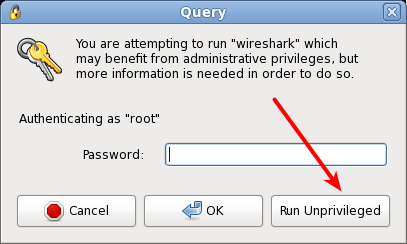
Once you’ve made the above changes you can now launch wireshark. It should be noted that when you run it you’ll still be presented with a dialog which makes you think it didn’t work, but this is just giving you the opportunity to either run wireshark as yourself, “unprivileged”, or as root.
Step #1: After launching, you’ll see this dialog.
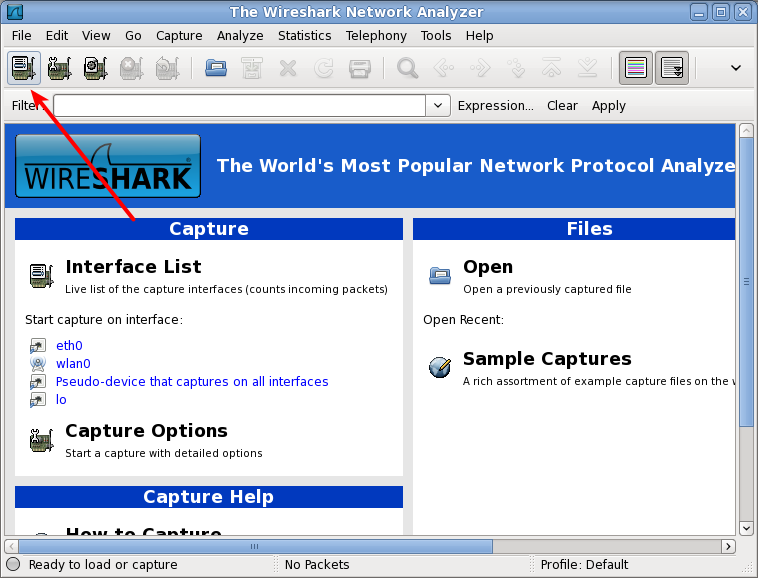
Step #2: If you select unprivileged, you’ll be presented with the main wireshark GUI:
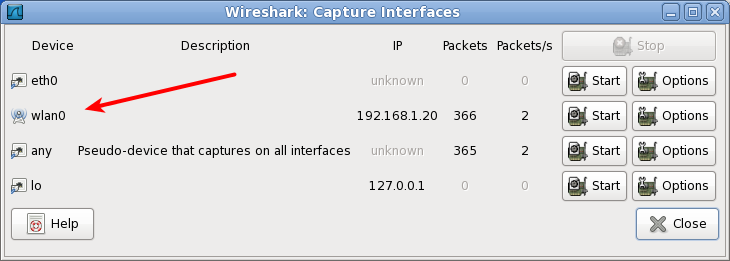
Step #3: If you select the available devices, you’ll notice that you can see these in promiscuous mode, which typically is not an option without the above capabilities changes:
Method 2
The procedure to run Wireshark as non-root user in CentOS is the same as in other distros.
However, in CentOS when running Wireshark, it keeps prompting for either input the root password or run unprivileged, whereas in other distros (at least the distros said above) it opens directly.
The mistake was my wrong assumption that it wasn’t working because it didn’t opened directly, but after perform the steps I said in the body of the question (http://wiki.wireshark.org/CaptureSetup/CapturePrivileges) it does work clicking on running as unprivileged user.
All methods was sourced from stackoverflow.com or stackexchange.com, is licensed under cc by-sa 2.5, cc by-sa 3.0 and cc by-sa 4.0