I need to be able to execute an executable shell script (sh) with a double click. I set the executable flag on the permissions for the file, and yet when I double click on it, it opens in a text editor. I do not have any options in my UI under the files properties menu to use a custom command or anything. It only lists various applications which are installed. I just want it to execute, nothing more. How can I accomplish this?
Answers:
Thank you for visiting the Q&A section on Magenaut. Please note that all the answers may not help you solve the issue immediately. So please treat them as advisements. If you found the post helpful (or not), leave a comment & I’ll get back to you as soon as possible.
Method 1
To run your script by double clicking on its icon, you will need to create a .desktop file for it:
[Desktop Entry]
Name=My script
Comment=Test hello world script
Exec=/home/user/yourscript.sh
Icon=/home/user/youricon.png
Terminal=false
Type=Application
Save the above as a file on your Desktop with a .desktop extension. Change /home/user/yourscript.sh and /home/user/youricon.png to the paths of your script and whichever icon you want it to have respectively and then you’ll be able to launch by double clicking it.
Method 2
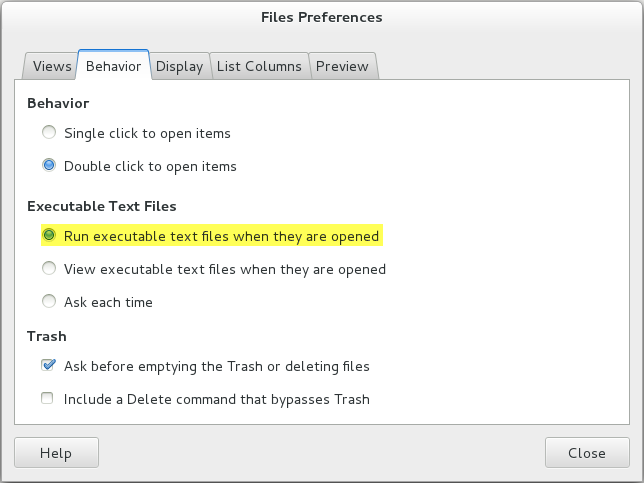
Its actually very simple to do that. Just go to your Nautilus files preferences and click on the ‘Behavior‘ tab. Under ‘Executable Text Files‘ check ‘Ask each time‘ or ‘Run executable text files when they are opened‘. Please look at the screenshot for reference.
Method 3
This involves using dconf-editor (sudo yum install dconf-editor):
Open dconf-editor, and navigate to the /org/gnome/nautilus/preferences menu.
Under “executable-text-activation”, change “Use default value” to OFF, and “Custom value” to ‘launch’.
You can then exit dconf-editor.
At this point, double-clicking on an icon which is a script, or a symbolic link to a script, will execute it, rather than opening up the file with gedit, which is what my system was doing.
So after changing the above preference, all I had to do is:
$ cd $HOME/Desktop

$ ln -s $HOME/bin/myscript.sh MyScript
and that’s that.
(My system is GNOME Version 3.1.2 running on CentOs 7)
You have to log-out and log-in again before the double click on the desktop icon works.
All methods was sourced from stackoverflow.com or stackexchange.com, is licensed under cc by-sa 2.5, cc by-sa 3.0 and cc by-sa 4.0