Which application would you recommend for Linux to tag MP3s? Under Windows I used to use Tag&Rename and liked it a lot; it works well under Wine, but I want something that runs natively.
Answers:
Thank you for visiting the Q&A section on Magenaut. Please note that all the answers may not help you solve the issue immediately. So please treat them as advisements. If you found the post helpful (or not), leave a comment & I’ll get back to you as soon as possible.
Method 1
There are various:
- easytag has a lot of options
- kid3 if you’re on a Qt/KDE environment
id3v2oreyeD3for the command line- Generally music players can also edit common tags, f.e.
banshee,rhythmboxoramarok
and a lot others, try searching your distributions repository and test some of them.
Method 2
I mostly use mid3v2. You can install it with sudo apt-get install python-mutagen in Ubuntu or with sudo easy_install pip;sudo pip install mutagen in OS X.
$ mid3v2 -h
Usage: mid3v2 [OPTION] [FILE]...

Mutagen-based replacement for id3lib's id3v2.

Options:
  --version             show program's version number and exit
  -h, --help            show this help message and exit
  -v, --verbose         be verbose
  -q, --quiet           be quiet (the default)
  -e, --escape          enable interpretation of backslash escapes
  -f, --list-frames     Display all possible frames for ID3v2.3 / ID3v2.4
  --list-frames-v2.2    Display all possible frames for ID3v2.2
  -L, --list-genres     Lists all ID3v1 genres
  -l, --list            Lists the tag(s) on the open(s)
  --list-raw            Lists the tag(s) on the open(s) in Python format
  -d, --delete-v2       Deletes ID3v2 tags
  -s, --delete-v1       Deletes ID3v1 tags
  -D, --delete-all      Deletes ID3v1 and ID3v2 tags
  --delete-frames=FID1,FID2,...
                        Delete the given frames
  -C, --convert         Convert tags to ID3v2.4 (any editing will do this)
  -a "ARTIST", --artist="ARTIST"
                        Set the artist information
  -A "ALBUM", --album="ALBUM"
                        Set the album title information
  -t "SONG", --song="SONG"
                        Set the song title information
  -c "DESCRIPTION":"COMMENT":"LANGUAGE", --comment="DESCRIPTION":"COMMENT":"LANGUAGE"
                        Set the comment information
  -g "GENRE", --genre="GENRE"
                        Set the genre or genre number
  -y YYYY[-MM-DD], --year=YYYY[-MM-DD], --date=YYYY[-MM-DD]
                        Set the year/date
  -T "num/num", --track="num/num"
                        Set the track number/(optional) total tracks
You can set the value for any ID3v2 frame by using '--' and then a frame ID.
For example:
        mid3v2 --TIT3 "Monkey!" file.mp3
would set the "Subtitle/Description" frame to "Monkey!".

Any editing operation will cause the ID3 tag to be upgraded to ID3v2.4.
id3v2 and id3tag don’t support Unicode and id3tool and mp3info don’t support ID3v2.
Method 3
I use Ex Falso. It was installed with QuodLibet music player, so I gave it a shot.
I’ve used it with single files, batches of files… It’s pretty intuitive, and best of all, works very well.
Method 4
I found this thread and decided to use id3tool. I was only interested in a very light-weight tool, command-line was fine. Trying to keep my system free of clutter brought on occasionally by weighty GUI-intensive tools.
Installing was super easy on Linux Mint:
sudo apt-get install id3tool
As far as I remember it didn’t require any additional libraries or anything. To get a full list of the available options:
man id3tool
To see the current metadata for an mp3 file:
id3tool <filename.mp3>
Here is the command I used to update quite afew mp3’s:
id3tool -t "<song title>" -a "<album name>" -r "<artist name>" -y "<year>" -c <track number, no quotes, just the number, like 1> <filename.mp3>
After doing this, I told Banshee to rescan my music library and there were no longer any files in the “Unknown” Category. Thanks to strangeronyourtrain for this tip!
Method 5
I’ve been a dedicated user of Picard for quite some time. The only cross-platform tagger that feels truly solid. Don’t forget MusicBrainz’s huge music database.
Method 6
I just discovered this little program called puddletag. It is not as wonderful as Tag & Rename, but it’s close enough.
From the website:
puddletag is an audio tag editor (primarily created) for GNU/Linux
similar to the Windows program, Mp3tag. Unlike most taggers for
GNU/Linux, it uses a spreadsheet-like layout so that all the tags you
want to edit by hand are visible and easily editable.The usual tag editor features are supported like extracting tag
information from filenames, renaming files based on their tags by
using patterns and basic tag editing.Then there’re Functions, which can do things like replace text, trim
it, do case conversions, etc. Actions can automate repetitive tasks.
Doing web lookups using Amazon (including cover art), Discogs (does
cover art too!), FreeDB and MusicBrainz is also supported. There’s
quite a bit more, but I’ve reached my comma quota.Supported formats: ID3v1, ID3v2 (mp3), MP4 (mp4, m4a, etc.),
VorbisComments (ogg, flac), Musepack (mpc), Monkey’s Audio (.ape) and
WavPack (wv).
Method 7
For GUI, I suggest easytag, and you can lookup more alternatives here. For the command line check out id3v2, but the alternatives are endless.
Method 8
I like eyeD3.
But install it from python pip not from apt. apt currently installs 0.6 version but pip installs latest I think. Docs here: https://eyed3.readthedocs.io/en/latest/ .
eyeD3 has good documentation so it’s easy to start. Also it has a bunch of useful plugins – try it!
$ pip install eyeD3
Method 9
I like TagTool and id3tool. Both are for the command line. I also find Picard useful for music files that exist in the MusicBrainz database.
Method 10
I would also suggest lltag.
Works on the command line, rather easy and fast. It also supports CDDB.
Method 11
Audacity has a metadata editing tool, which can be shown when exporting files or by going to ‘File’>’Edit metadata’:
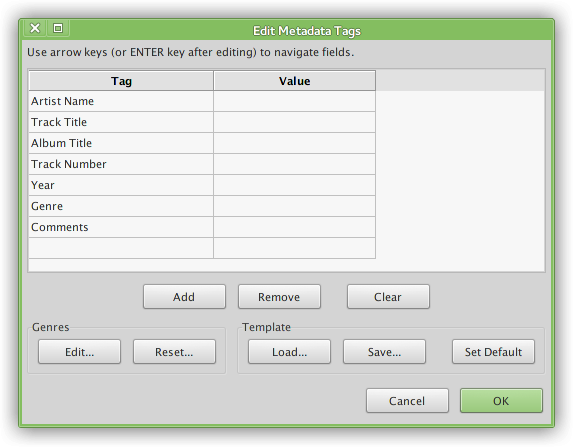
Note I think this uses ID3v2.4 tags (in Mp3), which are not compatible with some devices (and flippin Windows, even Win8…). Easytag however does have an options to use ID3v2.3, which should be compatible.
See also:
Method 12
#!/bin/bash
for i in *.mp3 ; do
resto=$(echo "${i}" | sed 's/.mp3$//')
mid3v2 -t "${resto}" "${i}"
echo "${i}"
done
All methods was sourced from stackoverflow.com or stackexchange.com, is licensed under cc by-sa 2.5, cc by-sa 3.0 and cc by-sa 4.0