I have the following piece of code.
bold=''
reset=$(echo -en '33[0m')
black=$(echo -en 'e[1;30m')
magenta=$(echo -en '33[00;35m')
blue=$(echo -en 'e[1;34m')
cyan=$(echo -en 'e[1;36m')
green=$(echo -en 'e[1;32m')
orange=$(echo -en 'e[1;33m')
purple=$(echo -en 'e[1;35m')
red=$(echo -en 'e[1;31m')
white=$(echo -en 'e[1;37m')
yellow=$(echo -en 'e[1;33m')
lime_yellow=$(echo -en 'e[1;33m')
power_blue=$(echo -en 'e[1;34m')
blink=$(echo -en 'e[1;31m')
reverse=$(echo -en 'e[1;31m')
underline=$(echo -en 'e[1;31m')

if [ -x /usr/bin/tput ] && tput setaf 1 &>/dev/null; then
    echo "tput color is supported."
    tput sgr0 # Reset colors
    bold=$(tput bold)
    reset=$(tput sgr0)
    black=$(tput setaf 0)
    magenta=$(tput setaf 5)
    blue=$(tput setaf 33)
    cyan=$(tput setaf 37)
    green=$(tput setaf 64)
    orange=$(tput setaf 166)
    purple=$(tput setaf 125)
    red=$(tput setaf 124)
    white=$(tput setaf 15)
    yellow=$(tput setaf 136)
    lime_yellow=$(tput setaf 190)
    power_blue=$(tput setaf 153)
    blink=$(tput blink)
    reverse=$(tput smso)
    underline=$(tput smul)
else
    echo "tput color is not supported. Use old school colors."
fi

echo ${red}RED${green}GREEN${yellow}YELLOW${blue}BLUE${purple}PURPLE${cyan}CYAN${white}WHITE${reset}
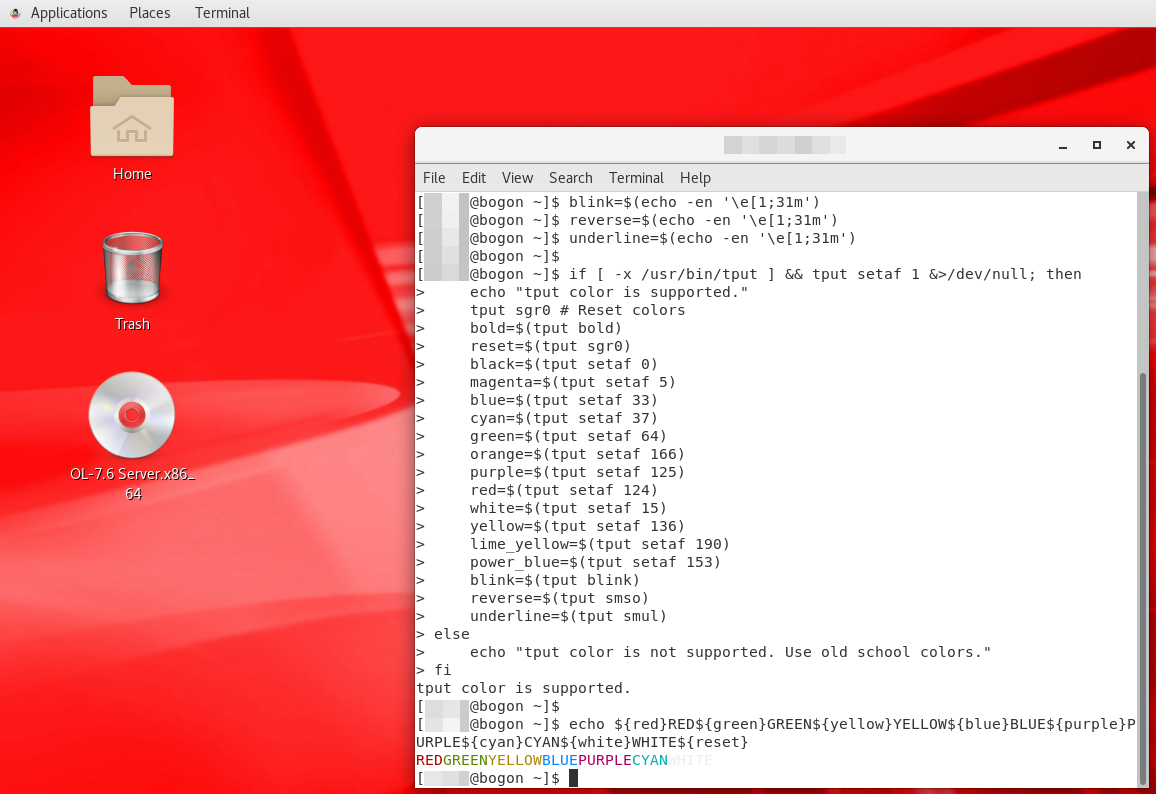
Basically there are two types of colors, tput generated or the old-fashioned escape characters like e[1;32m. Since the tput type is more interesting, for example, it supports blinking and underline, the code uses tput type color if possible. Here is an image to prove it works as expected in Oracle Linux 7.6 (kinda like RedHat or CentOS) GUI environment.
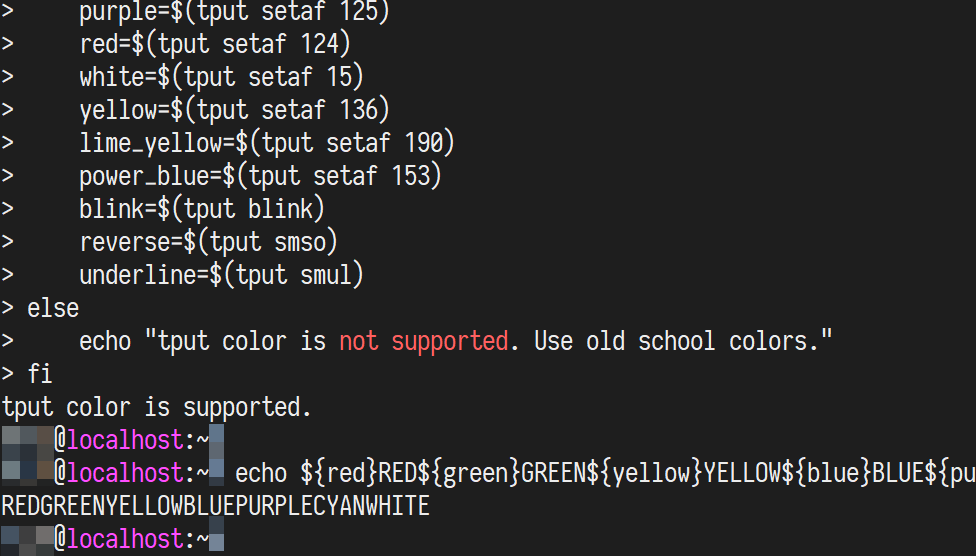
When I run it from other terminals, it doesn’t work. For example, below is the snapshot when running in MobaXterm.
I also tried putty and it doesn’t work either. Is there anything wrong with my code?
Update
I executed echo $TERM in each of the terminals and below is the result.
Oracle Linux with Desktop environment (color works)
Output: xterm-256color

MobaXterm on Windows (color doesn't work)
Output: xterm

putty on Windows (color doesn't work)
Output: xterm
Answers:
Thank you for visiting the Q&A section on Magenaut. Please note that all the answers may not help you solve the issue immediately. So please treat them as advisements. If you found the post helpful (or not), leave a comment & I’ll get back to you as soon as possible.
Method 1
You must configure your terminal type as putty, putty-256color, or putty-sco when using PuTTY, or things based upon it such as MobaXTerm. They are the only terminal types whose entries in the terminfo database correctly describe PuTTY.
It is a widespread incorrect assumption that terminal emulators are all compatible with XTerm, and that the xterm and xterm-256color entries in the terminfo database correctly describe them.
This erroneous thinking is called out in Thomas Dickey’s XTerm FAQ and it is worth observing that the xterm and xterm-256color entries do not even describe all versions of XTerm, let alone other terminal emulators.
The putty entry in the terminfo database describes a terminal that is only capable of 8 ECMA-48 colours. As, indeed, does the xterm entry. But merely switching from xterm to xterm-256colour is wrong. PuTTY differs from XTerm.
In fact, PuTTY is quite capable of indexed colour (256 colours from a palette) using ISO/IEC 8613 control sequences. Indeed, since 2017 it is quite capable of direct colour (24-bit RGB colour) using ISO/IEC 8613 control sequences. The putty-256colour entry describes the former. terminfo does not have a way to fully describe the latter.
Use the correct terminal type, and tput will look up the correct control sequences.
Further reading
Method 2
These codes should work :
    magenta=$(tput setaf 5)
    blue=$(tput setaf 4)
    cyan=$(tput setaf 6)
    green="$(tput setaf 2)"
    purple=$(tput setaf 5)
    red=$(tput setaf 1)
    white=$(tput setaf 7)
    yellow=$(tput setaf 3)
Method 3
It’s the terminal’s capability that doesn’t support the colors besides the 8 basic ones. I found this piece of code to test all available color (source: tput setaf color table? How to determine color codes?):
# Connector fifos directory
read TMPDIR < <(mktemp -d /dev/shm/bc_shell_XXXXXXX)

fd=3
# find next free fd
nextFd() { while [ -e /dev/fd/$fd ];do ((fd++)) ;done;printf -v $1 %d $fd;}

tputConnector() {
    mkfifo $TMPDIR/tput
    nextFd TPUTIN
    eval "exec $TPUTIN> >(LANG=C exec stdbuf -o0 tput -S - >$TMPDIR/tput 2>&1)"
    nextFd TPUTOUT
    eval "exec $TPUTOUT<$TMPDIR/tput"
}
myTput() { echo -e "$1ncr" 1>&$TPUTIN && IFS= read -r -d $'r' -u $TPUTOUT $2
}
tputConnector

myTput op op
myTput "setaf 7" grey
myTput "setaf 16" black
fore=("$black" "$grey")
for ((i=0; i<256; i++)) ;do
    myTput "setab $i" bgr
    printf "  %s%s  %3d  %s" "$bgr" "${fore[ i>231 && i<244||(i<17)&& (i%8<2)||
        (i>16&&i<232)&&((i-16)%6*11+(i-16)/6%6*14+(i-16)/36*10)<58
        ? 1 : 0 ]}" $i "$op"
    (( ((i<16||i>231) && ((i+1)%8==0)) || ((i>16&&i<232)&& ((i-15)%6==0)) )) &&
        printf "n" ''
done
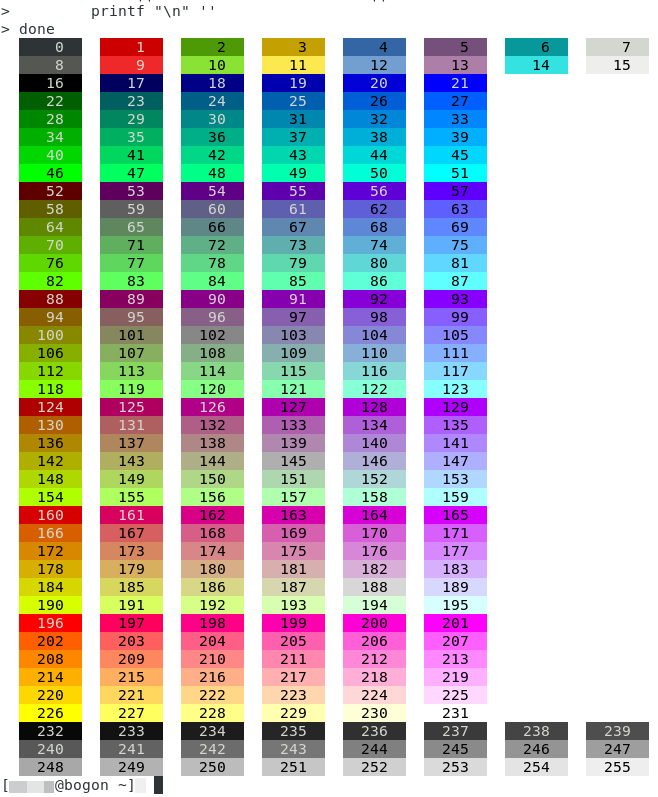
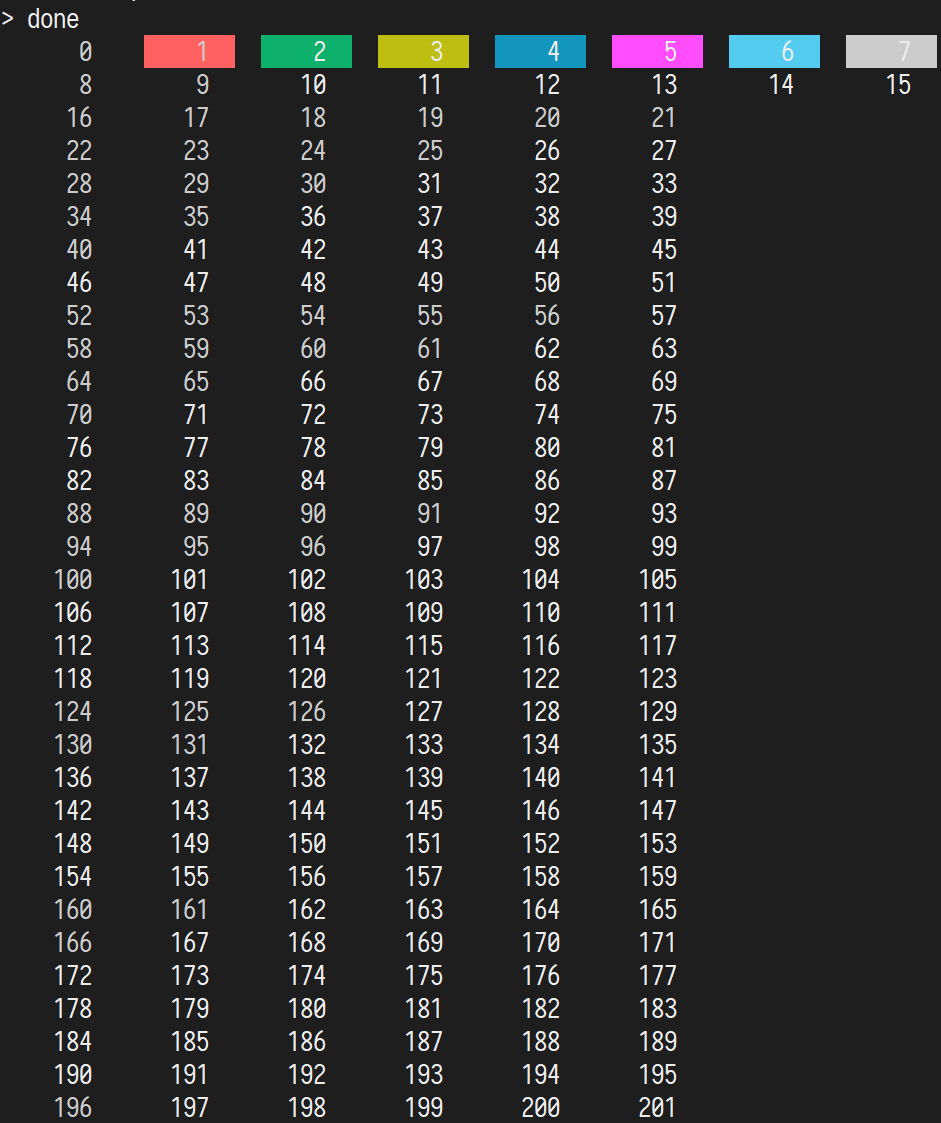
Below is the output from all three terminal I’ve tested.
-
Oracle Linux with Desktop environment
-
MobaXterm on Windows
-
putty on Windows
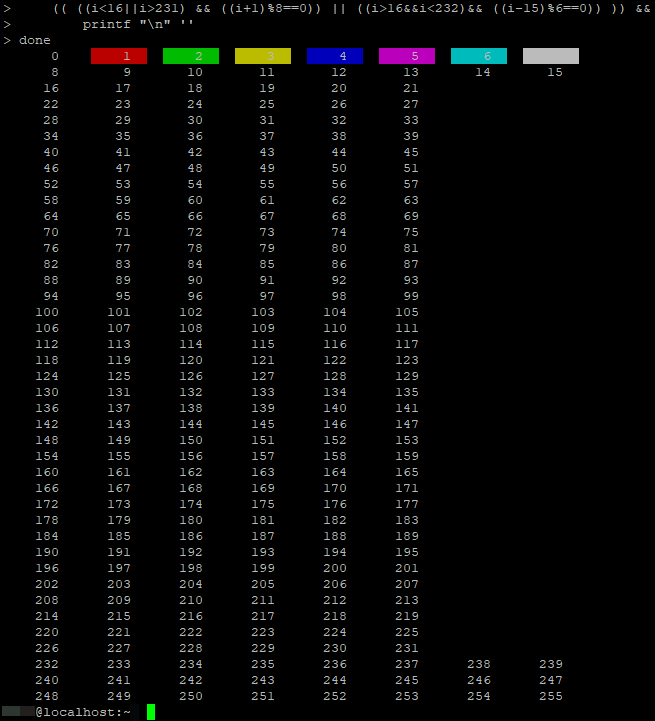
So it’s the terminal doesn’t support the colors besides the 8 basic ones. To be safe and portable, use just these 8 colors.
All methods was sourced from stackoverflow.com or stackexchange.com, is licensed under cc by-sa 2.5, cc by-sa 3.0 and cc by-sa 4.0