When I attach an external HDD, GNOME suggests opening it with Anjuta:
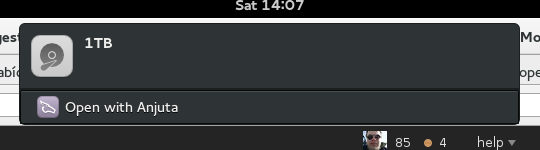
How can I make it open with Nautilus instead?
Answers:
Thank you for visiting the Q&A section on Magenaut. Please note that all the answers may not help you solve the issue immediately. So please treat them as advisements. If you found the post helpful (or not), leave a comment & I’ll get back to you as soon as possible.
Method 1
Most likely it has to do with this commit:
where they changed:
 [File Loader]
-SupportedMimeTypes=application/x-anjuta-old
+SupportedMimeTypes=application/x-anjuta-old,inode/directory
so when installing anjuta, update-desktop-database is run (during post-install); that updates /usr/share/applications/mimeinfo.cache and the default handler for inode/directory becomes anjuta.
To fix this run:
xdg-mime default org.gnome.Nautilus.desktop inode/directory
or manually edit ~/.local/share/applications/mimeapps.list and add inode/directory=org.gnome.Nautilus.desktop under [Default Applications] e.g:
[Default Applications]
inode/directory=org.gnome.Nautilus.desktop
or if you already have an entry for inode/directory, make sure org.gnome.Nautilus.desktop is the first in the list.
The command (that you had tried)
xdg-mime default nautilus.desktop inode/directory
no longer works with newer versions of gnome/nautilus because the (gnome) apps are launched using D-BUS activation. As a result, nautilus.desktop no longer exists – it has been replaced by org.gnome.Nautilus.desktop
If editing mimeapps.list has no effect that means your DE isn’t freedesktop.org compliant so maybe it’s time to file a bug report.
All methods was sourced from stackoverflow.com or stackexchange.com, is licensed under cc by-sa 2.5, cc by-sa 3.0 and cc by-sa 4.0