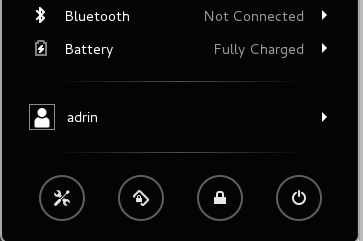
I can’t figure out what the icon between my settings and lock-screen icon in Gnome3 is supposed to do.
It has two states, locked and unlocked, but it’s not the lock screen. When I click it, it toggles its status.
Answers:
Thank you for visiting the Q&A section on Magenaut. Please note that all the answers may not help you solve the issue immediately. So please treat them as advisements. If you found the post helpful (or not), leave a comment & I’ll get back to you as soon as possible.
Method 1
That button locks/unlocks screen orientation on devices that can detect which way they are held – usually touchscreen devices – see Screen orientation section on the gnome wiki touchscreen page: Easy ability to temporarily disable and enable auto-rotation (rotation lock).
It was introduced a couple of years ago: Add an orientation lock action button. The icon used is rotation-locked-symbolic and it’s counterpart is rotation-allowed-symbolic. They’re under /usr/share/icons/Adwaita/scalable/status and they’re both part of the symbolic icons set.
On some systems with hard disk accelerometers that button appears even if your device doesn’t support screen orientation detection. If that’s the case you can disable the gnome-settings-daemon plugin via gsettings:
gsettings set org.gnome.settings-daemon.plugins.orientation active false
All methods was sourced from stackoverflow.com or stackexchange.com, is licensed under cc by-sa 2.5, cc by-sa 3.0 and cc by-sa 4.0