I’d like to know the equivalent of
cat inputfile | sed 's/(.)/1n/g' | sort | uniq -c
presented in https://stackoverflow.com/questions/4174113/how-to-gather-characters-usage-statistics-in-text-file-using-unix-commands for production of character usage statistics in text files for binary files counting simple bytes instead of characters, i.e. output should be in the form of
18383 57
12543 44
11555 127
 8393 0
It doesn’t matter if the command takes as long as the referenced one for characters.
If I apply the command for characters to binary files the output contains statistics for arbitrary long sequences of unprintable characters (I don’t seek explanation for that).
Answers:
Thank you for visiting the Q&A section on Magenaut. Please note that all the answers may not help you solve the issue immediately. So please treat them as advisements. If you found the post helpful (or not), leave a comment & I’ll get back to you as soon as possible.
Method 1
With GNU od:
od -vtu1 -An -w1 my.file | sort -n | uniq -c
Or more efficiently with perl (also outputs a count (0) for bytes that don’t occur):
perl -ne 'BEGIN{$/ = 4096};
          $c[$_]++ for unpack("C*");
          END{for ($i=0;$i<256;$i++) {
              printf "%3d: %dn", $i, $c[$i]}}' my.file
Method 2
For large files using sort will be slow. I wrote a short C program to solve the equivalent problem (see this gist for Makefile with tests):
#include <stdio.h>

#define BUFFERLEN 4096

int main(){
    // This program reads standard input and calculate frequencies of different
    // bytes and present the frequences for each byte value upon exit.
    //
    // Example:
    //
    //     $ echo "Hello world" | ./a.out
    //
    // Copyright (c) 2015 Björn Dahlgren
    // Open source: MIT License

    long long tot = 0; // long long guaranteed to be 64 bits i.e. 16 exabyte
    long long n[256]; // One byte == 8 bits => 256 unique bytes

    const int bufferlen = BUFFERLEN;
    char buffer[BUFFERLEN];
    int i;
    size_t nread;

    for (i=0; i<256; ++i)
        n[i] = 0;

    do {
        nread = fread(buffer, 1, bufferlen, stdin);
        for (i = 0; i < nread; ++i)
            ++n[(unsigned char)buffer[i]];
        tot += nread;
    } while (nread == bufferlen);
    // here you may want to inspect ferror of feof

    for (i=0; i<256; ++i){
        printf("%d ", i);
        printf("%fn", n[i]/(float)tot);
    }
    return 0;
}
usage:
gcc main.c
cat my.file | ./a.out
Method 3
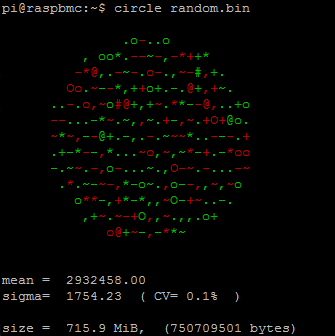
As mean, sigma and CV are often important when judging statistic data of the content of binary files, I’ve created a cmdline program that graphs all this data as an ascii circle of byte deviations from sigma.
http://wp.me/p2FmmK-96
It can be used with grep, xargs and other tools to extract statistics.
Method 4
The recode program can do this quickly even for large files, either frequency statistics either for bytes or for the characters of various character sets. E.g. to count byte frequencies:
$ echo hello there > /tmp/q
$ recode latin1/..count-characters < /tmp/q
1  000A LF   1  0020 SP   3  0065 e    2  0068 h    2  006C l    1  006F o
1  0072 r    1  0074 t
Caution – specify your file to recode as standard input, otherwise it will silently replace it with the character frequencies!
Use recode utf-8/..count-characters < file to treat the input file as utf-8. Many many other character sets are available, and it will fail if the file contains any illegal characters.
Method 5
This is similar to Stephane’s od answer but it shows the ASCII value of the byte. It is also sorted by frequency / number of occurences.
xxd -c1 my.file|cut -c10-|sort|uniq -c|sort -nr
I don’t think this is efficient since many processes are started but it’s good for single files, particularly small files.
All methods was sourced from stackoverflow.com or stackexchange.com, is licensed under cc by-sa 2.5, cc by-sa 3.0 and cc by-sa 4.0