With the help of a couple of users, my last two questions were highlighting a custom menu item through its ID.
Now I’m trying to combine the code of the following two functions to make it work by Post Name:
Add highlighting to new Admin Dashboard Menu Item
add_action( 'admin_menu', 'create_menu' );
add_action( 'admin_head-post.php', 'wpse_58567_highlight_menu_item' );

function create_menu() {
    $settings_page = add_menu_page(
                                   'Edit_Post_69',
                                   'Edit_Post_69',
                                   'add_users',
                                   '/post.php?post=69&action=edit',
                                   '',
                                   get_stylesheet_directory_uri() . '/editicon.png',
                                   2
                                  );
}

function wpse_58567_highlight_menu_item() {
    global $post;

    if( 69 != $post->ID )
        return;
?>
    <script type="text/javascript">
        jQuery(document).ready( function($) {
            $('#toplevel_page_post-post-69-action-edit').removeClass('wp-not-current-submenu').addClass('current');
            $('#toplevel_page_post-post-69-action-edit').find('a:last').addClass('current');
        });
    </script>
<?php
}
and….
Convert post name into post ID
$post = get_page_by_title( $post_name, OBJECT, 'post' );
echo $post->ID;
I am now trying to combine them so that I can specify a post name instead of a post ID, can anyone point me in the right direction?
Answers:
Thank you for visiting the Q&A section on Magenaut. Please note that all the answers may not help you solve the issue immediately. So please treat them as advisements. If you found the post helpful (or not), leave a comment & I’ll get back to you as soon as possible.
Method 1
Attention to the use of get_page_by_title parameters.
And also to the use of the Heredoc PHP syntax.
$the_post_title = 'The Portfolio';

add_action( 'admin_menu', 'wpse_59050_add_menu' );
add_action( 'admin_head-post.php', 'wpse_59050_highlight_menu_item' );

function wpse_59050_add_menu()
{
    global $the_post_title;
    $our_page = get_page_by_title( $the_post_title );

    $settings_page = add_menu_page( 'Edit '.$our_page->post_title, 'Edit '.$our_page->post_title, 'add_users', '/post.php?post='.$our_page->ID.'&action=edit', '', '', 2);
}

function wpse_59050_highlight_menu_item()
{
    global $the_post_title, $post;

    if( !is_object( $post ) )
        return;

    $our_page = get_page_by_title( $the_post_title );

    if( $our_page->ID != $post->ID )
        return;

    echo <<<HTML
        <script type="text/javascript">
            jQuery(document).ready( function($) {
                $('#toplevel_page_post-post-{$our_page->ID}-action-edit').removeClass('wp-not-current-submenu').addClass('current');
                $('#toplevel_page_post-post-{$our_page->ID}-action-edit').find('a:last').addClass('current');
            });
        </script>
HTML;
}
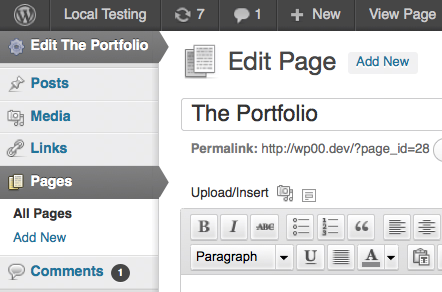
Result:
Method 2
There’s a much easier way for setting the current menu context – the parent_file filter.
add_filter( 'parent_file', array( 'WPSE_59050', 'parent_file' ) );
add_action( 'admin_menu',  array( 'WPSE_59050', 'admin_menu' ) );

class WPSE_59050
{
    /**
     * The title of the post to add our menu item for.
     */
    const POST_TITLE = 'My Post Title';

    /**
     * Our cached post ID from title.
     *
     * @var int
     */
    private static $_post_id;

    /**
     * Correctly set the menu context if we're editing our post.
     *
     * @return string
     */
    public static function parent_file( $parent_file )
    {
        global $pagenow;

        if ( $pagenow == 'post.php' && isset( $_REQUEST['post'] ) && $_REQUEST['post'] == self::get_post_id() )
            $parent_file = "post.php?post={$_REQUEST['post']}&action=edit";

        return $parent_file;
    }

    /**
     * Add the menu item if the post can be found.
     */
    public static function admin_menu()
    {
        if ( $post_id = self::get_post_id() )
            add_menu_page( 'Edit ' . self::POST_TITLE, 'Edit ' . self::POST_TITLE, 'add_users', "/post.php?post=$post_id&action=edit" );
    }

    /**
     * Get our post ID from the title & cache it.
     *
     * @return int
     */
    public static function get_post_id()
    {
        if ( ! isset( self::$_post_id ) ) {
            if ( $post = get_page_by_title( self::POST_TITLE, OBJECT, 'post' ) )
                self::$_post_id = $post->ID;
            else
                self::$_post_id = null;
        }

        return self::$_post_id;
    }
}
Update: Changed menu & page title to use post title, rather than ID.
Method 3
add_filter( 'parent_file', 'parent_file_hover' );
function parent_file_hover( $parent_file )   {
    global $pagenow;
    if ( $pagenow == 'post.php')
        $parent_file = "post.php?post={$_REQUEST['post']}&action=edit";
    elseif($pagenow == 'post-new.php')
        $parent_file = "post-new.php?post_type={$_REQUEST['post_type']}";
    return $parent_file;
}
All methods was sourced from stackoverflow.com or stackexchange.com, is licensed under cc by-sa 2.5, cc by-sa 3.0 and cc by-sa 4.0