I have a data set with huge number of features, so analysing the correlation matrix has become very difficult. I want to plot a correlation matrix which we get using dataframe.corr() function from pandas library. Is there any built-in function provided by the pandas library to plot this matrix?
Answers:
Thank you for visiting the Q&A section on Magenaut. Please note that all the answers may not help you solve the issue immediately. So please treat them as advisements. If you found the post helpful (or not), leave a comment & I’ll get back to you as soon as possible.
Method 1
You can use pyplot.matshow() from matplotlib:
import matplotlib.pyplot as plt

plt.matshow(dataframe.corr())
plt.show()
Edit:
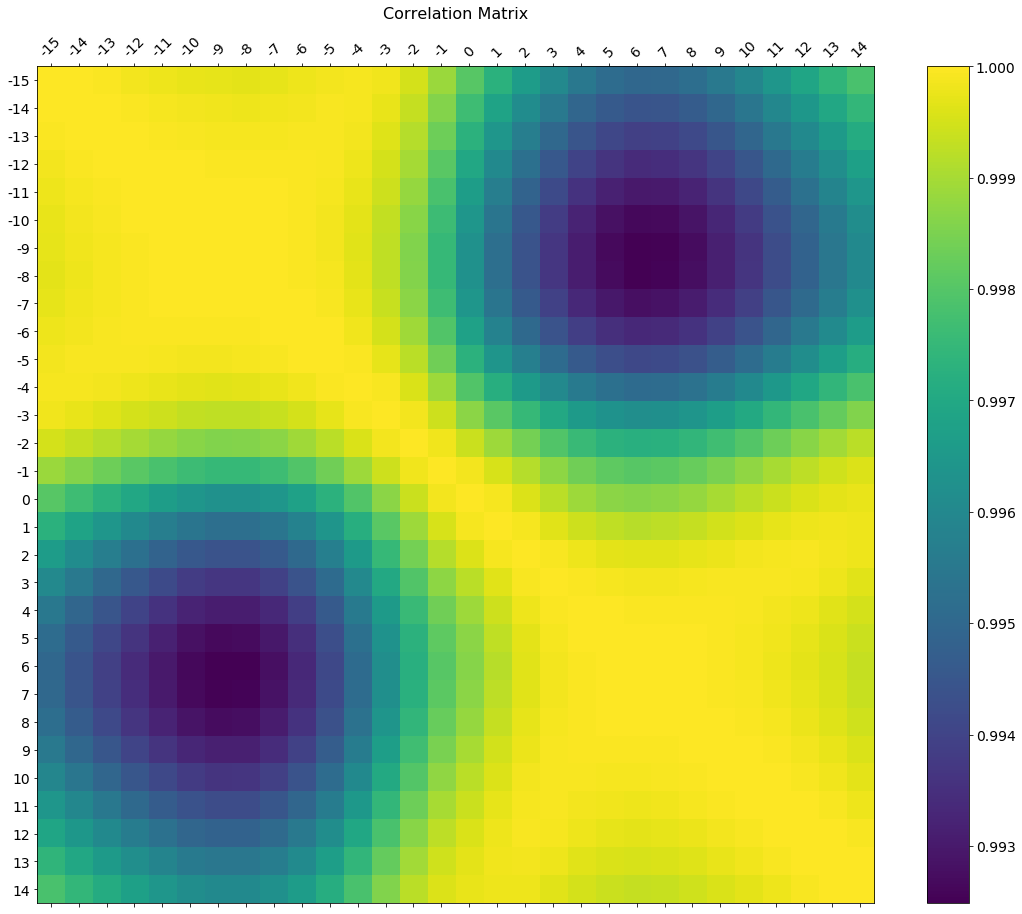
In the comments was a request for how to change the axis tick labels. Here’s a deluxe version that is drawn on a bigger figure size, has axis labels to match the dataframe, and a colorbar legend to interpret the color scale.
I’m including how to adjust the size and rotation of the labels, and I’m using a figure ratio that makes the colorbar and the main figure come out the same height.
EDIT 2:
As the df.corr() method ignores non-numerical columns, .select_dtypes(['number']) should be used when defining the x and y labels to avoid an unwanted shift of the labels (included in the code below).
f = plt.figure(figsize=(19, 15))
plt.matshow(df.corr(), fignum=f.number)
plt.xticks(range(df.select_dtypes(['number']).shape[1]), df.select_dtypes(['number']).columns, fontsize=14, rotation=45)
plt.yticks(range(df.select_dtypes(['number']).shape[1]), df.select_dtypes(['number']).columns, fontsize=14)
cb = plt.colorbar()
cb.ax.tick_params(labelsize=14)
plt.title('Correlation Matrix', fontsize=16);
Method 2
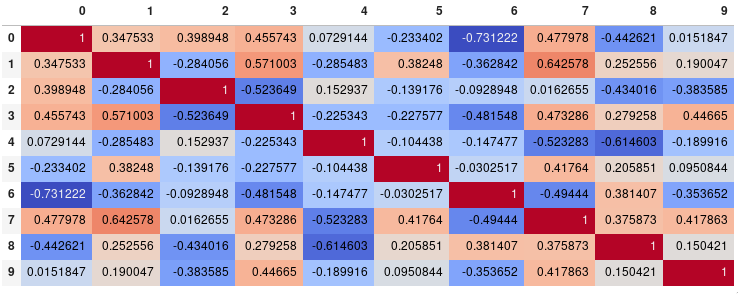
If your main goal is to visualize the correlation matrix, rather than creating a plot per se, the convenient pandas styling options is a viable built-in solution:
import pandas as pd
import numpy as np

rs = np.random.RandomState(0)
df = pd.DataFrame(rs.rand(10, 10))
corr = df.corr()
corr.style.background_gradient(cmap='coolwarm')
# 'RdBu_r', 'BrBG_r', & PuOr_r are other good diverging colormaps
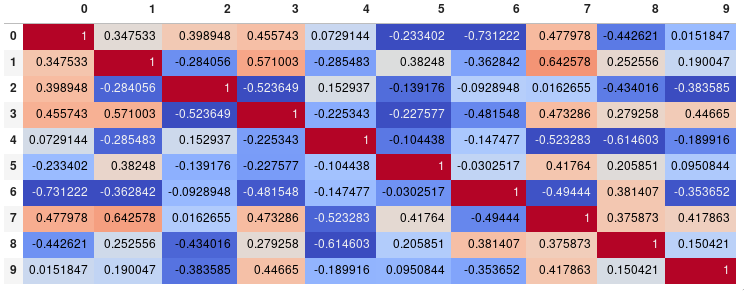
Note that this needs to be in a backend that supports rendering HTML, such as the JupyterLab Notebook.
Styling
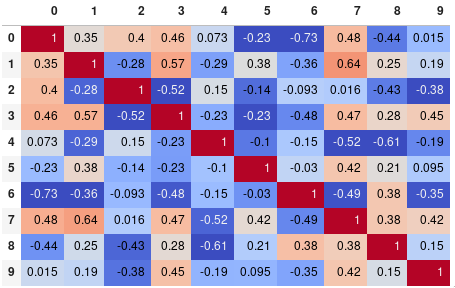
You can easily limit the digit precision:
corr.style.background_gradient(cmap='coolwarm').set_precision(2)
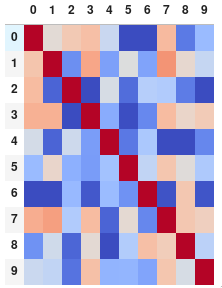
Or get rid of the digits altogether if you prefer the matrix without annotations:
corr.style.background_gradient(cmap='coolwarm').set_properties(**{'font-size': '0pt'})
The styling documentation also includes instructions of more advanced styles, such as how to change the display of the cell the mouse pointer is hovering over.
Time comparison
In my testing, style.background_gradient() was 4x faster than plt.matshow() and 120x faster than sns.heatmap() with a 10×10 matrix. Unfortunately it doesn’t scale as well as plt.matshow(): the two take about the same time for a 100×100 matrix, and plt.matshow() is 10x faster for a 1000×1000 matrix.
Saving
There are a few possible ways to save the stylized dataframe:
- Return the HTML by appending the
render()method and then write the output to a file. - Save as an
.xslxfile with conditional formatting by appending theto_excel()method. - Combine with imgkit to save a bitmap
- Take a screenshot (like I have done here).
Normalize colors across the entire matrix (pandas >= 0.24)
By setting axis=None, it is now possible to compute the colors based on the entire matrix rather than per column or per row:
corr.style.background_gradient(cmap='coolwarm', axis=None)
Single corner heatmap
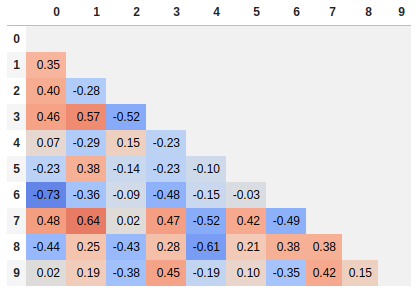
Since many people are reading this answer I thought I would add a tip for how to only show one corner of the correlation matrix. I find this easier to read myself, since it removes the redundant information.
# Fill diagonal and upper half with NaNs
mask = np.zeros_like(corr, dtype=bool)
mask[np.triu_indices_from(mask)] = True
corr[mask] = np.nan
(corr
 .style
 .background_gradient(cmap='coolwarm', axis=None, vmin=-1, vmax=1)
 .highlight_null(null_color='#f1f1f1')  # Color NaNs grey
 .set_precision(2))
Method 3
Seaborn’s heatmap version:
import seaborn as sns
corr = dataframe.corr()
sns.heatmap(corr,
            xticklabels=corr.columns.values,
            yticklabels=corr.columns.values)
Method 4
Try this function, which also displays variable names for the correlation matrix:
def plot_corr(df,size=10):
    """Function plots a graphical correlation matrix for each pair of columns in the dataframe.

    Input:
        df: pandas DataFrame
        size: vertical and horizontal size of the plot
    """

    corr = df.corr()
    fig, ax = plt.subplots(figsize=(size, size))
    ax.matshow(corr)
    plt.xticks(range(len(corr.columns)), corr.columns)
    plt.yticks(range(len(corr.columns)), corr.columns)
Method 5
You can observe the relation between features either by drawing a heat map from seaborn or scatter matrix from pandas.
Scatter Matrix:
pd.scatter_matrix(dataframe, alpha = 0.3, figsize = (14,8), diagonal = 'kde');
If you want to visualize each feature’s skewness as well – use seaborn pairplots.
sns.pairplot(dataframe)
Sns Heatmap:
import seaborn as sns

f, ax = pl.subplots(figsize=(10, 8))
corr = dataframe.corr()
sns.heatmap(corr, mask=np.zeros_like(corr, dtype=np.bool), cmap=sns.diverging_palette(220, 10, as_cmap=True),
            square=True, ax=ax)
The output will be a correlation map of the features. i.e. see the below example.
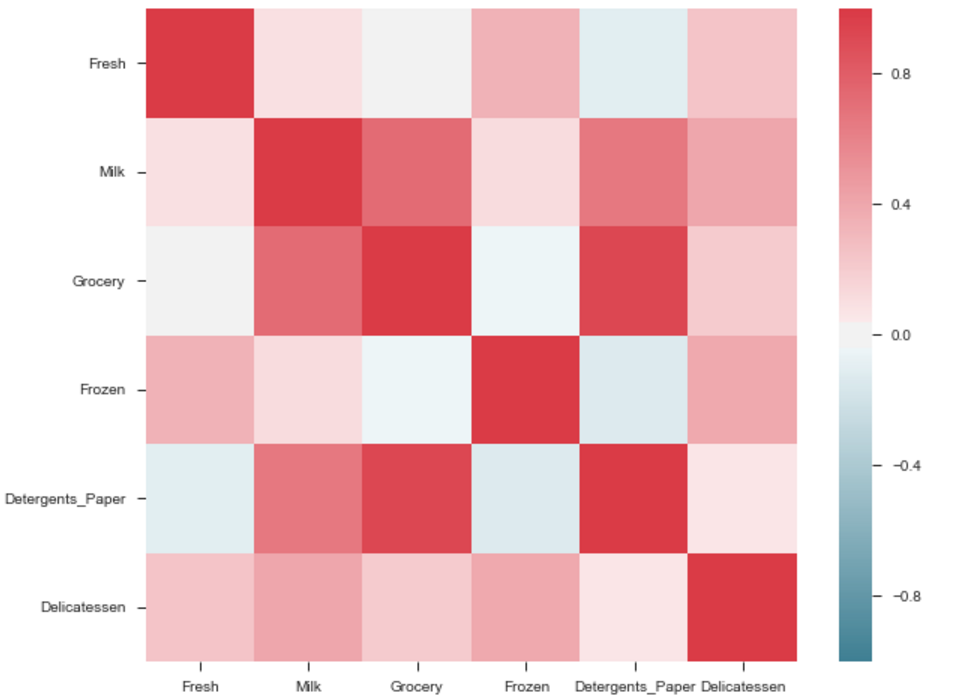
The correlation between grocery and detergents is high. Similarly:
Pdoducts With High Correlation:
- Grocery and Detergents.
Products With Medium Correlation:
- Milk and Grocery
- Milk and Detergents_Paper
Products With Low Correlation:
- Milk and Deli
- Frozen and Fresh.
- Frozen and Deli.
From Pairplots: You can observe same set of relations from pairplots or scatter matrix. But from these we can say that whether the data is normally distributed or not.
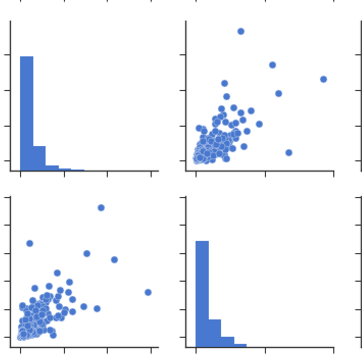
Note: The above is same graph taken from the data, which is used to draw heatmap.
Method 6
For completeness, the simplest solution i know with seaborn as of late 2019, if one is using Jupyter:
import seaborn as sns
sns.heatmap(dataframe.corr())
Method 7
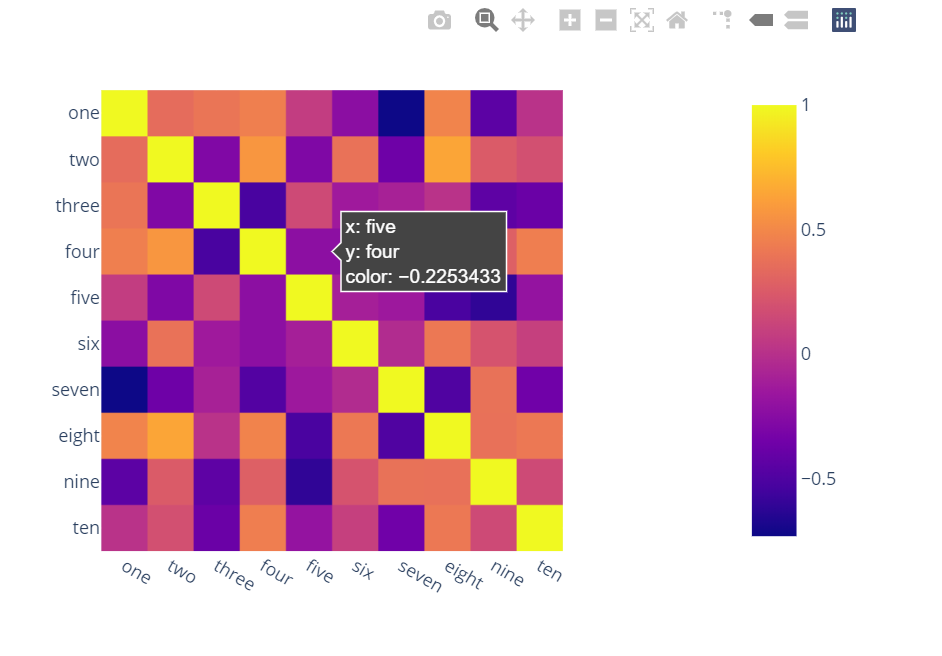
Surprised to see no one mentioned more capable, interactive and easier to use alternatives.
A) You can use plotly:
- Just two lines and you get:
- interactivity,
- smooth scale,
- colors based on whole dataframe instead of individual columns,
- column names & row indices on axes,
- zooming in,
- panning,
- built-in one-click ability to save it as a PNG format,
- auto-scaling,
- comparison on hovering,
-
bubbles showing values so heatmap still looks good and you can see
values wherever you want:
import plotly.express as px
fig = px.imshow(df.corr())
fig.show()
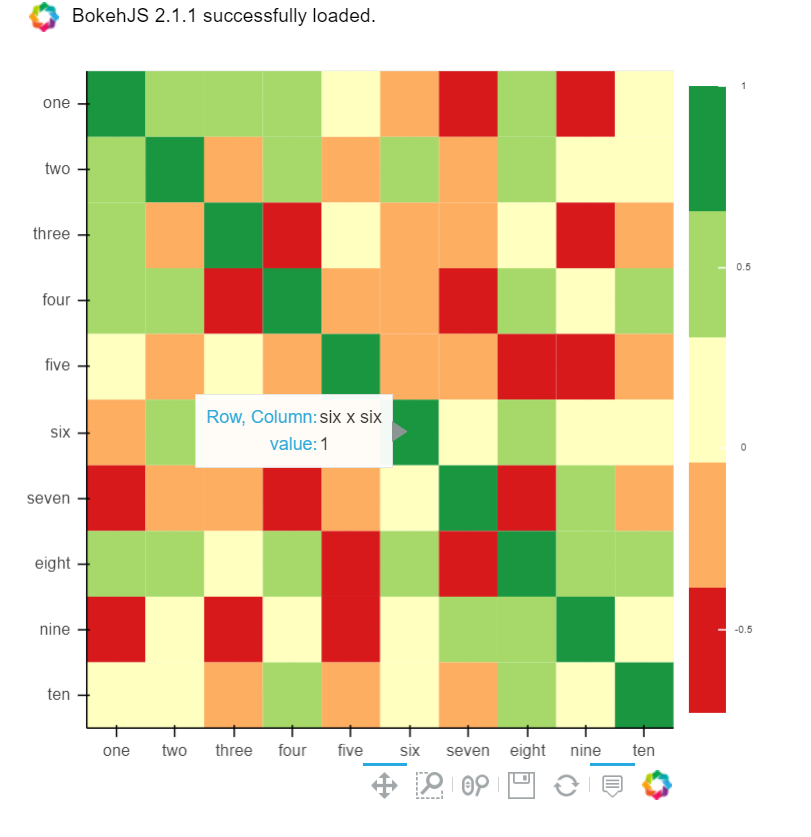
B) You can also use Bokeh:
All the same functionality with a tad much hassle. But still worth it if you do not want to opt-in for plotly and still want all these things:
from bokeh.plotting import figure, show, output_notebook
from bokeh.models import ColumnDataSource, LinearColorMapper
from bokeh.transform import transform
output_notebook()
colors = ['#d7191c', '#fdae61', '#ffffbf', '#a6d96a', '#1a9641']
TOOLS = "hover,save,pan,box_zoom,reset,wheel_zoom"
data = df.corr().stack().rename("value").reset_index()
p = figure(x_range=list(df.columns), y_range=list(df.index), tools=TOOLS, toolbar_location='below',
           tooltips=[('Row, Column', '@level_0 x @level_1'), ('value', '@value')], height = 500, width = 500)

p.rect(x="level_1", y="level_0", width=1, height=1,
       source=data,
       fill_color={'field': 'value', 'transform': LinearColorMapper(palette=colors, low=data.value.min(), high=data.value.max())},
       line_color=None)
color_bar = ColorBar(color_mapper=LinearColorMapper(palette=colors, low=data.value.min(), high=data.value.max()), major_label_text_font_size="7px",
                     ticker=BasicTicker(desired_num_ticks=len(colors)),
                     formatter=PrintfTickFormatter(format="%f"),
                     label_standoff=6, border_line_color=None, location=(0, 0))
p.add_layout(color_bar, 'right')

show(p)
Method 8
If you dataframe is df you can simply use:
import matplotlib.pyplot as plt
import seaborn as sns

plt.figure(figsize=(15, 10))
sns.heatmap(df.corr(), annot=True)
Method 9
You can use imshow() method from matplotlib
import pandas as pd
import matplotlib.pyplot as plt
plt.style.use('ggplot')

plt.imshow(X.corr(), cmap=plt.cm.Reds, interpolation='nearest')
plt.colorbar()
tick_marks = [i for i in range(len(X.columns))]
plt.xticks(tick_marks, X.columns, rotation='vertical')
plt.yticks(tick_marks, X.columns)
plt.show()
Method 10
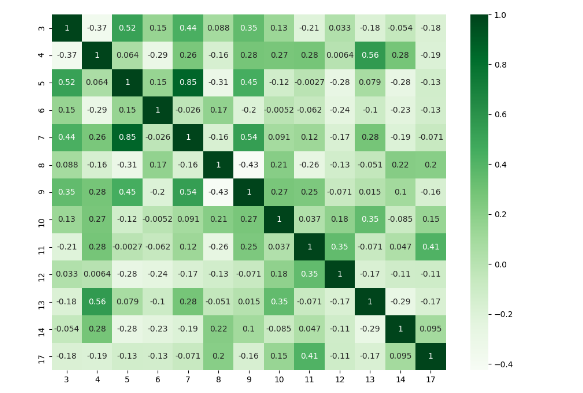
I think there are many good answers but I added this answer to those who need to deal with specific columns and to show a different plot.
import numpy as np
import seaborn as sns
import pandas as pd
from matplotlib import pyplot as plt

rs = np.random.RandomState(0)
df = pd.DataFrame(rs.rand(18, 18))
df= df.iloc[: , [3,4,5,6,7,8,9,10,11,12,13,14,17]].copy()
corr = df.corr()
plt.figure(figsize=(11,8))
sns.heatmap(corr, cmap="Greens",annot=True)
plt.show()
Method 11
statmodels graphics also gives a nice view of correlation matrix
import statsmodels.api as sm
import matplotlib.pyplot as plt

corr = dataframe.corr()
sm.graphics.plot_corr(corr, xnames=list(corr.columns))
plt.show()
Method 12
Along with other methods it is also good to have pairplot which will give scatter plot for all the cases-
import pandas as pd
import numpy as np
import seaborn as sns
rs = np.random.RandomState(0)
df = pd.DataFrame(rs.rand(10, 10))
sns.pairplot(df)
Method 13
Form correlation matrix, in my case zdf is the dataframe which i need perform correlation matrix.
corrMatrix =zdf.corr()
corrMatrix.to_csv('sm_zscaled_correlation_matrix.csv');
html = corrMatrix.style.background_gradient(cmap='RdBu').set_precision(2).render()

# Writing the output to a html file.
with open('test.html', 'w') as f:
   print('<!DOCTYPE html><html lang="en"><head><meta charset="UTF-8"><meta name="viewport" content="width=device-widthinitial-scale=1.0"><title>Document</title></head><style>table{word-break: break-all;}</style><body>' + html+'</body></html>', file=f)
Then we can take screenshot. or convert html to an image file.
Method 14
You can use heatmap() from seaborn to see the correlation b/w different features:
import matplot.pyplot as plt
import seaborn as sns

co_matrics=dataframe.corr()
plot.figure(figsize=(15,20))
sns.heatmap(co_matrix, square=True, cbar_kws={"shrink": .5})
Method 15
Please check below readable code
import numpy as np
import seaborn as sns
import matplotlib.pyplot as plt
plt.figure(figsize=(36, 26))
heatmap = sns.heatmap(df.corr(), vmin=-1, vmax=1, annot=True)
heatmap.set_title('Correlation Heatmap', fontdict={'fontsize':12}, pad=12)```

  [1]: https://i.stack.imgur.com/I5SeR.png
Method 16
corrmatrix = df.corr()
corrmatrix *= np.tri(*corrmatrix.values.shape, k=-1).T
corrmatrix = corrmatrix.stack().sort_values(ascending = False).reset_index()
corrmatrix.columns = ['Признак 1', 'Признак 2', 'Корреляция']
corrmatrix[(corrmatrix['Корреляция'] >= 0.7) + (corrmatrix['Корреляция'] <= -0.7)]
drop_columns = corrmatrix[(corrmatrix['Корреляция'] >= 0.82) + (corrmatrix['Корреляция'] <= -0.7)]['Признак 2']
df.drop(drop_columns, axis=1, inplace=True)
corrmatrix[(corrmatrix['Корреляция'] >= 0.7) + (corrmatrix['Корреляция'] <= -0.7)]
All methods was sourced from stackoverflow.com or stackexchange.com, is licensed under cc by-sa 2.5, cc by-sa 3.0 and cc by-sa 4.0