I have a pandas dataframe df as illustrated below:
BrandName Specialty
A          H
B          I
ABC        J
D          K
AB         L
I want to replace 'ABC' and 'AB' in column BrandName by 'A'.
Can someone help with this?
Answers:
Thank you for visiting the Q&A section on Magenaut. Please note that all the answers may not help you solve the issue immediately. So please treat them as advisements. If you found the post helpful (or not), leave a comment & I’ll get back to you as soon as possible.
Method 1
The easiest way is to use the replace method on the column. The arguments are a list of the things you want to replace (here ['ABC', 'AB']) and what you want to replace them with (the string 'A' in this case):
>>> df['BrandName'].replace(['ABC', 'AB'], 'A')
0    A
1    B
2    A
3    D
4    A
This creates a new Series of values so you need to assign this new column to the correct column name:
df['BrandName'] = df['BrandName'].replace(['ABC', 'AB'], 'A')
Method 2
Replace
DataFrame object has powerful and flexible replace method:
DataFrame.replace(
        to_replace=None,
        value=None,
        inplace=False,
        limit=None,
        regex=False,
        method='pad',
        axis=None)
Note, if you need to make changes in place, use inplace boolean argument for replace method:
Inplace
inplace: boolean, default
False
IfTrue, in place. Note: this will modify any other views on this object (e.g. a column form a DataFrame). Returns the caller if this isTrue.
Snippet
df['BrandName'].replace(
    to_replace=['ABC', 'AB'],
    value='A',
    inplace=True
)
Method 3
loc method can be used to replace multiple values:
df.loc[df['BrandName'].isin(['ABC', 'AB'])] = 'A'
Method 4
You could also pass a dict to the pandas.replace method:
data.replace({
    'column_name': {
        'value_to_replace': 'replace_value_with_this'
    }
})
This has the advantage that you can replace multiple values in multiple columns at once, like so:
data.replace({
    'column_name': {
        'value_to_replace': 'replace_value_with_this',
        'foo': 'bar',
        'spam': 'eggs'
    },
    'other_column_name': {
        'other_value_to_replace': 'other_replace_value_with_this'
    },
    ...
})
Method 5
This solution will change the existing dataframe itself:
mydf = pd.DataFrame({"BrandName":["A", "B", "ABC", "D", "AB"], "Speciality":["H", "I", "J", "K", "L"]})
mydf["BrandName"].replace(["ABC", "AB"], "A", inplace=True)
Method 6
Created the Data frame:
import pandas as pd
dk=pd.DataFrame({"BrandName":['A','B','ABC','D','AB'],"Specialty":['H','I','J','K','L']})
Now use DataFrame.replace() function:
dk.BrandName.replace(to_replace=['ABC','AB'],value='A')
Method 7
Just wanted to show that there is no performance difference between the 2 main ways of doing it:
df = pd.DataFrame(np.random.randint(0,10,size=(100, 4)), columns=list('ABCD'))

def loc():
    df1.loc[df1["A"] == 2] = 5
%timeit loc
19.9 ns ± 0.0873 ns per loop (mean ± std. dev. of 7 runs, 10000000 loops each)


def replace():
    df2['A'].replace(
        to_replace=2,
        value=5,
        inplace=True
    )
%timeit replace
19.6 ns ± 0.509 ns per loop (mean ± std. dev. of 7 runs, 10000000 loops each)
Method 8
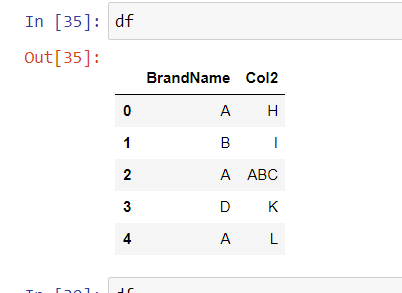
You can use loc for replacing based on condition and specifying the column name
df = pd.DataFrame([['A','H'],['B','I'],['ABC','ABC'],['D','K'],['AB','L']],columns=['BrandName','Col2'])
df.loc[df['BrandName'].isin(['ABC', 'AB']),'BrandName'] = 'A'
Output
All methods was sourced from stackoverflow.com or stackexchange.com, is licensed under cc by-sa 2.5, cc by-sa 3.0 and cc by-sa 4.0