How do I embed a matplotlib figure object inside a WxPython panel?
I googled around and saw complicated examples involving interactive graphics and other extra stuff. Can anybody help with a minimal example?
Answers:
Thank you for visiting the Q&A section on Magenaut. Please note that all the answers may not help you solve the issue immediately. So please treat them as advisements. If you found the post helpful (or not), leave a comment & I’ll get back to you as soon as possible.
Method 1
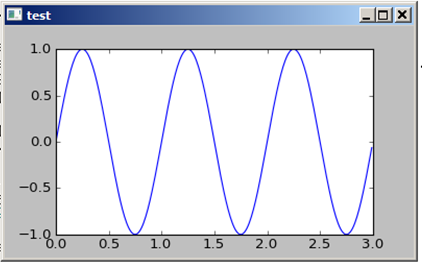
This is a minimal example for a Panel with a matplotlib canvas:
from numpy import arange, sin, pi
import matplotlib
matplotlib.use('WXAgg')

from matplotlib.backends.backend_wxagg import FigureCanvasWxAgg as FigureCanvas
from matplotlib.backends.backend_wx import NavigationToolbar2Wx
from matplotlib.figure import Figure

import wx

class CanvasPanel(wx.Panel):
    def __init__(self, parent):
        wx.Panel.__init__(self, parent)
        self.figure = Figure()
        self.axes = self.figure.add_subplot(111)
        self.canvas = FigureCanvas(self, -1, self.figure)
        self.sizer = wx.BoxSizer(wx.VERTICAL)
        self.sizer.Add(self.canvas, 1, wx.LEFT | wx.TOP | wx.GROW)
        self.SetSizer(self.sizer)
        self.Fit()

    def draw(self):
        t = arange(0.0, 3.0, 0.01)
        s = sin(2 * pi * t)
        self.axes.plot(t, s)


if __name__ == "__main__":
    app = wx.PySimpleApp()
    fr = wx.Frame(None, title='test')
    panel = CanvasPanel(fr)
    panel.draw()
    fr.Show()
    app.MainLoop()
Method 2
Defining the frame size:
if __name__ == "__main__":
    app = wx.App()
    fr = wx.Frame(None, title='test', size=wx.Size(806, 450))
    panel = CanvasPanel(fr)
    panel.draw()
    fr.Show()
    app.MainLoop()
or defining the panel size:
class CanvasPanel(wx.Panel):
    def __init__(self, parent):
        wx.Panel.__init__(self, parent,size=wx.Size(806, 450))
...
All methods was sourced from stackoverflow.com or stackexchange.com, is licensed under cc by-sa 2.5, cc by-sa 3.0 and cc by-sa 4.0